







PROJECT MANAGEMENT SOFTWARE

Efficient Project Management for Teams

See the big picture and focus on the work that matters.
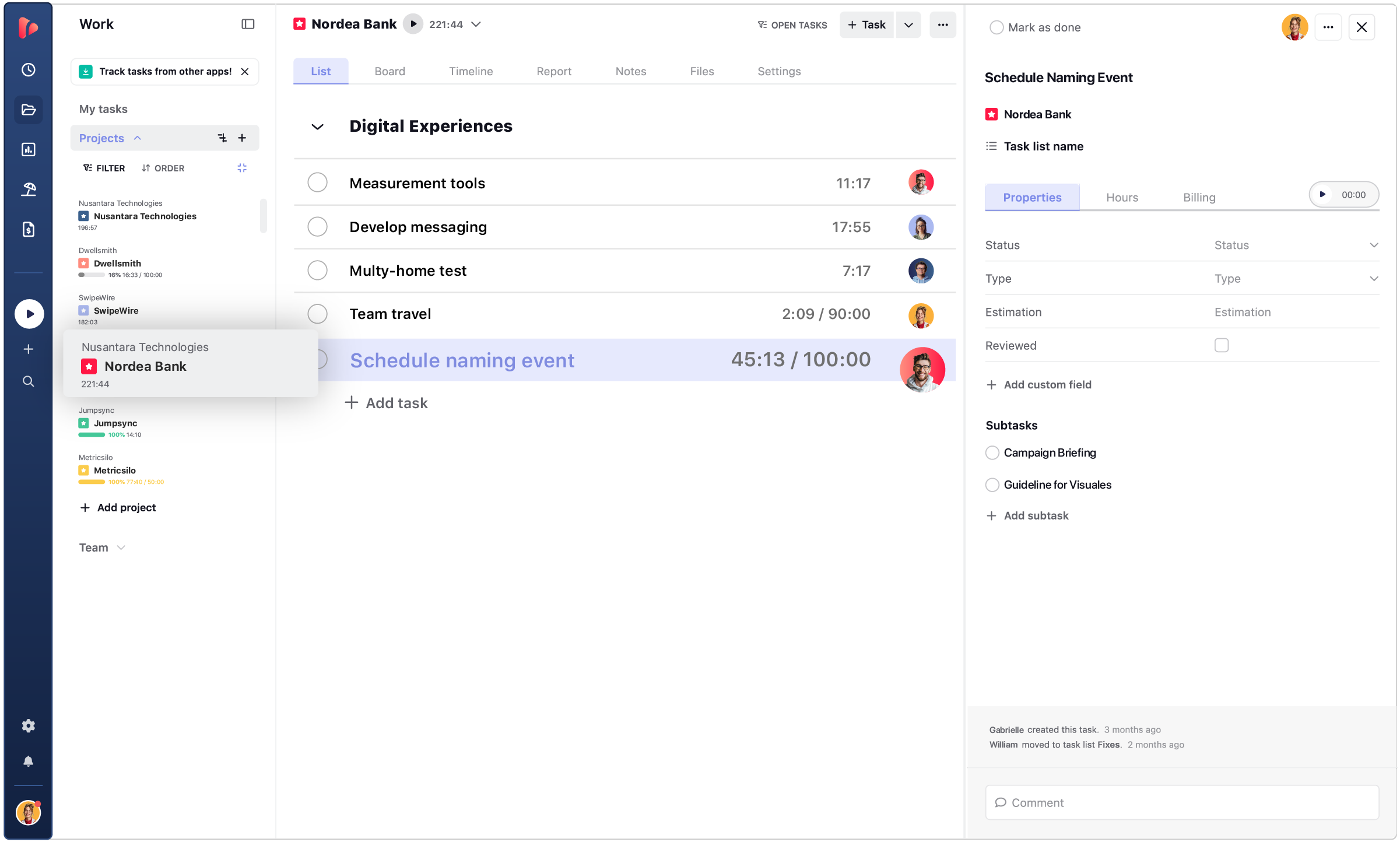
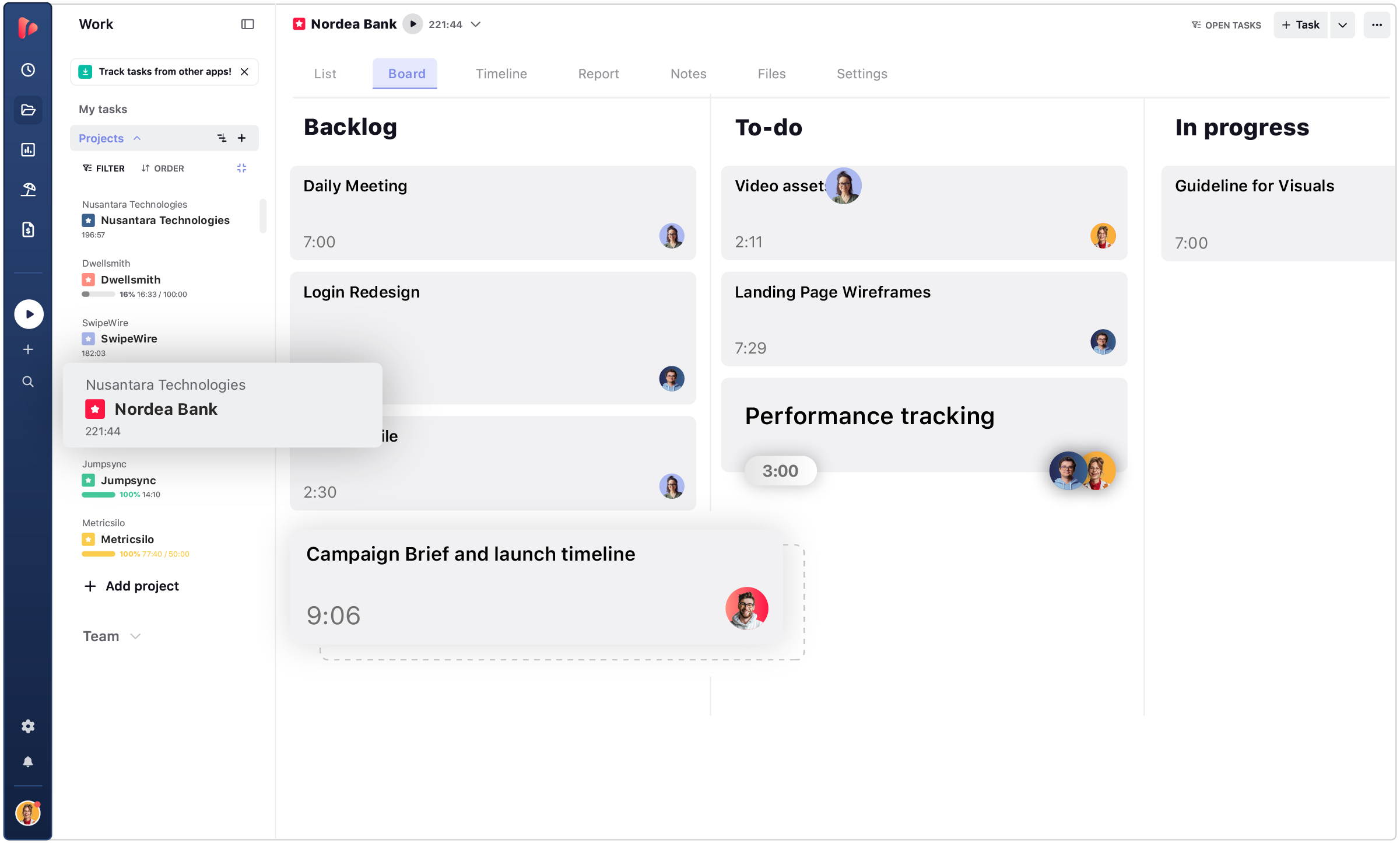
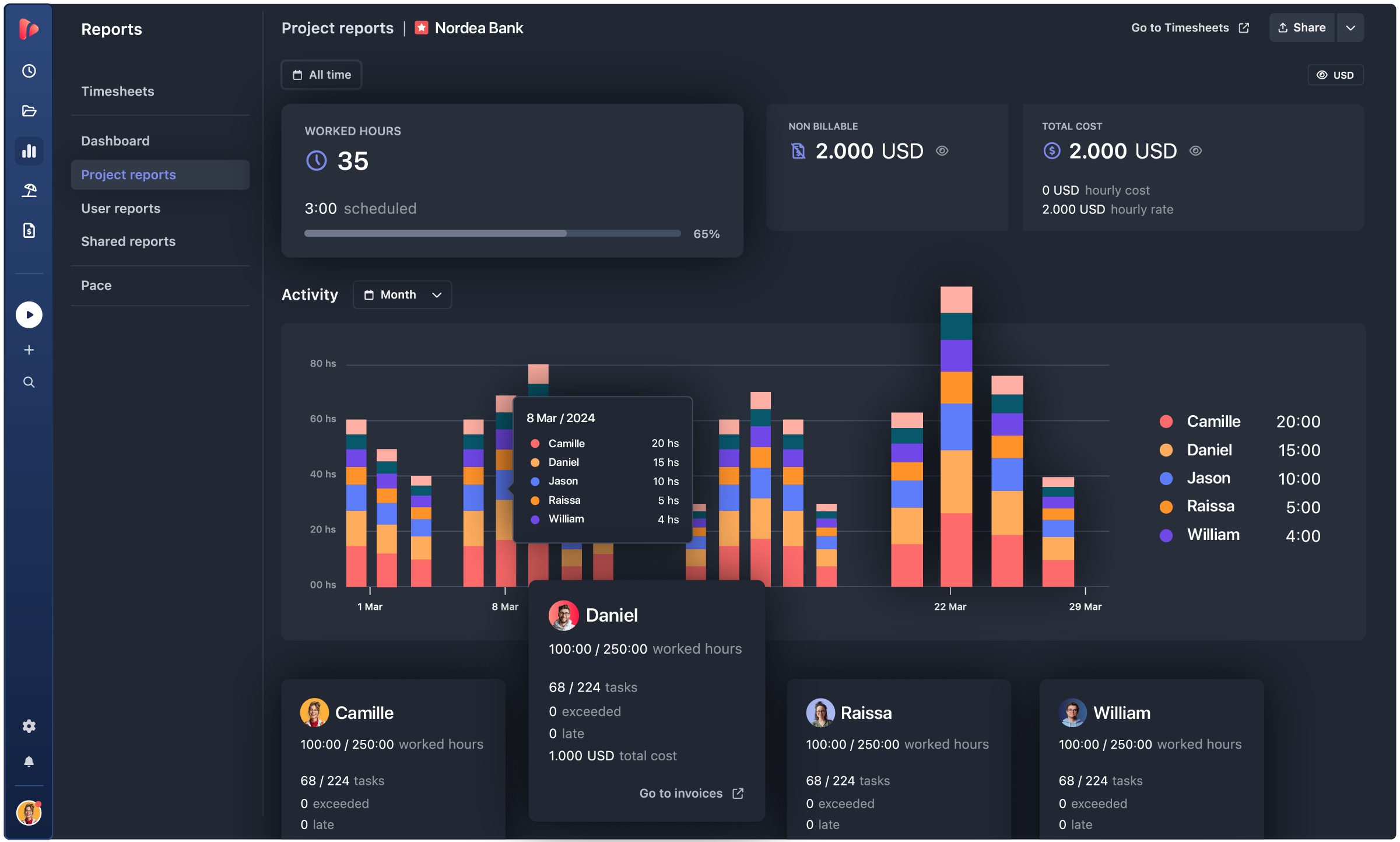
Get a clear overview of progress to stay on top of everything and prioritize tasks.

  • Task list view
  • Board view
  • ReDesign_ProjectReport
  • ReDesign_Timeline-

Unlimited users, even on our free plan.


TRUSTED BY COMPANIES OF ALL SHAPES AND SIZES

  • SSL
  • MCI
  • MoMA
  • OpenStax
  • PlayPass
  • Smartsheet

PROJECT TRACKING

Track Project Progress
In One Central Hub

Project management with built-in time tracking to streamline daily work.
Visualize every task your team is working on, in real-time, without switching apps

track progress

Track Progress

Keep track of what your team is doing to stay on top of what’s happening within your projects.
Get a clear view of what needs to be done and how far along you are in each project.

files

Share Files

Attach project files and share them with your team. Enhance teamwork by keeping all your assets
organized in one central hub for easy access. Avoid attachments and downloads, and never lose a document again.

reports

Custom Reports

Create your own project labels to add detailed information for your team in all your projects. Customize each project with relevant details to automatically display on business reports.

TASK MANAGEMENT

Improve Employee Performance

Manage team work efficiently. Keep everyone on the same page to promote transparency and build a work culture around trust.

reminder icon
Collaborate

Create and assign tasks and subtasks, attach files, and set notifications. A simple way for work teams to collaborate and coordinate teamwork in one place.

Communicate

Keep projects running smoothly. Easily add notes, descriptions, and comments to any task or project to communicate with everyone involved.

Custom fields icon
Manage Permissions

Give each team member the access they need to do their job and protect sensitive data. Assign user roles with different levels of permission as needed.

automation icon
Sync Work

Get a clear view of all tasks on a kanban board to manage project progress. Create, prioritize and complete tasks and projects.

Automatic time tracker icon
Track Tasks

Organize tasks and assign them to different team members to keep a productive workflow. Easily share tasks to stay in sync.

Set Due Dates

Keep track of your project due dates and meet your client’s deadlines. Focus on getting work done instead of stressing out about deliverables.

What Project Management Software Can Do for Your Team’s Workflow

Project management goes beyond simple time tracking—it empowers teams to coordinate tasks, manage workloads, and keep every project on schedule and within budget. With real-time insights and a streamlined interface, this tool is designed to enhance project tracking, team accountability, and business efficiency.

By leveraging TrackingTime, teams gain visibility into time allocation, improve coordination, and enjoy the convenience of centralized project and time tracking—leading to better planning and smoother workflows across the board.

automation icon

Workflow Optimization

Gain full visibility into how your team spends their time. Identify patterns, allocate resources efficiently, and forecast project outcomes to stay aligned with deadlines and budgets.

More on Time Management
team icon

Enhanced Team Coordination

Track both individual and team efforts to refine project tracking and streamline collaboration. Get clear insights into time spent on tasks and ensure workload is distributed effectively.

More on Team Collaboration
billing icon

Accurate Billing

Simplify client billing and internal budgeting: Track every billable hour to invoice with confidence and keep financial planning aligned with project delivery.

More on Client billing
Insights icon

Encourage Team Efficiency

Leverage smart time insights to uncover performance trends. Help your team enhance their focus, balance priorities, and continuously improve with detailed, actionable data.

More on Performance Improvement

Project management that supports real progress: Streamline your workflows with project management software built for clarity and control. From estimation and planning to real-time project tracking, workload balancing, and accurate budgeting, TrackingTime brings structure to every stage of your projects.

project planning

How Do I Track Project Budgets and Estimates Based on Time?

TrackingTime lets you set project and task estimates and track progress against them in real time, so you can stay on budget and hit your deadlines without extra tools.

Standard Time Trackers

  • No project-level or task-level estimates
  • No real-time budget tracking
  • Require separate tools for budgets and reporting
  • Limited visibility into time vs. plan
  • Manual effort to track overages

TrackingTime

  • Set project and task time estimates
  • Track actual time vs. estimates in real time
  • Get visual dashboards for budget progress
  • Export reports on budget and time variances
  • All-in-one time + budget + project tracking

TrackingTime gives you full visibility into time, tasks, and budgets — so you can manage projects efficiently without switching tools.

PROJECT TIMELINE

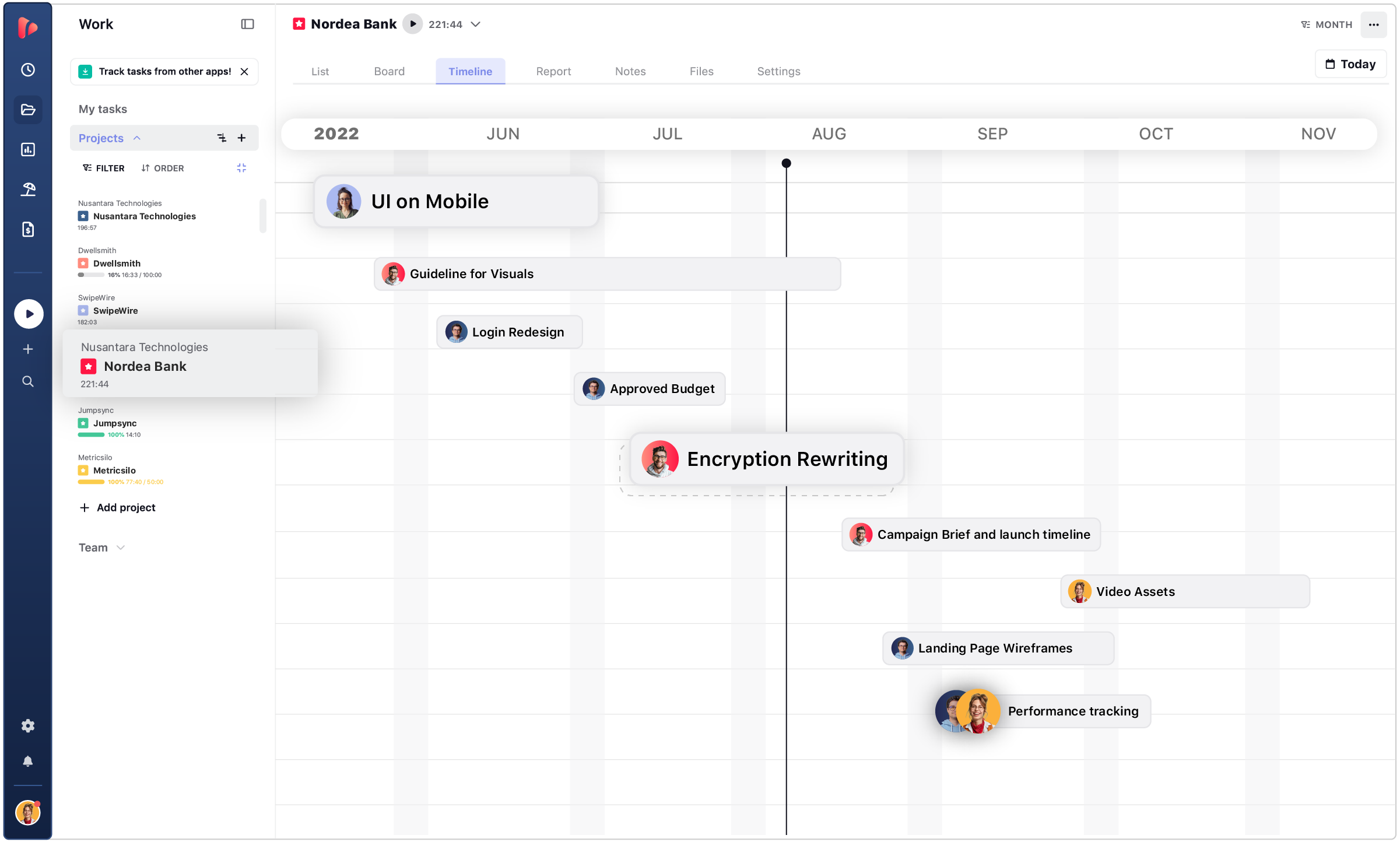
Overview Project Progress

Organize your timeline with project milestones, clearly visualize progress,
identify possible bottlenecks, and stay on top of everyone’s work.

ReDesign_Timeline-

See how everything falls into place and allocate all your resources wisely

Make a clear breakdown of the project plan by setting milestones and deadlines

Visualize all ongoing projects to see how they connect with each other

time reports

Leverage Live and Scheduled Shared Reports

Simplify the reporting process with a comprehensive solution to bill clients and report internally to colleagues and partners.

Create Reports

Filter billable hours for the desired period by project, task, user, or client, and group them according to your needs. Export your report in the desired format or directly into an invoice to send to your clients.

  • Accurate reporting of billable hours.
  • Group your data to improve the process.
  • Export professional reports and invoices.

Share Reports

Generate a customized report to share online through a private or public link. Create professional reports with stylish colors, patterns, and charts. Display the latest data available with Live Shared Reports.

  • Professional and customized reports.
  • Share online reports with link.
  • Rely on the latest data available.

Schedule Reports

Automate your reporting process with scheduled shared reports.
Schedule your reports to be sent to clients and collegues automatically to simplify month-end close.

  • Schedule periodic reports.
  • Automate client reporting.
  • Simplify month-end close.

PROJECT REPORT

Analyze Project Profitability with Insightful Reports

Make sure your projects run on time and on budget. Fully visualize team progress. Share and analyze data to make the right decisions to grow your business.

ReDesign_ProjectReport

INTEGRATIONS

Add Time Tracking to the Apps You Use Every Day

Sync TrackingTime with the tools your team uses every day to fit their work habits. This way, they can keep track of every minute without switching between apps while working on their browser.

  • This app is a lifesaver! With TrackingTime, I can easily set project timelines and track my team's progress. The ability to create detailed timesheets and business reports for clients is a game-changer.

    Frances F. - Project Manager on nachonacho.com

  • TrackingTime was incredibly convenient to use; its simple design made it accessible to anyone. The features were outstanding and the reports provided invaluable insights into my own productivity.

    Emmanuella - Sonographer on capterra.com

  • TrackingTime keeps my team and projects on track. Saves us hours of headaches and facilitates working remotely. Top notch.

    Anne S. - CEO on nachonacho.com

TESTIMONIALS - GREAT REVIEWS

Trusted by All Kinds of Clients

We believe that our clients' success is our success, and we are committed to doing everything we can to help them achieve their goals. We're proud to assist them with their daily struggles to improve their workdays, and we appreciate their positive feedback.

leave your feedback

TIME TRACKING APP

Track Time, Not People

Free for Unlimited Users!

Unleash team productivity with automatic time tracking

FAQ

Frequently Asked Questions

Get answers to all your questions about our service and plans.

What is project management?

Project management is the process of planning, executing, and monitoring tasks to meet specific goals within deadlines and budgets.

Why is it important?

It ensures projects are completed efficiently, resources are utilized effectively, and objectives are met successfully.

What features does it offer?

TrackingTime offers task assignment, real-time tracking, file sharing, customizable reports, and integration with popular tools.

Can I track milestones?

Yes, you can set milestones, monitor timelines, and ensure projects stay on track.

How do I track project budgets and estimates based on time?

TrackingTime lets you set project and task estimates and track progress against them in real time, helping you stay on budget and meet deadlines.

How does it help teams?

It improves collaboration by centralizing communication, sharing files, and providing real-time updates.

Does it help with resources?

Yes, it tracks tasks and time to manage workload and allocate resources efficiently.

Does it integrate with tools?

Yes, TrackingTime integrates with tools like Asana, Trello, and Slack, ensuring seamless workflows.

Is it mobile-friendly?

Yes, you can manage projects and track progress from mobile devices.

Is my data secure?

Yes, TrackingTime ensures data security with encryption and regular backups.

Who can access data?

Access is managed via permissions, letting admins control who can view or edit information.