Best Project Management Software in 2026

Choosing the right project management software can make or break how your team delivers work. This guide compares the 10 best project management tools in 2026 — with confirmed pricing, G2 ratings, and honest pros and cons — so you can find the right fit for your team size and workflow.
Project management software has become the central hub for modern teams — combining task tracking, collaboration, and reporting in one place. Whether you need time tracking built in, a simple Kanban board for a small team, or enterprise-grade workflow automation, one of these tools fits your workflow.
👉 Quick summary
- Best overall: ClickUp — most features per dollar, 15+ views, great free plan
- Best with native time tracking: TrackingTime — PM + time tracking + invoicing in one tool
- Best for agencies: Teamwork — client portal, retainer tracking, budget monitoring
- Best for enterprise: Wrike — advanced governance, custom workflows, AI features
- Cheapest paid option: Trello at $5/user/month
Project Management Software Comparison (2026)
Here’s how all 10 tools stack up across the criteria that matter most:
| Tool | Free Plan | Starting Price | Time Tracking | Best For |
|---|---|---|---|---|
| TrackingTime | ✅ Unlimited users | $3.75/user/mo | ✅ Native | Agencies, SMBs |
| ClickUp | ✅ Unlimited members | $7/user/mo | ✅ Native | All-in-one teams |
| Teamwork | ✅ Up to 5 users | $9.99/user/mo | ✅ Native | Client-service teams |
| Asana | ✅ Up to 10 users | $10.99/user/mo | ❌ Via integration | Marketing, operations |
| Monday.com | ✅ 2 seats | $9/user/mo | ⚡ Basic | Visual workflows |
| Trello | ✅ Unlimited cards | $5/user/mo | ❌ Via Power-Up | Simple Kanban |
| Wrike | ✅ Unlimited users | $10/user/mo | ✅ Native | Enterprise, marketing |
| Azure DevOps | ✅ 5 users free | $6/user/mo | ❌ Via extension | Dev teams |
| Basecamp | ✅ 1 project | $15/user/mo | ⚡ Add-on | Small teams |
| Notion | ✅ Unlimited blocks | $10/user/mo | ❌ No native | Knowledge + projects |
Top 10 Project Management Software Tools for Teams in 2026
1. TrackingTime
TrackingTime is a project management platform with native time tracking built into every task — making it the go-to tool for teams that need to manage work AND measure how hours are spent. Unlike tools that require a separate time tracker, TrackingTime handles billable hours, project reports, and invoicing in one workspace.
Its project boards support Kanban, list, and calendar views. Every task has a built-in start/stop timer, and managers get real-time visibility into where team time goes. For agencies and consultancies that bill by the hour, this eliminates the overhead of maintaining two separate tools.
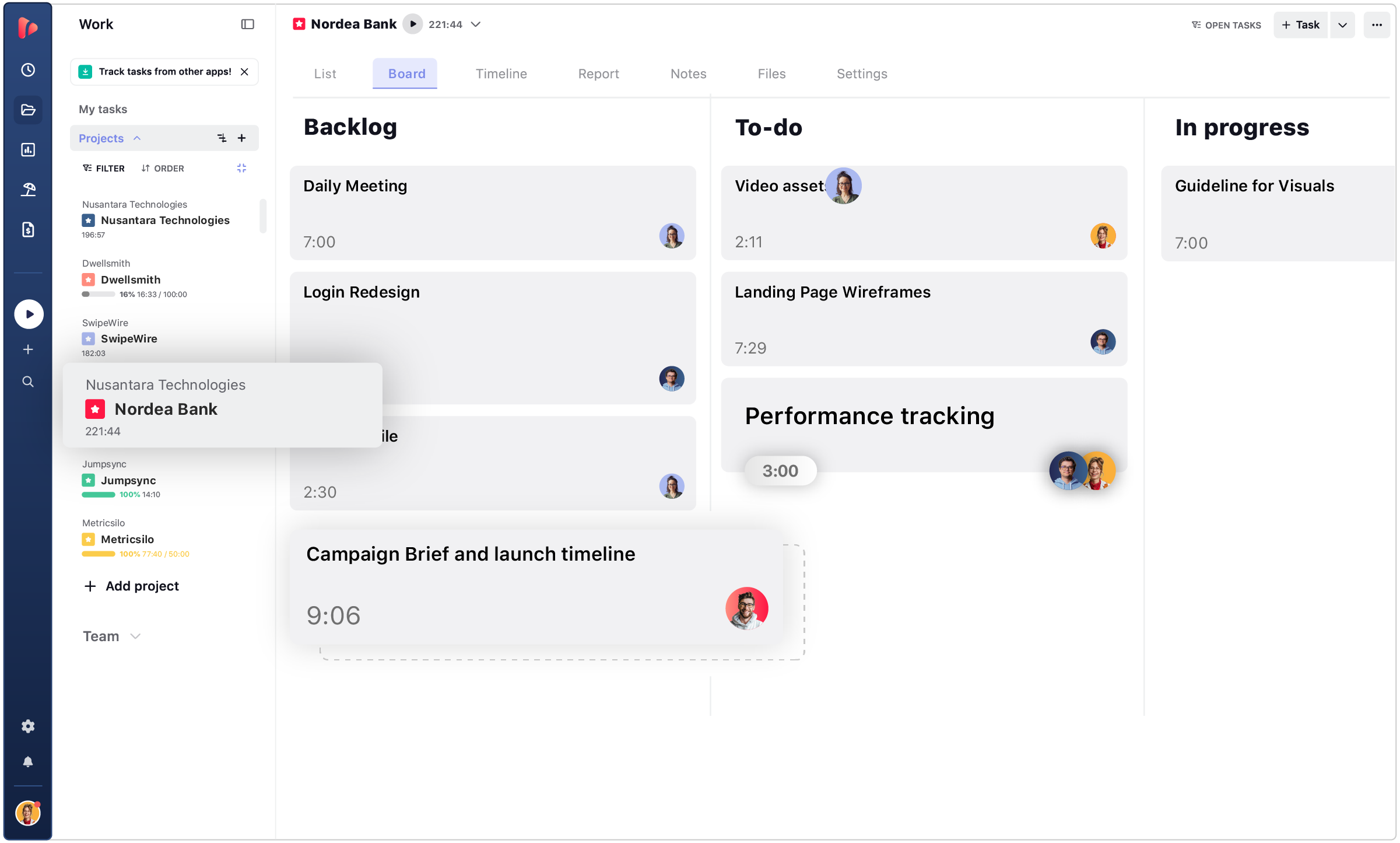
- Built-in time tracking with one-click timers on every task
- Project views: Kanban board, list, and calendar
- Time reports by project, client, user, or date range
- Billing rates, invoicing, and profitability tracking per client
- 50+ integrations: Asana, Jira, Trello, Google Calendar, Slack
Pricing
- Free: Unlimited users, unlimited projects — basic time tracking included
- Starter: $3.75/user/month (annual) — reports, estimates, project views
- Pro: $5.75/user/month (annual) — billing rates, invoicing, calendar sync
- Business: $10/user/month (annual) — SSO, audit logs, advanced roles
G2 Rating
⭐ 4.5/5 (300+ reviews on G2)
Pros
- ✅ Free plan with unlimited users — one of the most generous in the PM space
- ✅ Native time tracking means no separate tool needed
- ✅ Built-in invoicing and billing rates — ideal for client-facing teams
Cons
- ❌ No native Gantt chart on lower-tier plans
- ❌ Smaller integration ecosystem vs. ClickUp or Asana
Best for
Agencies, consultancies, and SMBs that manage client projects and need billable time tracking built directly into their workflow — without paying for two separate platforms.
2. ClickUp
ClickUp is one of the most feature-rich project management platforms available — and it’s built to replace multiple tools with a single workspace. Teams use it for tasks, docs, goals, chat, time tracking, and reporting all in one place. Its 15+ customizable views (Board, Gantt, Timeline, Workload, Calendar, and more) make it adaptable to virtually any workflow.
The free plan is one of the most generous in the industry — unlimited members with a wide feature set. Paid plans unlock automation, time tracking reports, advanced dashboards, and AI features. ClickUp is widely used by marketing teams, product teams, software agencies, and remote-first companies.

- 15+ project views: Board, Gantt, Timeline, Workload, Calendar, Table, Map, and more
- Built-in time tracking with time estimate vs. actual reporting
- Native Docs, Whiteboards, Goals, and Chat features
- 1,000+ integrations including Slack, GitHub, Zoom, Google Drive
- AI-powered task summaries, writing assistance, and automations (paid)
Pricing
- Free Forever: Unlimited members, unlimited tasks, 100MB storage
- Unlimited: $7/user/month (annual) — unlimited storage, integrations, dashboards
- Business: $12/user/month (annual) — advanced time tracking, custom exporting, AI
- Enterprise: Custom pricing — SSO, advanced permissions, dedicated support
G2 Rating
⭐ 4.7/5 (9,000+ reviews on G2)
Pros
- ✅ Most views and customization options of any tool on this list
- ✅ Free plan works for unlimited team members — genuinely usable at scale
- ✅ All-in-one: replaces Docs, chat, goals, and time tracking tools
Cons
- ❌ Steep learning curve — the breadth of features can overwhelm new users
- ❌ Mobile app is less polished than desktop experience
Best for
Teams that want a single tool to replace their entire productivity stack — from task management and docs to chat and time reporting. Particularly popular with marketing agencies and remote software teams.
3. Teamwork
Teamwork is purpose-built for client-service businesses — agencies, consultancies, and professional services firms that need to manage multiple client projects simultaneously. Unlike general-purpose PM tools, Teamwork includes a built-in client portal, retainer tracking, and detailed budget monitoring out of the box.
Time tracking is native and deeply integrated — every task can have logged hours that flow directly into invoicing. Teamwork’s billing module lets you set hourly rates per team member, track retainer usage, and generate invoices without leaving the platform. For agencies managing 10+ client projects at once, this tight integration saves significant admin overhead.

- Dedicated client portal — share project progress with clients through a branded view
- Native time tracking with billable/non-billable hour separation
- Retainer management and budget tracking per project
- Resource management with workload visualization
- Gantt charts, Kanban boards, list and table views
Pricing
- Free: Up to 5 users, 2 projects
- Basics: $9.99/user/month (annual) — unlimited projects, time tracking
- Accelerate: $24.99/user/month (annual) — client portal, retainers, resource scheduling
- Optimize: Custom pricing — advanced reporting, custom branding, SSO
G2 Rating
⭐ 4.4/5 (1,000+ reviews on G2)
Pros
- ✅ Best-in-class client portal — no other tool matches its client-facing features
- ✅ Native invoicing and retainer management — eliminates billing admin for agencies
- ✅ Powerful resource management for multi-project team scheduling
Cons
- ❌ Client portal and retainer features only available on the Accelerate plan ($24.99/user)
- ❌ UI feels more complex than ClickUp or Asana for teams without client-billing needs
Best for
Digital agencies, creative studios, and consulting firms that manage client projects and need to track billable hours, retainers, and budgets in a single platform — and want to share project progress with clients through a dedicated portal.
4. Asana
Asana is one of the most polished project management tools available — known for its clean interface, powerful workflow builder, and strong adoption across marketing, operations, and product teams. Its Timeline view (a Gantt-style chart with dependencies) and Rules (automated workflows) are standout features even on the Starter plan.
Asana doesn’t have native time tracking — you’ll need to connect Toggl, Harvest, TrackingTime, or a similar tool via integration. But for teams that don’t need time tracking, Asana’s combination of ease of use, templates, and portfolio management makes it one of the best options in this price range.

- Timeline view with task dependencies and project milestones
- Rules automation — trigger actions based on task status, assignee, or due date changes
- Portfolio view for tracking multiple projects and team workload
- 200+ templates for marketing campaigns, product launches, sprints, and more
- Integrations with Slack, Google Drive, Microsoft 365, Salesforce, Zoom
Pricing
- Free: Up to 10 users, unlimited tasks, basic views
- Starter: $10.99/user/month (annual) — Timeline, automation, admin controls
- Advanced: $24.99/user/month (annual) — portfolios, workload, advanced reporting
- Enterprise: Custom pricing — advanced security, SAML SSO, custom roles
G2 Rating
⭐ 4.4/5 (9,500+ reviews on G2)
Pros
- ✅ Best-in-class UX — easiest onboarding experience for non-technical teams
- ✅ Powerful automation rules on all paid plans
- ✅ Portfolio view ideal for managers overseeing multiple simultaneous projects
Cons
- ❌ No native time tracking — requires integration with a third-party tool
- ❌ Starter plan ($10.99/user) is pricier than ClickUp’s Unlimited ($7/user) for similar features
Best for
Marketing teams, operations teams, and product managers who want a clean, polished tool with strong workflow automation — and don’t need native time tracking.
5. Monday.com
Monday.com is a highly visual project management platform built around customizable “boards” — spreadsheet-like grids where every column can be a different data type (status, person, date, number, timeline, dependency, and more). This flexibility makes it adaptable to almost any workflow, from software sprints to marketing calendars to CRM pipelines.
Monday.com offers basic time tracking through its Time Tracking column, but it’s not as deep as dedicated time tracking tools. For teams that need billable hours and invoicing, an integration with a dedicated time tracker is still recommended. Where Monday.com shines is in its visual clarity and the speed at which non-technical teams can build custom workflows without developer help.

- Highly customizable boards with 30+ column types
- Basic time tracking column with time logging per task
- Automations and integrations with 200+ apps
- Workdocs — collaborative documents built inside Monday.com
- Dashboards for cross-board reporting and portfolio-level visibility
Pricing
- Free: 2 seats, 3 boards, basic features
- Basic: $9/user/month (annual) — unlimited boards, 5GB storage
- Standard: $12/user/month (annual) — Timeline, Gantt, automations, integrations
- Pro: $19/user/month (annual) — time tracking, formula columns, chart view
- Enterprise: Custom — advanced security, compliance, reporting
G2 Rating
⭐ 4.7/5 (12,000+ reviews on G2)
Pros
- ✅ Most visually intuitive interface — easy for non-technical stakeholders to adopt
- ✅ Extremely flexible — can be used as a PM tool, CRM, HR tracker, or content calendar
- ✅ Strong automation builder with a no-code interface
Cons
- ❌ Time tracking column only available on the Pro plan ($19/user) — one of the most expensive entry points for this feature
- ❌ Free plan is limited to 2 seats — not useful for teams larger than 2 people
Best for
Non-technical teams and business operations that want highly visual, flexible workflows without a steep learning curve — and don’t mind paying more for time tracking features.
6. Trello
Trello pioneered the Kanban board concept for mainstream teams — and it remains the simplest way to manage visual workflows. Cards move between columns representing stages in a workflow (e.g., To Do → In Progress → Done), and teams can add checklists, attachments, due dates, labels, and members to each card. It’s intuitive enough that most people are productive within minutes of signing up.
Trello’s simplicity is also its limitation. For teams that outgrow basic Kanban, it can feel constrained — no native Gantt, no time tracking, and limited reporting on the free plan. Power-Ups (integrations and extensions) can add some of this functionality, but heavy Power-Up usage starts to feel like stitching tools together rather than using one cohesive platform.

- Classic Kanban board with drag-and-drop cards
- Multiple views on paid plans: Board, Timeline, Calendar, Table, Dashboard, Map
- Butler automation for no-code rule building
- Power-Ups for time tracking (Harvest, TrackingTime), Gantt charts, and more
- Free plan includes unlimited cards and 10 boards per workspace
Pricing
- Free: Unlimited cards, 10 boards per workspace, 1 Power-Up per board
- Standard: $5/user/month (annual) — unlimited boards, custom fields, advanced checklists
- Premium: $10/user/month (annual) — Timeline, Dashboard, Calendar views, AI features
- Enterprise: $17.50+/user/month (annual) — organization-wide management, SSO
G2 Rating
⭐ 4.4/5 (13,000+ reviews on G2)
Pros
- ✅ Easiest PM tool to onboard — virtually zero learning curve
- ✅ Most affordable paid plan at $5/user/month
- ✅ Excellent mobile app — one of the best on this list for on-the-go use
Cons
- ❌ No native time tracking or Gantt chart — requires Power-Ups
- ❌ Limited for complex projects — better suited for simple task workflows
Best for
Small teams and freelancers who want a simple, visual Kanban board without the complexity of enterprise PM tools — and don’t need time tracking or advanced reporting built in.
7. Wrike
Wrike is an enterprise-grade project management platform designed for large teams with complex workflows, compliance requirements, and cross-departmental visibility needs. It offers native time tracking, advanced request forms, custom workflows with multiple statuses, and a powerful automation engine — making it one of the most capable tools on this list for scaling organizations.
Wrike’s AI features (available on higher-tier plans) include automated risk prediction, task generation from briefs, and smart summaries. Its marketing-specific plan (Wrike for Marketers) includes creative review and approval workflows with annotation tools — a standout feature for design and content teams. The tradeoff is complexity: Wrike has one of the steeper learning curves on this list.

- Native time tracking with detailed timesheet reports
- Advanced custom workflows with multiple task statuses per project type
- Gantt charts with critical path analysis and dependencies
- Creative review and proofing tools with annotation (Wrike for Marketers)
- AI risk prediction, task suggestions, and automated summaries
Pricing
- Free: Unlimited users, basic task management, 2GB storage
- Team: $10/user/month (annual) — 2–25 users, automations, unlimited projects
- Business: $25/user/month (annual) — custom fields, reporting, resource management
- Pinnacle / Apex: Custom pricing — enterprise security, advanced BI, locked spaces
G2 Rating
⭐ 4.2/5 (3,500+ reviews on G2)
Pros
- ✅ Best enterprise-grade governance and compliance features on this list
- ✅ Creative review and proofing tools are unique in the PM space
- ✅ AI features that genuinely reduce project management overhead
Cons
- ❌ One of the steeper learning curves — takes weeks to configure properly for a team
- ❌ Business plan at $25/user/month is expensive for smaller teams
Best for
Enterprise marketing teams, large agencies, and organizations with complex cross-departmental workflows that need advanced reporting, governance features, and creative review tools.
8. Azure DevOps
Azure DevOps is Microsoft’s end-to-end platform for software development teams — combining project management (Azure Boards), version control (Azure Repos), CI/CD pipelines (Azure Pipelines), test management, and artifact storage in one integrated environment. For software teams already in the Microsoft ecosystem, it’s the most tightly integrated option available.
Azure Boards supports Scrum, Kanban, and CMMI process templates out of the box. Teams can create sprints, manage backlogs, track bugs as work items, and link commits directly to tasks. Time tracking isn’t native — teams typically use extensions from the Azure DevOps Marketplace or integrate external tools like TrackingTime. Azure DevOps is free for the first 5 users, making it attractive for small dev teams.

- Azure Boards — Scrum, Kanban, and CMMI project templates with sprint planning
- Backlog management with linked work items, epics, and user stories
- Direct integration with GitHub, Azure Repos, and CI/CD pipelines
- Test management and build automation baked in
- Extensible via Azure DevOps Marketplace (1,000+ extensions)
Pricing
- Free: First 5 users at no cost — includes Azure Boards, Repos, and Pipelines (2,000 CI/CD minutes/month)
- Basic: $6/user/month for users 6 and above — full access to Boards, Repos, and Pipelines
- Basic + Test Plans: $52/user/month — adds test case management
G2 Rating
⭐ 4.3/5 (1,200+ reviews on G2)
Pros
- ✅ Free for the first 5 users — unbeatable for small dev teams
- ✅ End-to-end dev toolchain in one platform (PM, repos, CI/CD, tests)
- ✅ Deep Microsoft 365 and GitHub integration
Cons
- ❌ Not suitable for non-technical teams — steep learning curve outside the dev workflow
- ❌ No native time tracking — requires Marketplace extension
Best for
Software development teams inside the Microsoft ecosystem that need an integrated PM, version control, and CI/CD platform — particularly mid-size dev shops and enterprises already using Azure infrastructure.
9. Basecamp
Basecamp takes a deliberately minimal approach to project management — offering a flat, opinionated structure built around a core set of tools: To-dos, Messages, Campfire (group chat), Docs & Files, Schedule, and Card Table (Kanban). The idea is to reduce decision fatigue and get teams collaborating without configuring a complex system.
Basecamp’s Pro Unlimited plan at $299/month flat (not per user) is an unusual pricing model — it becomes cost-effective for teams of 20+ people. The flat rate makes budgeting predictable and removes the per-seat pressure of growth. The tradeoff: Basecamp lacks native time tracking, Gantt charts, and advanced reporting. It’s a communication-first PM tool, not a data-driven workflow platform.

- Flat project structure: To-dos, Messages, Chat, Docs, Schedule, and Card Table
- Campfire — real-time group chat per project
- Hill Charts — unique visual metaphor for tracking project momentum
- Client-accessible projects — share specific projects with external stakeholders
- Pro Unlimited: flat $299/month for unlimited users and projects
Pricing
- Free: 1 project, 3 users, 1GB storage
- Pro: $15/user/month — unlimited projects, 500GB storage, priority support
- Pro Unlimited: $299/month flat (annual) — unlimited users and projects, ideal for 20+ person teams
G2 Rating
⭐ 4.1/5 (5,000+ reviews on G2)
Pros
- ✅ Flat-rate pricing ($299/month) is extremely cost-effective for teams of 20+
- ✅ Zero setup complexity — opinionated tool structure means no configuration paralysis
- ✅ Excellent async communication features — great for remote-first teams
Cons
- ❌ No native time tracking or Gantt chart
- ❌ Limited reporting — not suitable for teams that need data-driven project insights
Best for
Remote-first teams and growing companies (20+ people) that want a simple, communication-focused PM tool without per-user pricing — and don’t need advanced time tracking or reporting.
10. Notion
Notion is a flexible all-in-one workspace that combines notes, wikis, databases, and project tracking in a highly customizable interface. Unlike traditional PM tools, Notion lets you build your own project management system from scratch — creating databases with custom properties, linking records across tables, and embedding docs, timelines, and boards in the same workspace.
Notion doesn’t have native time tracking, and its PM features (while powerful) require more setup than tools like Asana or ClickUp. But for knowledge-heavy teams — product teams, startups, content teams — the combination of project tracking + documentation in one tool is a significant advantage. Notion AI (available on paid plans) can generate summaries, draft documents, and fill in project details automatically.

- Database-first structure — projects, tasks, and docs linked in relational tables
- Multiple database views: Board, Timeline, Calendar, Gallery, Table, List
- Notion AI — document drafting, auto-fill properties, and project summaries
- Nested pages and linked databases — build a complete company wiki alongside projects
- Templates marketplace with thousands of community-built project setups
Pricing
- Free: Unlimited blocks, unlimited pages, 10 guests
- Plus: $10/user/month (annual) — unlimited file uploads, 30-day history, unlimited guests
- Business: $20/user/month (annual) — SAML SSO, private teamspaces, advanced permissions
- Enterprise: Custom — audit logs, advanced security, dedicated success manager
G2 Rating
⭐ 4.7/5 (5,500+ reviews on G2)
Pros
- ✅ Best tool for combining project tracking with team documentation and wikis
- ✅ Highly flexible — build any PM system you can imagine without code
- ✅ Notion AI is one of the most useful AI integrations in the PM space
Cons
- ❌ No native time tracking — teams that bill by the hour need a separate tool
- ❌ Requires significant setup to use as a PM tool — not ready out of the box
Best for
Product teams, startups, and content-driven organizations that want to combine project management with team documentation — and are willing to invest time in building their own custom workspace setup.
Best Project Management Software by Use Case
The “best” project management software depends entirely on how your team works. Here’s how to match the right tool to your workflow:
Best for teams that bill by the hour
TrackingTime is the strongest choice if time tracking and client billing are core to your workflow. It’s the only tool on this list with native time tracking, billing rates, and invoicing built into the project management layer — so there’s no need to maintain a separate time tracking tool. Agencies and consultancies save hours per week on admin by keeping PM and billing in one place.
Best all-in-one PM tool
ClickUp wins on sheer feature breadth. It covers task management, time tracking, docs, goals, chat, and reporting across 15+ views — replacing several standalone tools. If your team wants to consolidate their tool stack and doesn’t mind a steeper learning curve, ClickUp delivers more per dollar than any other option here.
Best for client-service agencies
Teamwork is purpose-built for agencies managing multiple client accounts simultaneously. Its client portal, retainer management, and budget tracking features are unmatched on this list. If your team regularly shares project progress with external stakeholders and tracks billable retainers, Teamwork is worth the higher price on the Accelerate plan.
Best for non-technical teams
Monday.com or Asana are the clearest options for teams without a technical background. Both have intuitive interfaces, strong template libraries, and no-code automation builders. Asana edges ahead on task management depth; Monday.com wins on visual flexibility and the ability to adapt boards to almost any workflow.
Best for small teams and freelancers
Trello is the simplest entry point — and at $5/user/month on the Standard plan, one of the cheapest paid options. For freelancers and teams of 2–5 people managing simple workflows, Trello’s Kanban board is all most people need. Add a TrackingTime Power-Up if you need time tracking without switching tools.
Best for software development teams
Azure DevOps is the natural choice for dev teams in the Microsoft ecosystem. Its tight integration with repos, pipelines, and test management makes it uniquely suited for software development workflows. For teams using GitHub or preferring a more modern interface, ClickUp or Asana with GitHub integration are solid alternatives.
Best for remote-first teams
Basecamp was designed for async, distributed teams — its flat structure and communication-first approach reduce noise and keep everyone on the same page without constant meetings. For larger remote teams (20+ people), its flat-rate $299/month plan is also one of the best deals in the market.
Best for knowledge-heavy teams
Notion stands out when project management and documentation need to live in the same space. Product teams, content teams, and startups that maintain wikis, SOPs, and project tracking together will find Notion’s database-first approach genuinely powerful. Just budget time for initial setup — it won’t be ready on day one.
How to Choose the Right Project Management Software
With so many tools on the market, it’s easy to get stuck comparing features for too long. Here are the five questions that cut through the noise:
1. Do you need time tracking built in?
If you bill clients by the hour or track team capacity against hours, native time tracking saves significant overhead. TrackingTime, ClickUp, Teamwork, and Wrike all include it. Asana, Trello, and Notion require third-party integrations. This is often the most important differentiator for service businesses.
2. How large is your team?
For teams under 10 people, Trello or Asana Free is often enough. For 10–50 people, ClickUp or Monday.com at $7–12/user/month gives strong value. For 50+ people, Wrike, Teamwork, or Basecamp Pro Unlimited ($299/month flat) offer better governance and reporting without runaway per-seat costs.
3. Do you manage external clients?
If clients need visibility into project progress, Teamwork’s client portal is the strongest option. Basecamp also supports external access to specific projects. Most other tools require workarounds (guest seats, read-only links) that feel cobbled together compared to Teamwork’s dedicated client experience.
4. How complex are your workflows?
Simple task lists with Kanban → Trello. Multi-phase projects with dependencies → Asana or ClickUp. Agile software sprints → Azure DevOps or ClickUp. Enterprise multi-department workflows with governance → Wrike. The more moving pieces your workflow has, the more powerful (and complex) a tool you’ll need.
5. What tools do you already use?
Integration fit matters more than feature lists. If your team runs on Microsoft 365, Azure DevOps and Monday.com integrate more smoothly. If you use GitHub and Slack heavily, ClickUp and Asana have richer connectors. Before committing to any tool, verify it integrates cleanly with your existing stack — especially for time tracking, communication, and file storage.
Manage Projects and Track Time in One Tool
If your team manages client work and needs to track where hours go, TrackingTime combines project management, time tracking, and invoicing in one platform — free for unlimited users. No separate time tracker required.


