







EMPLOYEE TIMESHEET SOFTWARE

Timesheet software for hybrid and remote teams

Automate timesheet submissions, simplify approvals with easy customization, and generate detailed reports for payroll, productivity, and project costs. Time locking and one-click audits provide control and compliance, while real-time data drives smarter business decisions.

Get started
  • trackingtime - timesheet software

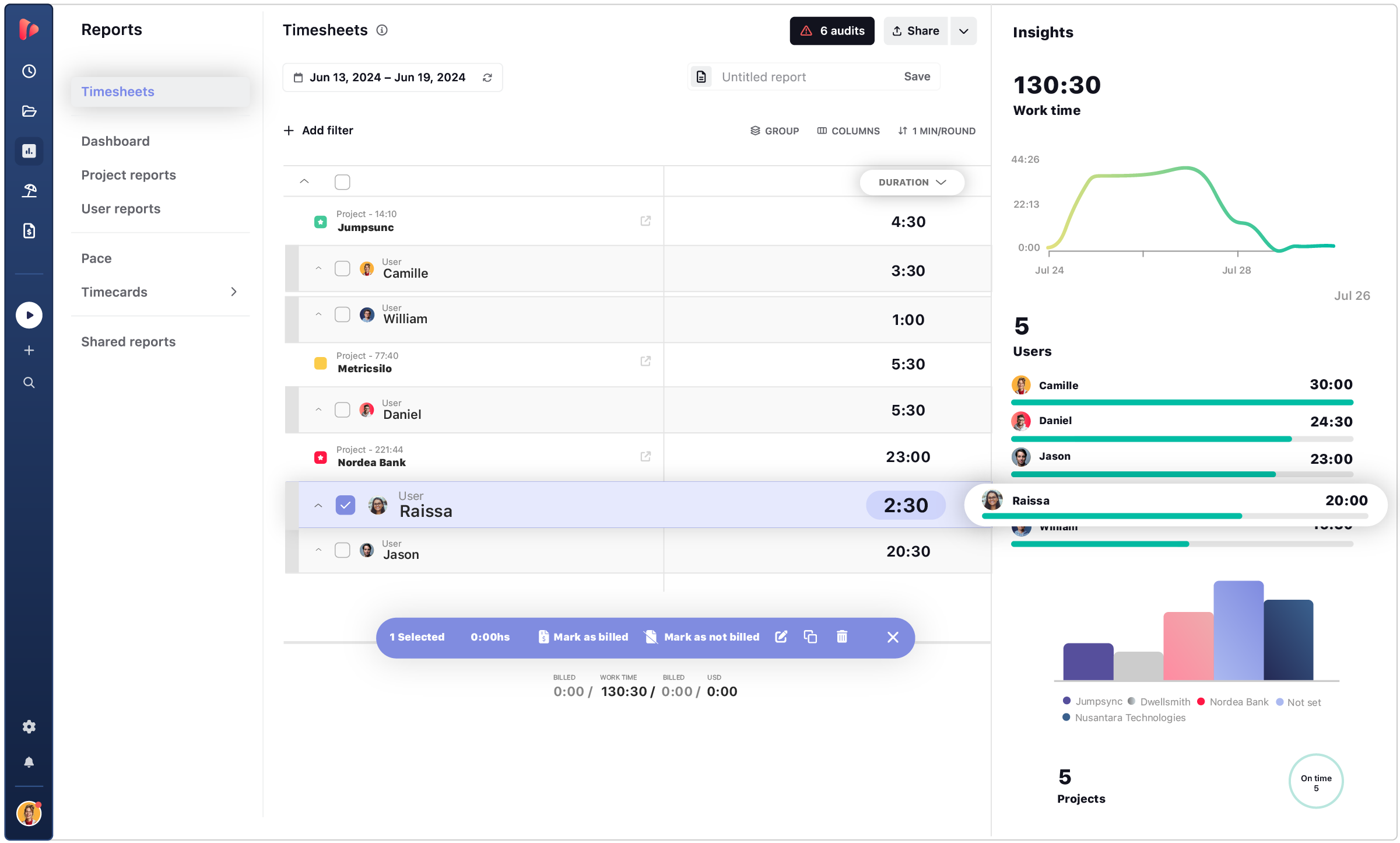
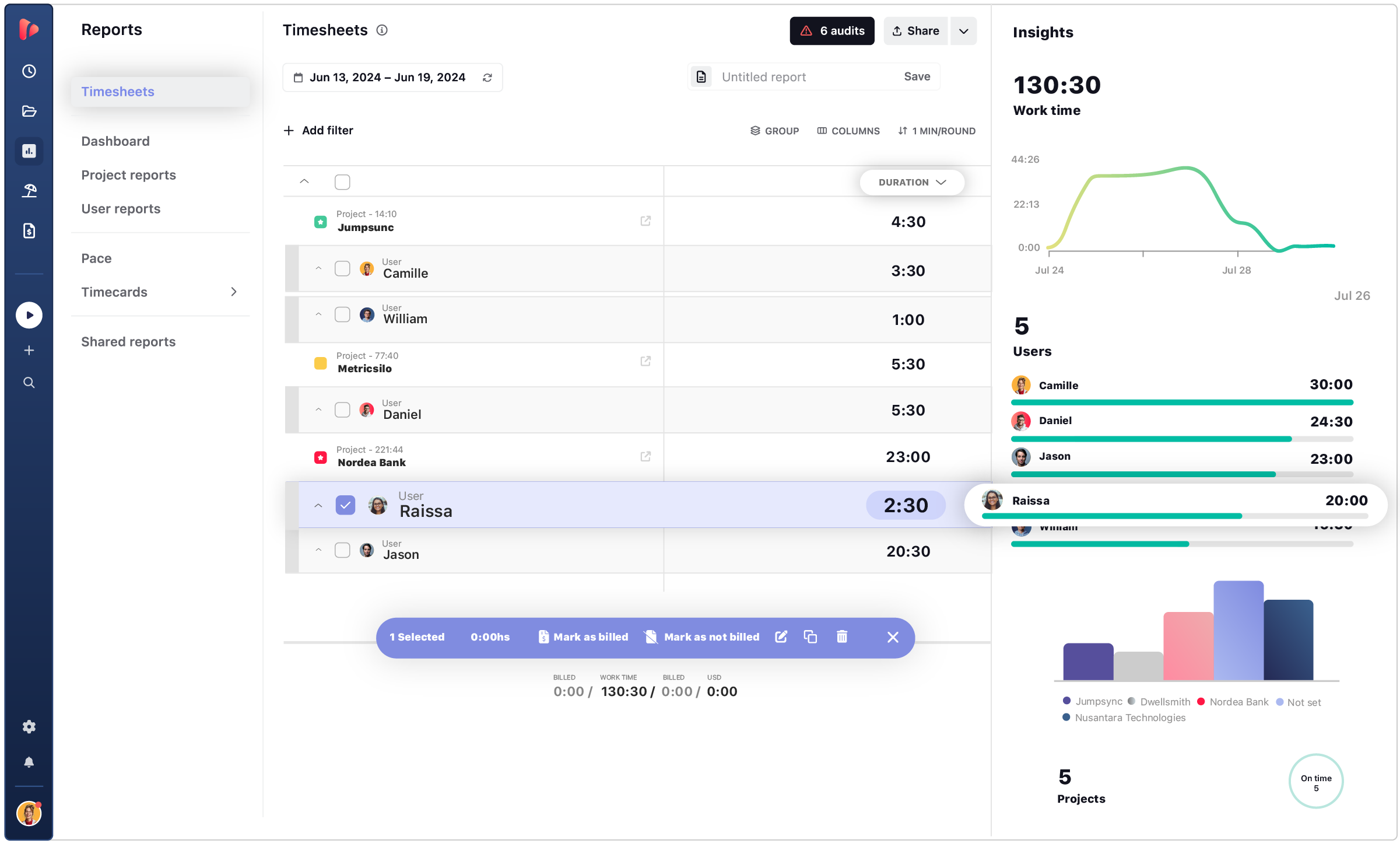
Timesheet Insights

Transform raw hours into actionable charts and trends—spot under‑utilized capacity and pinpoint projects that need extra support.

Accurate Time Tracking Data

Make informed decisions with accurate, real-time data from employee timesheets, enabling better planning and resource management.

Simple Customization

Capture the information most relevant to your business. Tailor your timesheets to meet the specific needs of your workflow.

TRUSTED BY TEAMS WORLDWIDE. 60+ INTEGRATIONS. FREE PLAN FOR UNLIMITED USERS.

TIMESHEET AUTOMATION

The free timesheet app for unlimited users

Improve internal processes and gain valuable insights with an automated timesheet workflow—designed to boost productivity and streamline time tracking for hybrid and remote teams.

One-Click Audit

One-Click Audit

Ensure every timesheet meets company policies and internal compliance standards with automated data reviews for consistency and completeness. Team members log hours as they work, keeping all time data accurate and up-to-date for seamless reporting and project tracking.

Easy Reporting

Easy Reporting

Add custom fields to capture the data that matters most to your team, and export timesheets for both client and internal use. Easily generate any report you need—for billing, payroll, or project profitability—with flexible formatting and layout options. Share polished, professional reports tailored to your audience, whether it’s clients or team members.

Automated Workflow

Automated Workflow

Streamline your time tracking with automatic reminders and scheduled timesheet submissions—minimizing manual follow-ups and easing the load on your admin team. Gain access to accurate, real-time data that delivers valuable insights for smarter resource allocation and improved operational efficiency.

REPORT EMPLOYEE HOURS

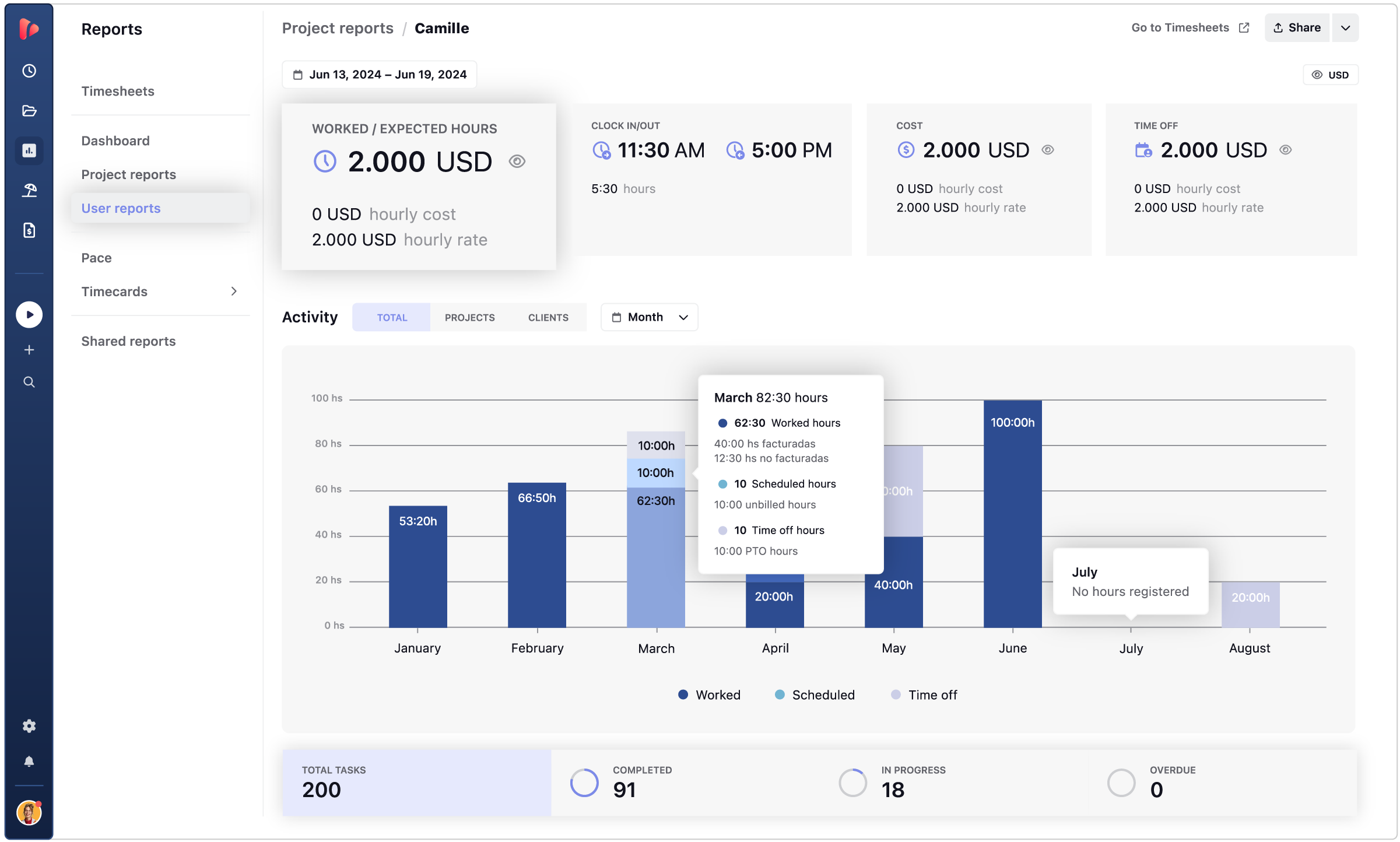
Get accurate time reports from time logs

With online timesheets and automated submissions, your time data is always accessible, up to date, and reliable—no manual input or chasing required.

Insights icon
Insights

Get valuable insights on every process to improve team performance and plan for next projects.

Lock time entries icon
Lock time entries

Lock time entries to prevent changes and ensure accurate, finalized timesheet data for billing and compliance.

accurate icon
Audits

Fix inconsistencies to make sure your data is always accurate, regardless of any mistakes made.

Approvals icon
Approvals

Use timesheet approvals to verify accuracy and maintain accountability before finalizing time entries.

reminder icon
Reminders

Automated reminders ensure timesheets are always up-to-date, keeping team members on track with minimal effort.

Custom fields icon
Custom fields

Track anything you need to know using custom fields to get timesheets that fit your company’s needs.

CONTENT HUB

Level up your timesheet game with actionable insights

Discover expert tips, guides, and resources to make the most of your timesheets. From setup to advanced strategies, explore how to track time smarter and faster. Stay ahead with insights designed to boost efficiency and productivity.

What a timesheet software can do for your team’s workflow:

Timesheet software is designed to simplify work hours tracking, boost team productivity, and streamline project management. A powerful timesheet tracker allows teams to optimize workflows, maintain project budgets, and ensure clear communication within the team and with clients.

With TrackingTime’s timesheet application, teams gain valuable insights into project progress, improve time management, and enjoy the flexibility of tracking time online.

accurate icon

Comprehensive Tracking for Workflow Optimization

TrackingTime’s timesheets provide a centralized solution to enhance productivity, manage deadlines, and make accurate project forecasts, ensuring every task is aligned with schedules and budgets. Keeps time entries consistent for reporting and approvals.

More on Time Management
communcation icon

Enhanced Team Coordination and Communication

Record individual and team hours, promoting effective time management and collaboration. Analyzing tracked data refines workflows and pinpoints areas for improvement, enhancing team coordination on shared goals.

More on Team Collaboration
billing icon

Accurate Billing and Financial Management

Our timesheet online solution offers real-time tracking for precise billing, simplifying client invoicing based on the actual time worked.
With clear time insights, you can keep projects financially on track and optimize cost management.

More on Client Billing
growth icon

Empower Personal Development and Team Efficiency

The timesheet application’s insights allow team members to review time usage and identify areas for improvement. With this understanding, teams can enhance skills, maximize productivity, and foster continuous growth.

More on Productivity

REPORT HOURS

Set live reports once and schedule delivery

Simplify the reporting process with a comprehensive solution to bill clients and report internally to colleagues and partners.

Export to Any Format

Filter billable hours by project, task, user, or client for any time period, and organize the data to fit your workflow. Export reports in your preferred format—CSV, XLS, PDF, or directly into an invoice—ready to share with clients or use internally.

  • Export accurate reports of billable hours
  • Organize and group data for efficient reporting
  • Generate and share professional reports

Online and Live Reports

Create professional, customized reports with your choice of colors, patterns, and charts, then share them online through public or private links. With Live Shared Reports, your viewers always see the most up-to-date data—no downloads needed.

  • Create and share live reports (public or private links)
  • Customize reports with charts, colors, and layouts
  • Ensure access to the latest data in real time

Schedule Reports to Any Inbox

Automate your reporting by scheduling reports to be delivered directly to clients or team members.
Simplify month-end tasks by sending recurring reports straight to their inbox—no manual work required.

  • Schedule reports to send automatically
  • Share with clients and team members effortlessly
  • Streamline your month-end reporting process

INTEGRATIONS

Track time where your team already works

TrackingTime lives where work happens. Add a timer to Asana, Jira, Notion, Monday, ClickUp, Microsoft Teams, Slack, and 60+ more — your team tracks without switching tabs.

  • This app is a lifesaver! With TrackingTime, I can easily set project timelines and track my team's progress. The ability to create detailed timesheets and business reports for clients is a game-changer.

    on nachonacho.com

  • TrackingTime was incredibly convenient to use; its simple design made it accessible to anyone. The features were outstanding and the reports provided invaluable insights into my own productivity.

    on capterra.com

  • TrackingTime keeps my team and projects on track. Saves us hours of headaches and facilitates working remotely. Top notch.

    on nachonacho.com

TESTIMONIALS

Trusted by all kinds of teams

4.7/5 on G2 · 117 verified reviews · Recognized every season as High Performer and Momentum Leader in Project Management, Time Tracking, and Time & Attendance.

leave your feedback

TIME TRACKING APP

Track time, not people

Free for unlimited users

Get started

Start tracking today. Invite your entire team — no seat limits, no credit card, no time limit on the free plan.

Sign in with Google

FAQ

Frequently Asked Questions

Get answers to all your questions about our service and plans.

What is timesheet software?

Timesheet software helps teams record, review, and organize work hours in a structured digital format. It replaces manual spreadsheets or paper logs with online timesheets that support payroll, client billing, compliance reporting, and productivity analysis — all from a single source of truth.

How does timesheet software work?

Employees log hours by task, project, or client using timers or manual entries. The system compiles those entries into digital timesheets that managers can review, approve, lock, and export. In TrackingTime, timesheets are structured as a datatable — filterable by any dimension — so the same data serves payroll, billing, and operational reporting without reformatting.

How do you automate employee timesheets?

Timesheets can be automated by capturing hours as people work — through timers, browser extensions, or AutoTrack, which logs activity in the background and suggests time entries with one click. This reduces manual admin, improves data completeness, and speeds up the approval and payroll cycle at the end of each period.

Can managers review and approve timesheets online?

Yes. TrackingTime includes a structured approval workflow where employees submit time entries, managers bulk approve or reject them, and approved records can be locked to prevent further edits. This creates a clear audit trail and ensures payroll and billing are based on verified hours.

Are timesheets legally required?

In many regions — including across the European Union — employers are legally required to keep accurate records of employee work hours. Digital timesheet software helps teams maintain complete, auditable records that meet labor law requirements, including work schedules, overtime, and time off, in one organized system.

Can I download free timesheet templates?

Yes. Free timesheet templates in Excel, PDF, and Google Sheets are useful for simple manual workflows. They work for small teams or occasional use, but as teams grow, automated timesheet software provides better accuracy, approval controls, and real-time reporting that spreadsheet templates can’t match.

What reporting options does timesheet software offer?

Timesheet software should let teams filter and group hours by project, client, user, or time period. TrackingTime generates project reports, company dashboards, and saved report views that update automatically — and includes shared reports for sending time data directly to clients or stakeholders without requiring workspace access.

Can timesheet data be exported for payroll or billing?

Yes. TrackingTime exports timesheet data to CSV, PDF, and Excel. For billing, approved hours can be converted directly into invoices using configured rates. For payroll, time card exports integrate with HR tools like BambooHR and FactorialHR to reduce manual data re-entry.

What is the best timesheet software?

The best timesheet software is accurate, easy to adopt, and flexible enough to support tracking, approvals, exports, and reporting in one workflow. TrackingTime is a strong option for teams that need online timesheets connected to projects, billable rates, payroll, and client reporting — without maintaining separate tools for each.

Is timesheet software better than manual spreadsheets?

Yes, for any team tracking time regularly. Spreadsheets require constant manual updates, are prone to errors, and break down when multiple people need to log, review, or approve hours simultaneously. Timesheet software automates data collection, enforces consistency through policies and reminders, and delivers real-time reporting that spreadsheets can’t support at scale.