Timesheet vs Time Tracking: Key Differences + When to Use Each

The main difference between timesheets and time tracking is how time is recorded and used. Time tracking captures work in real time, while timesheets summarize hours for reporting, payroll, and billing.
Timesheet vs Time Tracking: Key Differences
| Aspect | Time Tracking | Timesheets |
|---|---|---|
| Purpose | Capture time in real time | Summarize hours worked |
| Detail level | High (task-level) | Aggregated (daily/weekly) |
| Usage | Productivity, tracking work | Payroll, billing, reporting |
| Timing | Continuous | Periodic submission |
| Accuracy | More precise | Depends on manual input |
Timesheets and time tracking are different outputs in the same workflow. A timesheet is a structured record of hours worked over a defined period, typically used for payroll, billing, or compliance. Time tracking, on the other hand, is the process of recording work time as it happens.
When to Use Time Tracking vs Timesheets
Use time tracking when:
- You need detailed visibility into tasks
- You want accurate productivity data
- You manage projects or bill by time
Use timesheets when:
- You need summaries for payroll
- You track hours weekly or monthly
- You focus on compliance and reporting
💡 Quick Summary
- A timesheet organizes and summarizes hours worked over a defined period (weekly, biweekly, or monthly).
- Time tracking software records time spent on tasks, projects, or clients.
- Time tracking generates the data that timesheets later organize and formalize.
- Timesheets help teams manage payroll, billing, and reporting.
- Most businesses need both to balance real-time visibility with structured financial reporting.
Timesheet vs Time Tracking
- Timesheet vs Time Tracking: Key Differences
- What Is a Timesheet?
- How a Timesheet Fits in the Workflow
- How Time Tracking Fits in the Workflow
- The Core Difference: Process vs Output
- Quick Comparison Table: Timesheets vs Time Tracking
- Is It Really Timesheets vs Time Tracking?
- Why SMBs Use Time Tracking and Timesheets Together
What Is a Timesheet?
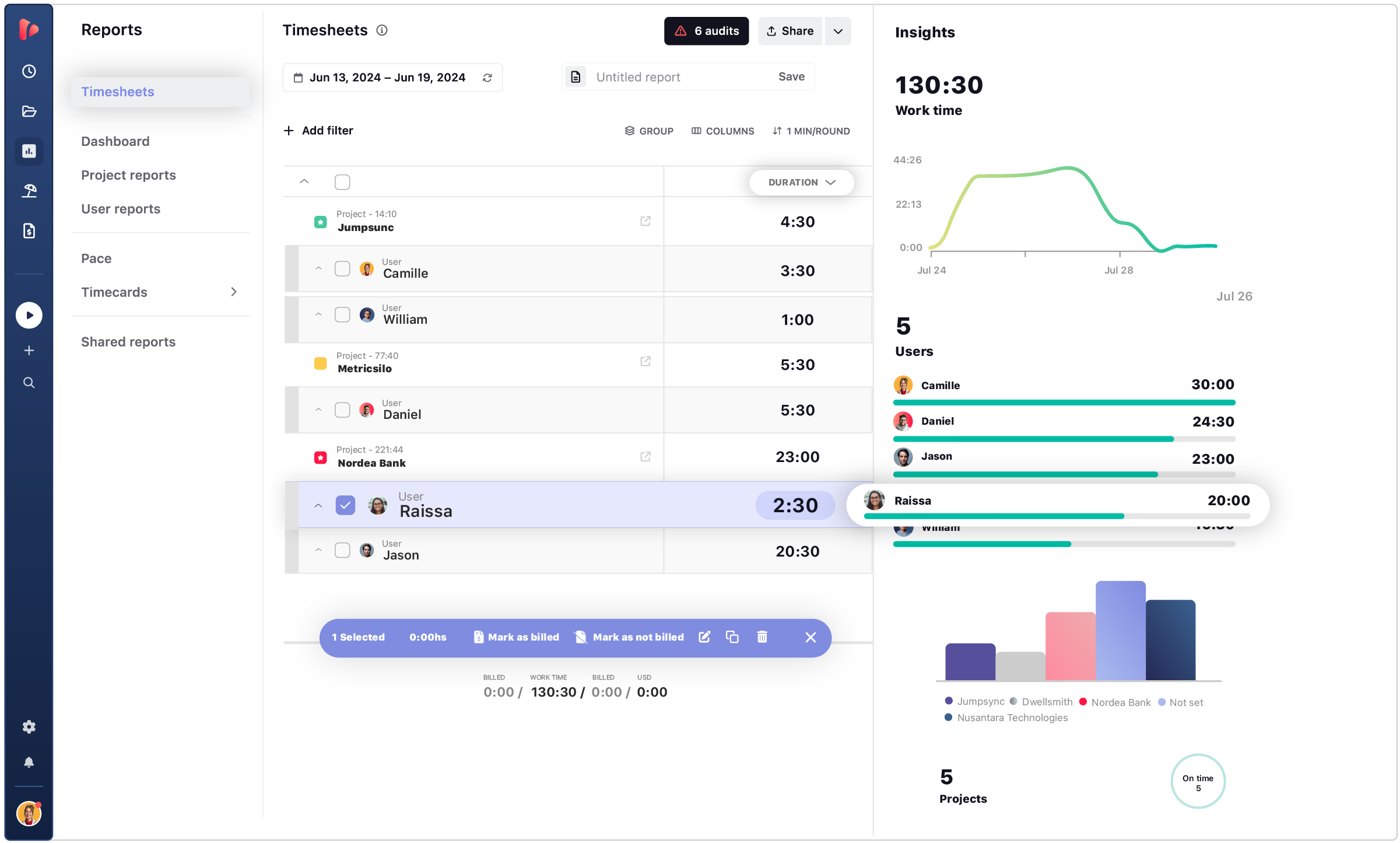
A timesheet is a structured record of hours worked during a defined time period, typically weekly, biweekly, or monthly. For a more detailed explanation, see our complete guide on what is a timesheet and how to use it effectively.
How a Timesheet Fits in the Workflow
A timesheet acts as a structured checkpoint at the end of a reporting period. It consolidates recorded hours into a defined timeframe, typically weekly, biweekly, or monthly.
Once the period closes, the system summarizes total hours worked, overtime, and categorized time. Managers review and approve those totals before they are finalized for payroll, billing, or compliance documentation.
In practical terms, the timesheet marks the transition from operational activity to formal reporting. It transforms accumulated work data into an approved, structured record that organizations can use for payroll and invoicing.
👉 Timesheets can be manual (paper or spreadsheets) or digital. Digital systems automate calculations, reduce errors, and simplify approvals.
When Timesheets Add the Most Value
Timesheets are most valuable in workflows where financial accuracy and documentation are the priority. They are essential in situations such as:
- Payroll processing for hourly employees
- Client billing based on total approved hours
- Contractor or freelance reporting
- Regulated industries requiring labor documentation
Strengths
- Creates a clear, period-based summary of work
- Ensures managerial review and approval
- Supports payroll, billing, and documentation
Limitations
- Relies on accurate input
- Can become inefficient if filled manually
- Offers limited insight during the active work cycle
💡 Looking for a Timesheet template? Check out our collection of 10+ ready-to-use free timesheet templates.
What Is Time Tracking?
Time tracking is the process of recording hours spent working on a task or project. The main goal of time tracking software is to capture when employees start and stop working, how long tasks take, and how time is distributed across projects.
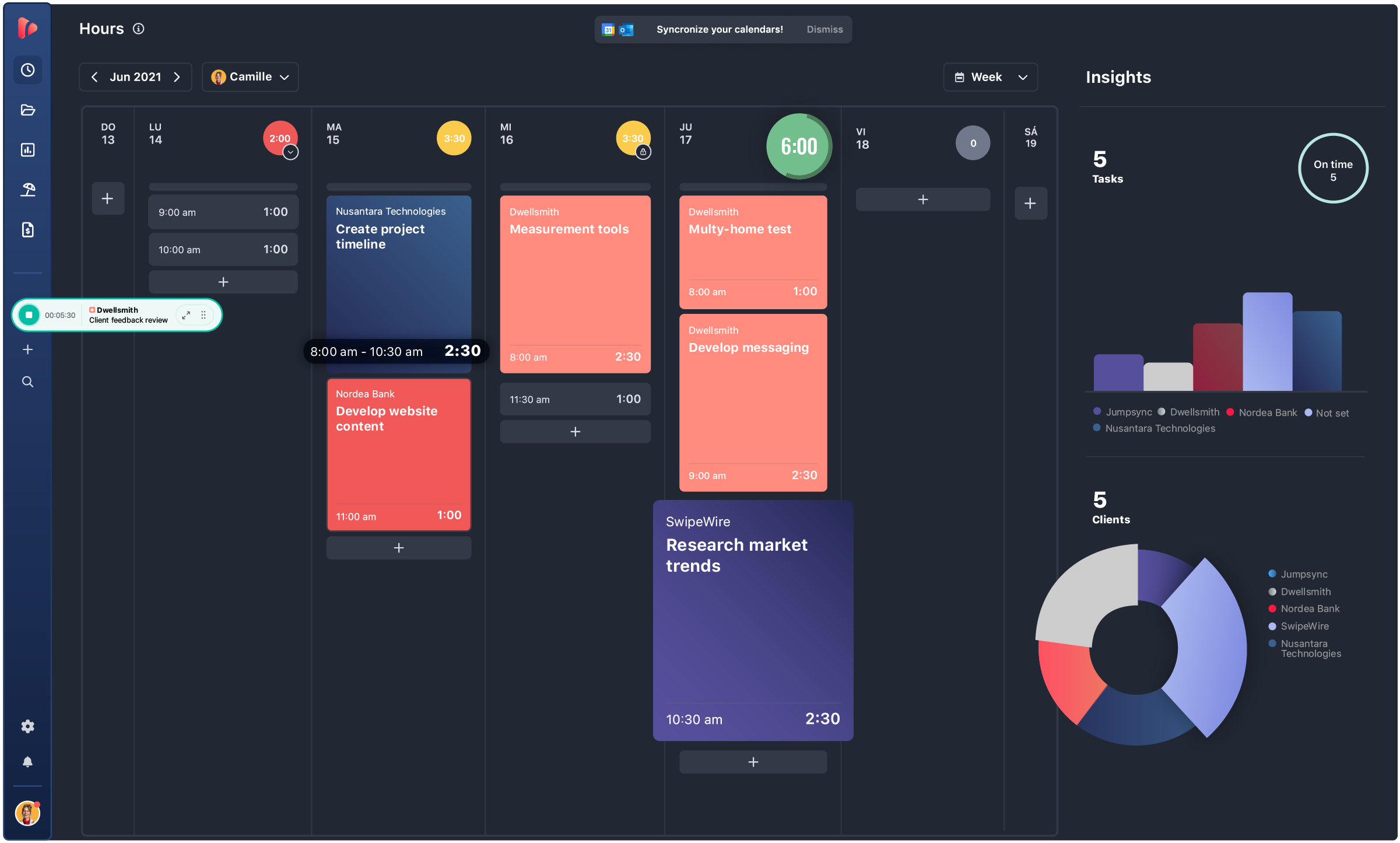
Time tracking can be manual (entering hours after the fact) or real-time (using timers). Some systems also offer automatic capture based on activity.
How Time Tracking Fits in the Workflow
Time tracking operates continuously throughout the work cycle, capturing activity as it happens.
Employees record when work starts and stops, and often tag time to tasks, projects, or clients. Each entry builds a detailed operational log. Over time, these entries create visibility into how work is distributed and how long tasks actually take.
This data exists before payroll or reporting. It supports decision-making during the work cycle, not just after it. Time tracking generates the raw time data that later becomes structured and approved in a timesheet.
When Time Tracking Adds the Most Value
Time tracking is most valuable in environments where operational visibility matters more than period-based summaries. It plays a critical role in:
- Agencies managing multiple clients and billable work
- Project-based teams tracking deadlines and deliverables
- Remote or hybrid teams requiring transparent workload insight
- Organizations analyzing productivity patterns and resource allocation
Strengths
- Provides immediate visibility
- Improves project transparency
- Supports workload management
Limitations
- Requires consistent usage
- Can feel unnecessary for simple payroll-only workflows
- Does not replace structured, approved reporting
The Core Difference: Process vs Output
The difference between time tracking and timesheets comes down to when and how time data is used in the workflow.
Time tracking captures work activity as it happens. It records start and stop times, task allocation, and daily effort. Its primary purpose is operational visibility.
A timesheet, by contrast, summarizes and formalizes recorded hours over a defined period. It transforms accumulated time entries into an approved, structured record suitable for payroll and billing.
In simple terms:
- Time tracking creates the data.
- A timesheet organizes and formalizes that data.
👉 Time tracking answers the question: “How is work time being used?”
👉 Timesheets answer the question: “How many hours were approved for this period?”
This distinction explains why most SMBs and big companies normally need both timesheets and time tracking: one ensures accurate capture, the other ensures structured accountability.
Quick Comparison Table: Timesheets vs Time Tracking
| Aspect | Timesheets | Time Tracking |
|---|---|---|
| Core Function | Period-based summary | Real-time recording |
| Focus | Reporting & payroll | Capturing work activity |
| Timeframe | Weekly / biweekly / monthly | Continuous / daily |
| Output | Structured record | Raw time data |
| Primary Use | Payroll, billing, compliance | Visibility, task tracking |
| Relationship | Built from tracked time | Feeds into timesheets |
How Time Tracking Feeds Into Timesheets
In modern workforce systems, time tracking and timesheets don’t compete against each other; they are sequential stages of the same workflow. Time tracking operates during the work cycle, and timesheets formalize that activity at the end of it.
Here’s how the process typically works:
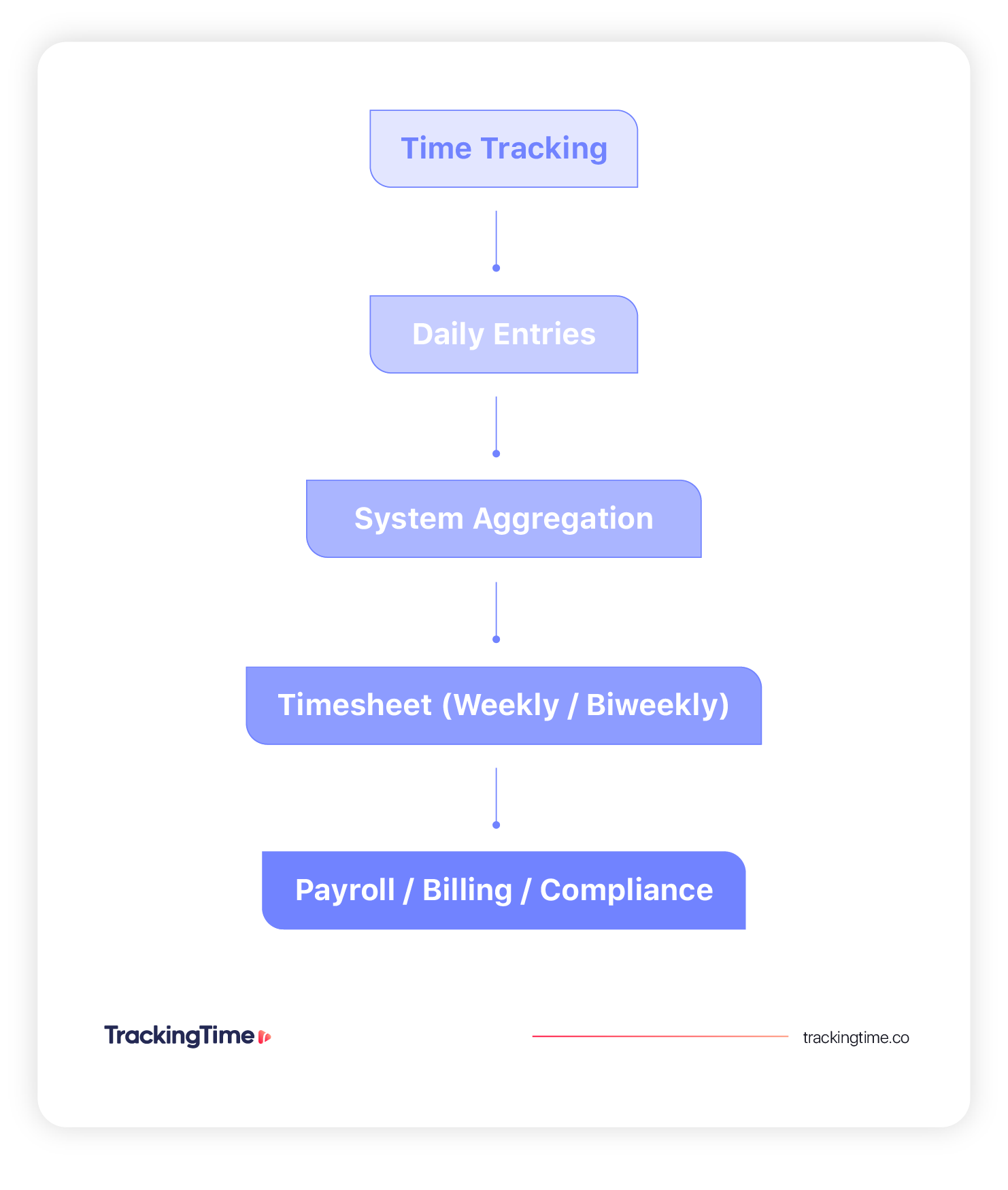
- Employees track time daily. They record when they start and stop working and often tag entries to specific tasks, projects, or clients. This creates granular visibility into how time is being spent.
- Entries accumulate automatically. Each recorded entry is stored in the system, building a continuous log of operational activity throughout the reporting period.
- The system compiles entries into a timesheet. At the end of a defined period (weekly or biweekly), the system aggregates total hours, calculates overtime when applicable, and organizes the data into a structured summary.
- Managers review and approve. The timesheet is checked for accuracy, completeness, and alignment with company policies before being finalized.
- Approved data flows into payroll or billing. Once validated, the finalized hours are exported or integrated into payroll systems, client invoices, or compliance records.
This structured flow connects real-time visibility with formal reporting requirements.
Is It Really Timesheets vs Time Tracking?
Both systems solve different operational needs. The right choice depends on whether your priority is structured reporting, real-time visibility, or a combination of both.
👉 In modern systems, time tracking and timesheets are not alternatives; they are stages of the same workflow. Tracking ensures accuracy. Timesheets ensure structure.
Why You Need Timesheets
Timesheets are most valuable when your primary concern is documentation and financial processing. If your workflow revolves around approved totals rather than daily visibility, a structured timesheet system may be sufficient.
- Payroll processing is your priority
- You bill clients based on total hours worked
- You need formal compliance records
- You require structured, period-based reporting
Why You Need Time Tracking
Time tracking becomes important when operational visibility matters more than end-of-period summaries. If you need to understand how time is being spent during the week, then time tracking is essential.
- You manage projects or task-based workflows
- You need task-level visibility
- You want insight into workload distribution
- You oversee remote or hybrid teams
Why SMBs Use Time Tracking and Timesheets Together
For many small and mid-sized businesses, choosing to only track time without generating timesheets, or choosing to fill timesheets without a time tracking tool, usually creates gaps. If you both manage active projects and process payroll internally, you need real-time insight and structured reporting working together.
When Both Systems Work Best Together
- You run a service-based business
- You manage hourly employees
- You process payroll internally
- You bill clients while managing ongoing projects
Time tracking helps you monitor work as it happens. Timesheets ensure those hours are reviewed, approved, and ready for payroll or invoicing. For most growing SMBs, the question is not which system to choose, but how to combine both effectively.
FAQs
Is a timesheet the same as time tracking?
No. Time tracking records time as work happens. A timesheet summarizes recorded hours over a defined period for payroll, billing, or compliance.
Do I need both time tracking and timesheets?
If your priority is payroll or billing, you need timesheets. If your priority is real-time visibility, you need time tracking. Most small and medium businesses use both.
Can time tracking replace timesheets?
Time tracking can generate the data used in timesheets, but it does not replace structured reporting required for payroll or compliance.
Is time tracking always real-time?
Not always. It can be manual or real-time. However, real-time tracking provides greater visibility and accuracy.
Should I use timesheets or time tracking for payroll?
Timesheets are better suited for payroll because they summarize approved hours over a defined period.
Are timesheets outdated with modern time tracking tools?
No. Modern time tracking tools often generate timesheets automatically. Timesheets are still necessary for structured payroll processing, billing, and compliance reporting.
How does time tracking feed into timesheets?
Time tracking captures daily work hours. At the end of the period, those entries are compiled into a structured timesheet used for approval, payroll, or billing.


