Employee Work Schedule: Types, Examples, and How to Manage Them

An employee work schedule defines when employees are expected to work, including days, hours, shifts, or flexible time windows. It helps teams maintain coverage, coordinate responsibilities, and create clearer expectations around who is working and when.
Types of Work Schedules: Quick Comparison
Employee work schedules can be structured in different ways depending on business hours, workload, and team needs. These are the five most common work schedule types:
| Work Schedule Type | Structure | Best For | How It Looks in Practice |
|---|---|---|---|
| Fixed | Same days and hours each week | Office-based teams, admin roles, and businesses with stable and predictable operating hours | Mon–Fri, 9 AM–5 PM |
| Shift-Based | Assigned shifts across different times or days | Retail, hospitality, healthcare, support | Morning, afternoon, and night shifts |
| Flexible | Employees choose start and end times within guidelines | Hybrid teams and knowledge workers | Core hours with flexible start and end times |
| Rotating | Employees rotate through different shifts on a set pattern | 24/7 operations such as emergency services and transportation | Weekly day/night rotation |
| Compressed | Longer workdays in fewer days | Teams that can sustain longer workdays in exchange for fewer days in the office each week | 10-hour shifts, 4 days a week. |
💡 Quick Summary
- An employee work schedule defines when employees are expected to work, including their days, hours, shifts, or flexible time windows.
- Work schedules help teams maintain coverage, coordinate responsibilities, and improve visibility over employee time and attendance.
- The most common work schedule types are: fixed, shift-based, flexible, rotating, and compressed, each with different benefits and trade-offs.
- Creating a work schedule involves defining coverage needs, identifying workload patterns, factoring in availability, and assigning shifts in a clear and structured way.
What Is an Employee Work Schedule?
- Types of Work Schedules: Quick Comparison
- Why Employee Work Schedules Matter for Teams and Operations
- Types of Employee Work Schedules
- Employee Work Schedule Examples
- How to Create a Work Schedule: Step by Step
- How to Choose the Right Work Schedule Type for Your Team
- How to Schedule Employees Effectively: 7 Basic Scheduling Principles
- Benefits and Challenges of Different Work Schedule Types
- Common Employee Scheduling Mistakes
- From Work Schedules to Workforce Visibility
An employee work schedule is a structured plan that defines when employees are expected to work — including their assigned days, start and end times, shifts, or flexible time windows. It establishes the working hours an organization expects from its team, and creates a shared reference for managers, employees, and operations.
Work schedules can be as simple as a standard Monday-to-Friday office routine, or as complex as a rotating shift system that covers multiple locations around the clock. Regardless of format, their core purpose is the same: ensure the right people are working at the right times to meet business needs and maintain operational continuity.
Why Employee Work Schedules Matter for Teams and Operations
For managers and operations teams, work schedules are one of the most effective ways to turn staffing needs into day-to-day coverage. They help organize who should be working, when coverage is needed, and how hours are distributed across the team. When schedules are well defined, it becomes easier to reduce gaps, coordinate responsibilities, and keep work moving without constant manual adjustments.
On top of that, work schedules also improve visibility. Managers can plan around peak hours, shifting demand, employee availability, and schedule changes with more confidence when expected work time is clearly structured. This supports better coordination across teams and creates a stronger foundation for tracking attendance and managing employee time in practice.
💡 The 3 Keys to an Effective Employee Work Schedule
An effective work schedule aligns three key elements:
- Demand: When work needs to happen
- People: Who is available to do it
- Structure: How you distribute coverage over time
If one is ignored, schedules tend to break down in practice.
Types of Employee Work Schedules
There are five main types of work schedules. Some types are more rigid and stay the same from week to week, while others offer more flexibility.
Fixed Work Schedule
A fixed work schedule maintains the same days and hours each week. Employees know in advance when they are expected to work, which makes this one of the simplest and most commonly used schedules.
This structure works well for businesses with predictable operating hours and stable routines. It can make coordination easier, but it offers less flexibility when staffing needs change frequently.
🎯 Best for: Teams with stable hours, predictable demand, and consistent weekly routines.
Shift-Based Work Schedule
A shift-based work schedule assigns employees to specific shifts across different times of the day or week. This is common when a business needs coverage beyond standard office hours, such as mornings, evenings, nights, or weekends.
Shift-based schedules are often used in retail, hospitality, healthcare, customer support, and operations. They help maintain coverage across longer service hours, but they usually require more coordination to keep staffing balanced and schedules clear.
🎯 Best for: Businesses that need coverage across extended hours, weekends, or multiple daily time blocks.
Flexible Work Schedule
A flexible work schedule gives employees some control over when they start and end work within defined expectations. Instead of following one fixed schedule, employees can choose from a time range as long as they complete their hours and remain available when needed.
This type of schedule is often a good fit for knowledge work (software development, design, content, legal analysis, etc), hybrid teams, and roles where output matters more than one standard start time.
🎯 Best for: Teams that need coordination but can allow employees flexibility in their start and end times.
💡 For a closer look at how flexible schedules work in practice, see our guide on Flex Time
Rotating Work Schedule
A rotating work schedule changes an employee’s shifts or working days over time based on a set pattern. For example, a team may rotate between day and night shifts each week, or move through different weekend assignments over a longer cycle.
This structure can help distribute coverage more evenly and share less desirable shifts across the team. At the same time, it can be harder to manage and less predictable for employees, especially when rotations are frequent or complex.
🎯 Best for: 24/7 operations that need to distribute day, night, or weekend shifts more evenly.
Compressed Work Schedule
A compressed work schedule allows employees to work their total weekly hours in fewer days. A common example is four 10-hour days instead of five 8-hour days.
This type of schedule can improve efficiency in some roles and give employees longer blocks of time off. However, longer workdays are not ideal for every team or workload, so managers need to consider energy, concentration, and the practical demands of the role.
🎯 Best for: Teams that can work longer days in exchange for fewer workdays each week.
Other Work Schedule Variations You May Encounter
Some teams also use schedule variations such as seasonal, on-call, split-shift, or irregular schedules. These are usually tied to changing demand, emergency coverage, or work that does not follow a stable weekly pattern.
A split-shift schedule, for example, divides an employee’s working hours into two separate blocks within the same day — such as a morning block and an evening block — with a longer unpaid break in between. This is common in food service, hospitality, and transportation, where demand peaks at specific times of day.
In most cases, these work as variations built around broader schedule models such as shift-based, flexible, or rotating schedules.
👉 Full-time and part-time schedules
A full-time or part-time schedule can still be fixed, shift-based, flexible, or rotating, depending on how those hours are organized.
Different work schedule types offer different trade-offs between predictability, flexibility, and coverage. The right choice depends on how stable your workload is and how much coordination your team requires.
Employee Work Schedule Examples
Here are some practical employee schedule examples that show how different schedule types work in real settings.
Fixed Schedule Example
A common fixed schedule example is an administrative team working Monday through Friday from 9:00 AM to 5:00 PM, with the same lunch break and the same hours each week. This creates a predictable routine and makes coverage easier to plan.
🔎 How it works in practice:
- Monday to Friday
- 9:00 AM to 5:00 PM
- 1-hour lunch break
- Same schedule every week
Shift Schedule Example
A customer support team may divide the day into morning, afternoon, and night shifts to maintain coverage across extended service hours. This is a common example of a shift schedule in teams that need staffing across multiple time blocks.
🔎 How it works in practice:
- Morning shift: 6:00 AM to 2:00 PM
- Afternoon shift: 2:00 PM to 10:00 PM
- Night shift: 10:00 PM to 6:00 AM
Flexible Schedule Example
A creative team may use flex time by setting shared core hours while allowing employees to start earlier or later, depending on their preferences. This is a common example of a flexible schedule because it supports coordination without requiring everyone to follow the same fixed hours.
🔎 How it works in practice:
- Core hours: 10:00 AM to 3:00 PM
- Employees choose their start time between 7:00 AM and 10:00 AM
- Employees finish after completing their daily hours
Rotating Schedule Example
A common example of a rotating schedule is an emergency response team rotating between day, evening, and overnight shifts to maintain 24/7 coverage. This type of schedule helps distribute demanding shifts more evenly across the team, but it usually requires more planning and clear communication to manage well.
🔎 How it works in practice:
- Week 1: Monday to Friday, 7:00 AM to 3:00 PM
- Week 2: Monday to Friday, 3:00 PM to 11:00 PM
- Week 3: Monday to Friday, 11:00 PM to 7:00 AM
Compressed Schedule Example
A common example of a compressed schedule is a product development team working four 10-hour days instead of five 8-hour days. This approach gives employees an extra day off each week while still covering the same total number of hours, and can work well for teams that benefit from longer uninterrupted work blocks.
🔎 How it works in practice:
- Monday to Thursday
- 7:00 AM to 5:00 PM
- Friday off
How to Create a Work Schedule: Step by Step
Creating a work schedule usually follows a repeatable process. While the exact structure may vary by team or business, the goal is the same: ensure you schedule the right people at the right times based on coverage needs, workload, and availability.
Using the following structured approach helps teams build a predictable and manageable system.
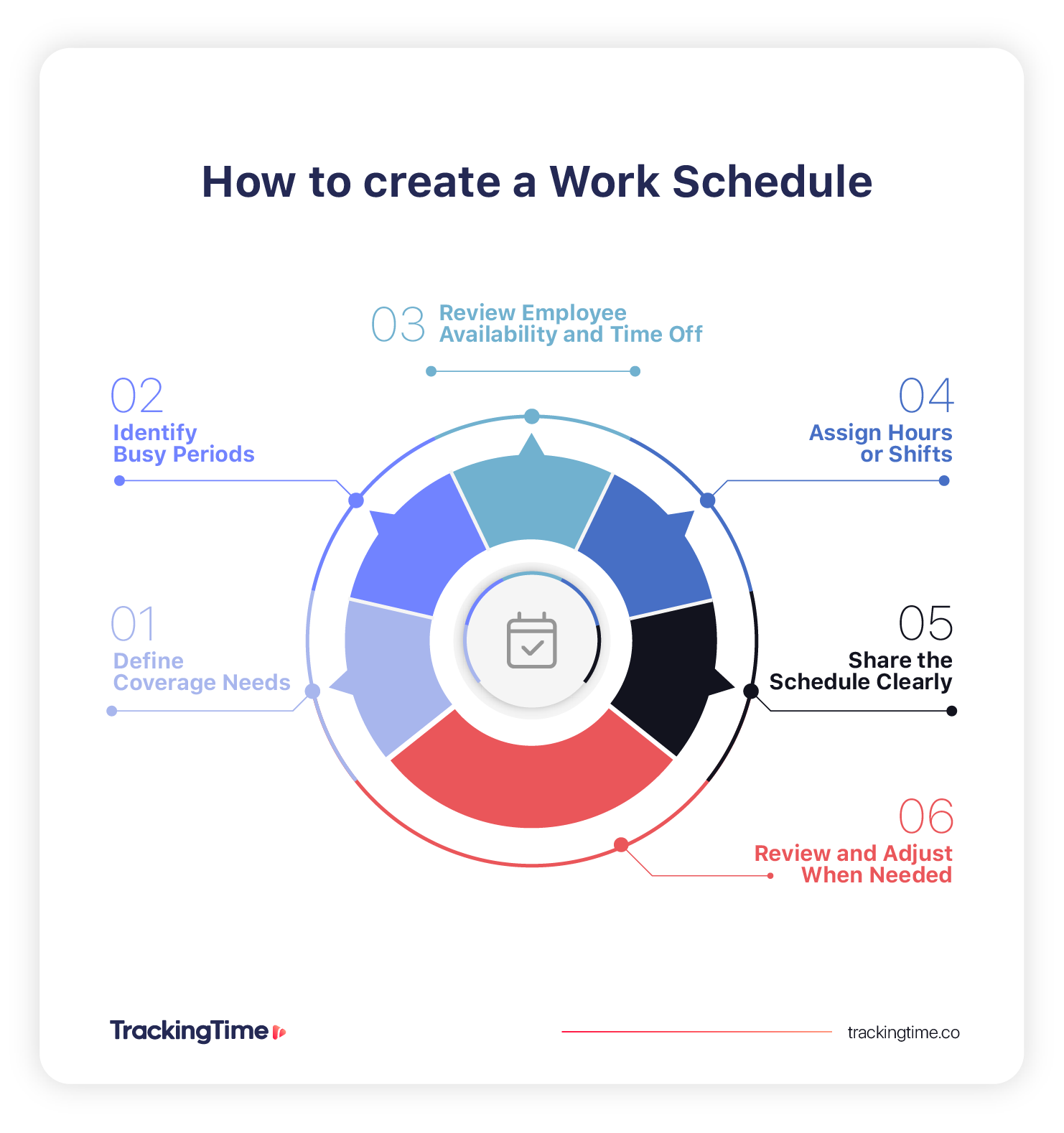
1. Define coverage needs
Start with the times when work needs to happen. This may include opening hours, service windows, delivery periods, shift handoffs, or any part of the day when employee coverage matters most. An effective schedule requires a clear understanding of when people actually need to be working.
2. Identify busy periods and workload patterns
Not every hour or day requires the same staffing level. Some teams need more coverage during peak business hours, while others need it around deadlines, recurring meetings, or production cycles. Looking at workload patterns helps managers avoid understaffing during busy periods and overstaffing when demand is lower.
💡 Not all coverage gaps are visible
Some scheduling gaps are not obvious until work starts.
Hidden gaps often appear during transitions, handoffs, or peak moments when coordination matters most.
3. Review employee availability and time off
Before assigning hours, it is important to account for employee availability, time off, and any role-specific constraints. This helps prevent avoidable conflicts and makes the schedule more realistic from the start.
4. Assign hours or shifts
Once coverage needs and availability are clear, managers can begin assigning hours or shifts. Be sure to match staffing to actual demand while keeping the schedule balanced, understandable, and practical for the team.
5. Share the schedule clearly
A schedule only works if employees can read it easily and know what is expected. Sharing schedules clearly, with enough notice, helps people prepare in advance and reduces confusion when the workweek begins.
6. Review and adjust when needed
Schedules often need to change. Absences, shifting priorities, and changes in workload can all affect staffing needs. More stable schedule types may only need occasional review, while more flexible or shift-based models may require more frequent adjustments to keep coverage aligned with demand.
💡 Work schedules shape team collaboration
Work schedules influence how teams communicate, hand off work, and stay aligned throughout the day.
How to Choose the Right Work Schedule Type for Your Team
Choosing the right work schedule type depends on your business needs and how your team operates. These questions can help you identify which structure fits best:
Based on Coverage Needs
Start with the hours your team needs to cover. If your business runs on standard daytime hours, a fixed schedule may be enough. If coverage needs extend across mornings, evenings, weekends, or multiple locations, a shift-based or rotating structure may work better.
Based on Workload Predictability
Some teams have stable routines, while others deal with changing demand throughout the week. Fixed schedules usually work best when workload stays consistent, while more flexible or rotating models can make more sense when staffing needs change more often.
Based on Employee Availability
The right schedule also depends on who is available to work and when. Team size, role requirements, time-off constraints, and employee preferences can all affect how easy a schedule is to maintain. A structure that looks efficient on paper may not work well if it does not align with actual availability.
Based on Operational Complexity
The best work schedule is not always the one with the most options. In many cases, a simpler structure works better because it is easier to communicate, follow, and adjust when needed.
| If you answer yes to this… | Consider this schedule type |
|---|---|
| Does your team need coverage beyond standard business hours (evenings, weekends, nights)? | Shift-based |
| Do you need to cover 24/7 operations while distributing demanding shifts fairly across the team? | Rotating |
| Is your workload stable and predictable week over week? | Fixed |
| Do you have knowledge workers or hybrid teams where output matters more than a fixed start time? | Flexible |
| Can your team sustain longer workdays in exchange for an extra day off each week? | Compressed |
In practice, many teams use a combination of types — for example, a fixed base schedule with flexible start and end times, or a shift-based model with rotating weekend assignments. The goal is to find a structure that covers your operational needs without creating more complexity than your team can manage consistently.
👉 The best schedule is usually the simplest one that meets your coverage needs. Complexity adds coordination cost. If a fixed or shift-based structure works, there is no need to layer in rotation or compression.
How to Schedule Employees Effectively: 7 Basic Scheduling Principles
Effective scheduling means building a structure that reflects real business needs, supports coverage, and is easy to follow consistently. These are the main principles that an effective schedule should follow.
1. Match Workload and Demand
Employee schedules should reflect when work actually needs to happen. Instead of relying only on default hours, managers should look at peak periods, slower periods, deadlines, customer demand, or service windows. This helps teams avoid being short-staffed when demand is high or overstaffed when it is not.
2. Build for Coverage and Continuity
A good schedule covers important hours without creating unnecessary gaps. This is especially important for teams that rely on handoffs, shift transitions, customer support windows, or location-based coverage. The goal is to keep work moving smoothly from one time block to the next.
3. Be Fair and Predictable
Schedules are easier to manage when employees can see a reasonable level of consistency from week to week. Fairness matters too, especially when teams share shifts, weekends, or less desirable time slots. A schedule does not need to be identical for everyone, but it should feel balanced and predictable enough to ensure coordination.
4. Account for Availability and Constraints
Effective schedules also need to reflect real constraints. That includes employee availability, approved time off, role requirements, relevant legal hour limits, and any operational restrictions that affect who can work when. Ignoring these factors often creates avoidable problems later.
5. Keep Schedules Clear and Easy to Follow
A schedule should be easy to read and easy to understand. If employees have to guess when they are working, where they are assigned, or whether the schedule has changed, confusion builds quickly. Simple, readable schedules are usually more effective than complicated ones.
6. Communicate Changes Early
When schedules need to change, advance notice makes a big difference. Clear communication helps employees prepare, supports better coordination across the team, and reduces friction around last-minute adjustments. Even small schedule updates are easier to manage when they are shared clearly and early.
7. Review Planned Time vs Actual Attendance
Scheduling works best when managers look at what was planned and compare it with what actually happened. This helps teams spot gaps, missed coverage, repeated attendance issues, or schedule patterns that no longer fit the way the team works. Over time, that visibility can lead to better scheduling decisions and fewer surprises.
Benefits and Challenges of Different Work Schedule Types
Each work schedule type comes with trade-offs. Looking at the main benefits and challenges side by side can make it easier to compare schedule models and choose the one that best fits your team’s needs.
| Work Schedule Type | Main Benefits | Main Challenges |
|---|---|---|
| Fixed | Predictable routines, easier planning, clearer expectations | Less flexibility when workload or staffing needs change |
| Shift-Based | Stronger coverage across extended hours, clearer staffing by time block | More coordination, fairness concerns, and schedule changes to manage |
| Flexible | Greater autonomy, better adaptability, improved work-life balance | Requires clear expectations and stronger coordination across the team |
| Rotating | Distributes coverage more evenly, helps share less desirable shifts | Lower predictability, harder routines, and possible fatigue over time |
| Compressed | Fewer workdays, longer uninterrupted time off, efficient coverage in some roles | Longer shifts can be harder to sustain and may not fit every workload |
In practice, no schedule type is better by default.
Each option reflects a different balance between stability and flexibility. The best choice depends on how predictable your workload is, how much coordination your team requires, and how important consistency is for day-to-day operations.
Common Employee Scheduling Mistakes
Even well-structured schedules can fail if the underlying decisions are not aligned with how the team actually works. These are some of the most common mistakes that affect coverage, coordination, and day-to-day visibility:
- Scheduling without considering real demand: assigning hours based on assumptions instead of actual workload patterns often leads to overstaffing during slow periods and gaps during peak hours. Effective schedules start from demand, not from default hours.
- Ignoring employee availability and constraints: when schedules do not reflect real availability, approved time off, or role limitations, conflicts and last-minute changes become more frequent. This reduces reliability and makes schedules harder to follow in practice.
- Overcomplicating the schedule structure: adding too many variations, exceptions, or rotating patterns can make schedules difficult to understand and manage. In most cases, simpler structures are more sustainable and easier for teams to follow consistently.
- Lack of clear communication: even a well-built schedule can fail if changes are not communicated properly. When employees are unsure about when they are working or whether something has changed, coordination quickly breaks down.
- Not comparing planned vs actual work: without reviewing what actually happened, it is difficult to improve future schedules. Scheduling works best when managers look at what was planned and compare it with what actually happened. Reviewing time and attendance data alongside planned schedules helps teams spot gaps, missed coverage, repeated attendance issues, or schedule patterns that no longer fit the way the team works. Over time, that visibility can lead to better scheduling decisions and fewer surprises.
- Treating scheduling as a one-time task: schedules are not static. When they are not reviewed and adjusted regularly, they become outdated and disconnected from real conditions. Effective scheduling is an ongoing process.
Most scheduling problems are not caused by the schedule format itself, but by how decisions are made, communicated, and adjusted over time.
From Work Schedules to Workforce Visibility
Work schedules help teams define when work is expected to happen, but effective scheduling also depends on knowing what happens in practice. When teams can compare planned schedules with actual attendance, they can spot coverage gaps, improve coordination, and make better scheduling decisions over time.
That kind of visibility becomes even more useful when workloads shift, schedules change, or staffing needs become harder to predict.
In the end, employee scheduling is less about choosing the “right” format and more about creating a system that reflects how your team actually works, and adjusting it over time as those conditions evolve.
🏆 Work schedules are most effective when they support clear coverage and better visibility across the team. Explore how time and attendance supports employee scheduling in practice.
Frequently Asked Questions about Employee Work Schedules
What is the difference between fixed and flexible work schedules?
A fixed schedule has the same days and hours each week, while a flexible schedule allows employees to adjust their start and end times within defined limits. Fixed schedules prioritize predictability, while flexible schedules offer more autonomy.
What is the difference between a shift schedule and a rotating schedule?
A shift schedule assigns employees to specific time blocks, such as morning or night shifts, while a rotating schedule changes those assignments over time. Rotating schedules help distribute shifts more evenly across the team.
How do managers schedule employees effectively?
Managers schedule employees effectively by aligning coverage needs with workload patterns, factoring in availability and time off, assigning clear shifts, and communicating changes early to maintain coordination.
How do you choose the right work schedule for a team?
Choosing the right schedule depends on workload predictability, coverage needs, team availability, and operational complexity. The goal is to balance consistency with flexibility based on how the team actually works.
How often should employee work schedules be updated?
Work schedules should be reviewed regularly and updated as conditions change. Many teams adjust schedules weekly or biweekly, while others update them more frequently when demand or availability shifts.
How do work schedules relate to attendance tracking?
Work schedules define planned working hours, while attendance tracking records actual time worked. Comparing both helps identify gaps, overtime, and patterns that improve future scheduling decisions.
How do work schedules work?
Work schedules organize when employees work by assigning specific days, hours, or shifts. They are built based on coverage needs, workload patterns, and employee availability to ensure consistent operations.
How to do a work schedule for employees?
To create a work schedule, define when coverage is needed, identify busy periods, review employee availability, assign shifts or hours, and share the schedule clearly so everyone understands their responsibilities.
How to manage employee schedules?
Managing schedules involves maintaining clear structures, communicating updates early, tracking attendance, and adjusting plans based on real conditions to keep coverage and coordination consistent.
How to optimize employee scheduling?
Optimizing scheduling means aligning shifts with real demand, avoiding overstaffing or gaps, simplifying structures, and using past attendance data to continuously improve how schedules are planned.


