How to Connect Time Tracking to Payroll without Manual Reconciliation

Every payroll cycle, HR and operations teams lose time chasing missing hours, checking PTO, reviewing overtime, and manually reconciling data across spreadsheets and tools. The root cause is usually the same: time data is collected for one purpose but needed for another. Teams track hours to manage projects or attendance, while HR and operations need that same data to run payroll, and if those records are incomplete or disconnected from PTO, schedules, and approvals, payroll becomes a manual reconstruction effort at the end of every period.
This guide shows how to connect time tracking to payroll by building a consistent workflow that produces clean, approved, payroll-ready time data before the close.
💡 What this guide covers: how to move from scattered time data to a complete, approved, payroll-ready record before payroll closes.
Core steps:
- Set payroll periods and schedules
- Define time tracking rules
- Centralize hours, PTO, and attendance
- Audit missing or incorrect time
- Approve timesheets before close
- Generate employee time cards
- Export or connect data to payroll
Connect Time Tracking to Payroll
- Why Time Tracking Is Essential to Payroll
- What Time Data Do You Need for a Payroll-Ready Workflow?
- Payroll Benchmarks That Show Why Clean Time Data Matters
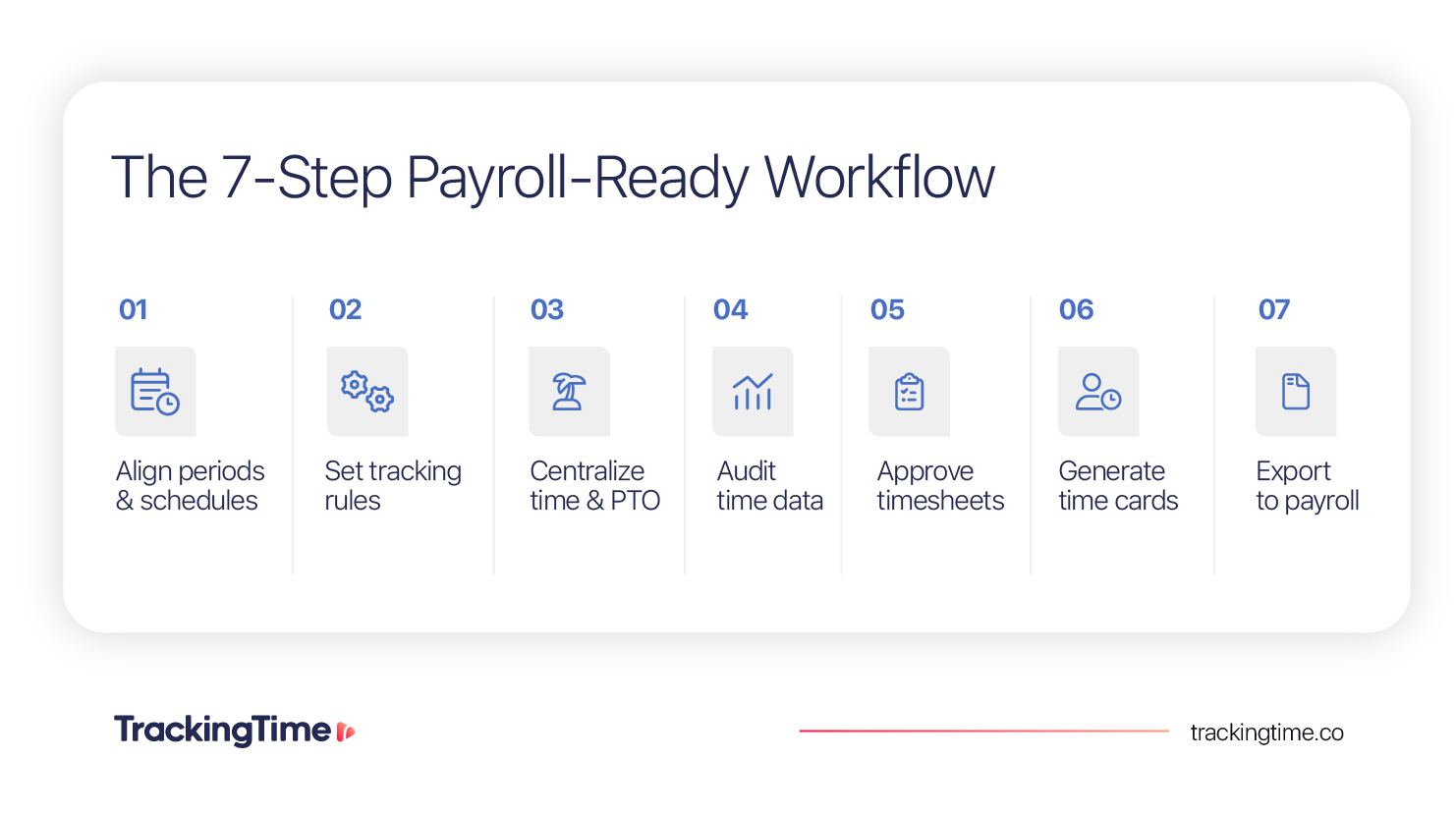
- How to Prepare Time Data for Payroll in 7 Steps
- 1. Align Payroll Periods With Work Schedules
- 2. Set Clear Rules for How Employees Should Track Time
- 3. Centralize Worked Hours, PTO, and Attendance Data
- 4. Audit Missing or Incorrect Time Before Close
- 5. Review and Approve Timesheets Before Payroll
- 6. Generate Employee Time Cards
- 7. Connect Time Data to Your Payroll System
- Manual Payroll Compilation vs. Employee Time Cards
- How TrackingTime Helps Companies Connect Time Tracking to Payroll
- What Multi-Country Teams Need to Handle Differently
- Common Mistakes When Connecting Time Tracking to Payroll
- Connect Time Tracking to Payroll with Payroll-Ready Time Data
Why Time Tracking Is Essential to Payroll
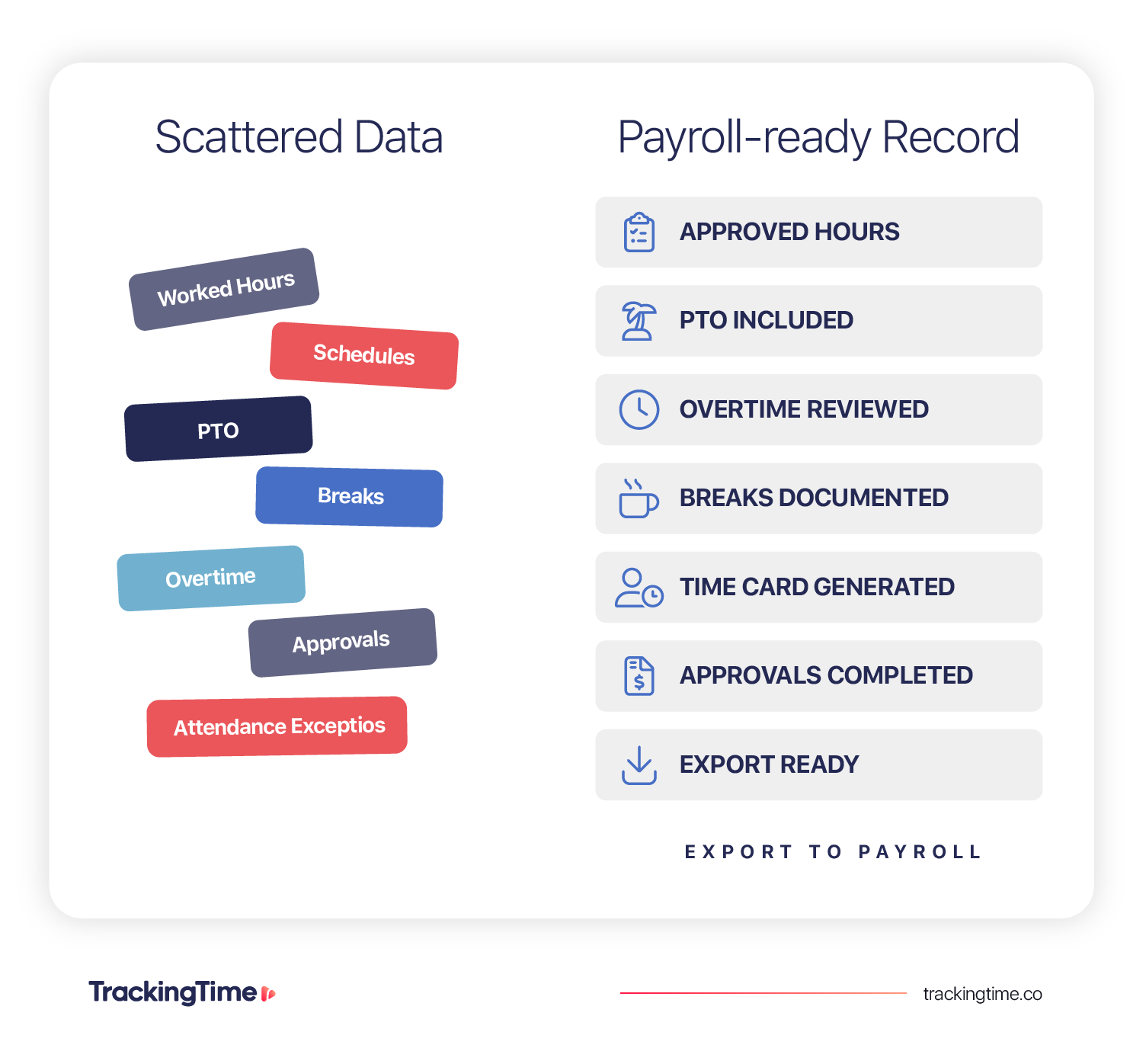
When time tracking and payroll are connected, payroll has what it needs before the process starts: a complete, approved record of worked hours, PTO, overtime, schedules, breaks, and attendance for each employee and period.
When they are not connected, payroll depends on manual reconciliation. HR and operations teams face the same overhead every cycle — missing hours, incorrect entries, PTO not reflected in the period, overtime discovered too late, unapproved time reaching payroll, and corrections after employees have already been paid.
Connecting time tracking to payroll means ensuring the data that feeds payroll is complete, accurate, approved, and ready to use before the payroll process starts. A centralized time-tracking workflow gives companies a single source of truth for all of that information.
What Time Data Do You Need for a Payroll-Ready Workflow?
Payroll-ready time data is essentially a validated record of worked time, time off, schedules, breaks, overtime, and approvals. These are the key time data points any company should accurately gather:
| Time Data Point | Where It Usually Lives | How to Make It Payroll-Ready |
|---|---|---|
| Worked hours | Time tracking tools, timesheets, or spreadsheets | Track hours by employee, day, and payroll period in one system |
| Work schedules | HR tools, spreadsheets, or manager records | Assign schedules so tracked hours can be compared with expected hours |
| PTO and approved absences | HR systems, leave tools, spreadsheets, or email requests | Manage or sync approved time off before payroll close |
| Holidays | HR calendars, local holiday calendars, or spreadsheets | Apply holiday calendars by country, region, team, or employee |
| Breaks | Time entries, manual notes, or attendance records | Capture breaks as part of the daily time record |
| Overtime | Manual calculations, spreadsheets, or manager reviews | Detect overtime by comparing tracked hours with schedules and policies |
| Time entry details | Project tools, task lists, or timesheets | Include the context needed to review and approve time |
| Approval status | Manager notes, email, Slack, or approval tools | Approve or reject hours before they reach payroll |
| Locked period | Payroll tools, spreadsheets, or admin controls | Prevent edits after time data has been reviewed and closed |
| Employee time cards | Timesheets, exports, or payroll records | Generate a structured period record for each employee |
Forrester research shows that 77% of surveyed organizations store employee data across multiple HCM databases, and 71% cannot transfer or share employee data between those systems
💡 A centralized time tracking software allows companies to keep these inputs in one workflow, so payroll does not depend on spreadsheets, email approvals, or last-minute corrections.
Payroll Benchmarks That Show Why Clean Time Data Matters
Payroll problems often start before payroll is processed. Recent payroll and HR benchmarks and industry signals show why clean time data is a very valuable asset for any company:
| Industry Signal | Source | What It Means for Payroll |
|---|---|---|
| Payroll errors are costly | One payroll input error can cost an average of $291, and that 20% of a company’s annual payroll may contain errors | Even small time data errors can create real payroll costs when they repeat across employees and pay periods |
| Disconnected systems increase payroll risk | 77% of surveyed organizations store employee data across multiple HCM databases, and 71% cannot transfer or share employee data between those systems | Payroll teams often need to reconcile data manually because employee information, time off, and time records are not connected |
| Unified workforce data can reduce payroll preparation time | The Kraft Group reportedly saved $5 million and reduced payroll preparation time by 75% after moving to a single-database HCM system | Centralized employee and time data can reduce the operational work required before payroll close |
| Payroll mistakes affect employee trust and retention | A 2026 survey of 2,000 UK workers found that one in five had missed a bill or regular payment because of a wrong or late payslip, and 61% said they would likely look for a new job if pay mistakes or delays continued for six months | Payroll accuracy is not only an operational issue. Clean time data helps protect employee trust by reducing avoidable payroll mistakes |
The takeaway is clear: payroll accuracy depends on the quality of time data. Before teams export, sync, or integrate time data with payroll, they need a reliable process for collecting, auditing, approving, and consolidating worked hours, PTO, schedules, overtime, and employee time cards.
How to Prepare Time Data for Payroll in 7 Steps
A clean payroll workflow should start at the point of time entry. These steps show how to move from daily time records to payroll-ready data that can be reviewed, consolidated, and exported with less manual reconciliation.
1. Align Payroll Periods With Work Schedules
Most companies already have a payroll period defined. However, an important step that many companies do not have fully systematized is making sure that work schedules, time entries, PTO, approvals, employee time cards, and payroll exports all align with that payroll period.
Work schedules give payroll the baseline it needs to understand what each employee was expected to work. They define working days, expected hours per day or week, part-time or full-time arrangements, and holidays when relevant.
In this sense, as a first step, teams should aim to align:
- Payroll period
- Time tracking cutoff dates
- Employee submission deadlines
- Manager approval deadlines
- Work schedules
- Expected hours per day or week
- PTO and holiday calendars
- Time card generation dates
- Payroll export or submission dates
This alignment helps HR and operations review time data in the right context, knowing which records belong to each period.
📖 Read our Employee Work Schedules Guide
For a deeper look at how different work schedules operate in practice, see our guide to Employee Work Schedules.
2. Set Clear Rules for How Employees Should Track Time
Data can only be trusted if employees track time consistently. For that reason, teams need clear rules for when time should be recorded, what information each entry should include, and how exceptions should be handled.
Clear rules help prevent incomplete or unclear records from reaching payroll. If time entries are missing key details, logged after the cutoff, or recorded without the right context, HR and operations teams may still need to review, correct, or confirm the data manually.
In general, ensure you have clearly defined:
- When employees should track time
- What information each time entry should include
- How breaks should be recorded
- How PTO and absences should be reflected
- How missing hours should be corrected
- What employees should submit before the payroll close
This creates a shared standard for time data quality. Instead of asking employees to fix incomplete records after payroll has already started, the company can collect cleaner time entries from the beginning of the period.
3. Centralize Worked Hours, PTO, and Attendance Data
If employees track work hours in one place, request PTO in another, and report attendance exceptions through messages or spreadsheets, HR and operations teams have to reconcile everything manually before payroll closes.
A payroll-ready workflow should bring these inputs together:
⏱️ Worked hours
🌴 PTO
🤒 Sick leave
📅 Holidays
⭕️ Unpaid leave
⚠️ Attendance exceptions
This matters because payroll needs the full picture of each employee’s period. A person may have fewer worked hours because they took approved PTO, had a sick day, or an unpaid absence. If those records are not connected to the time tracking workflow, missing hours can look like incomplete data instead of approved time away.
Payroll is easier when the entire time dataset comes from the same record. By centralizing hours, PTO, holidays, and attendance data before payroll close, teams can reduce manual checks and ensure each employee’s time card reflects the full period accurately.
📖 Read our Guide on Working Hours
Need to define what counts as working time before payroll? Read our guide to working hours and how they affect schedules, attendance, and payroll records.
4. Audit Missing or Incorrect Time Before Close
Registering hours is not the same as having payroll-ready hours. Before time data reaches payroll, teams need to check both quantity and quality: whether all expected hours were tracked, and whether each time entry has the information needed to be reviewed and approved.
Time audits help HR and operations teams catch issues before payroll close. Here’s a quick table of the main inputs you should review:
| Audit Area | What to Check | What to Do Before Close |
|---|---|---|
| Missing hours | Employees with incomplete days or expected hours not tracked | Ask employees to complete or correct their time |
| Incomplete entries | Entries without project, task, description, or required fields | Send entries back for correction |
| Unusual entries | Very long, very short, overlapping, or duplicated entries | Review with the employee or manager |
| Schedule mismatches | Entries outside assigned working hours or expected schedules | Confirm whether the time is valid or needs adjustment |
| PTO and absences | Time off, sick leave, holidays, or unpaid leave not reflected | Add or sync approved absence records |
| Overtime | Hours that exceed the expected schedule or policy | Review and approve overtime before payroll |
This step is especially important for growing agency teams because time tracking problems tend to repeat every payroll cycle.
Auditing time data before close gives managers a chance to correct issues while the period is still active. Employees can update missing entries, managers can review exceptions, and HR can make sure payroll receives a cleaner record.
📖 Read our Guide on Overtime
Overtime should be reviewed before payroll starts, not corrected after the fact. Learn how overtime works and what teams should track before payroll closes.
5. Review and Approve Timesheets Before Payroll
Payroll should not use unapproved hours. Approvals create the checkpoint between time tracking and payment, helping managers catch issues before time data becomes part of the payroll process.
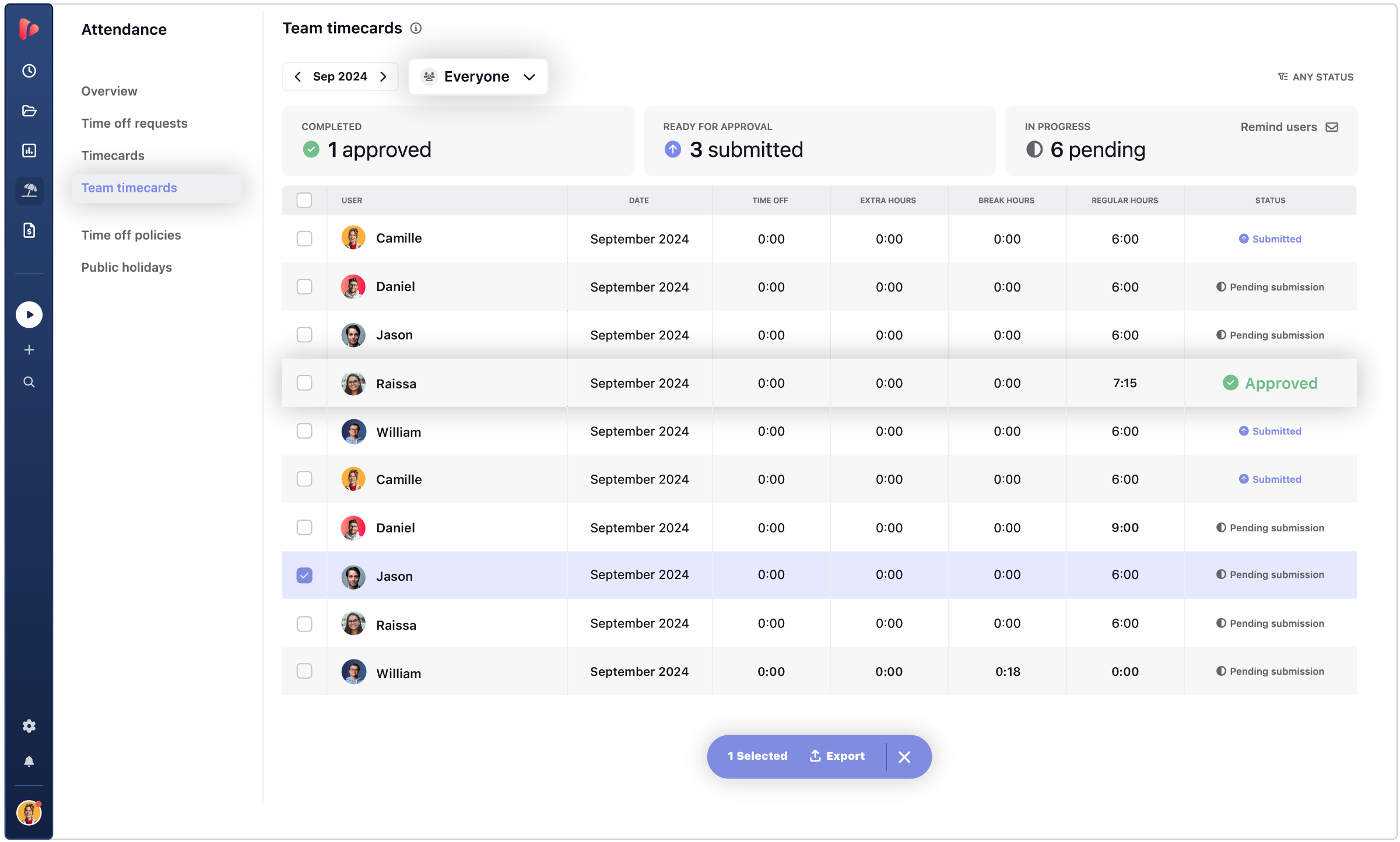
A simple approval workflow gives each role a clear responsibility. Employees submit their time for the period, managers review the records, and rejected entries go back to the employee for correction. Once the records are approved, those hours can move forward to payroll, reporting, or time card generation with more confidence.
✅ Example of Approval Workflow
Employee submits timesheet → Manager reviews → Corrected if needed → Approved → Ready for payroll
This approval cycle should happen before payroll close, not during payroll processing. It helps prevent common payroll problems, such as missing hours, incorrect entries, disputed overtime, untracked absences, or changes made after the payroll process has already started.
It also creates a clear review trail. Employees know what they need to submit, managers know what they need to review, and HR or operations can see which records are approved, rejected, corrected, or still pending before payroll begins.
6. Generate Employee Time Cards
Once time data has been reviewed and approved, the next step is to consolidate it into employee time cards.
Time cards turn daily time records into a structured period summary that HR and operations teams can review, export, and use as a payroll-ready record.
A useful employee time card should include:
⏱️ Daily worked hours
☕ Breaks
🌴 PTO and absences
⏰ Overtime
📊 Expected vs. actual hours
✅ Approval status
👤 Employee and period details
📤 Exportable payroll record
Employee time card software bring time inputs together into one structured record and make payroll review more consistent. Instead of checking scattered records one by one, teams can review each employee’s period summary, confirm whether the data is complete, and export the final record when it is ready for payroll.
🗂️ Explore Employee Time Card Software
Learn how employee time card software helps teams review hours, PTO, breaks, overtime, and approvals.
7. Connect Time Data to Your Payroll System
Once employee time cards are complete, approved, and ready to use, the final step is to move that data into the payroll process. This is where time tracking payroll integration can happen through an export, a direct integration, an API workflow, or a controlled manual upload, depending on how your company manages payroll.
For agencies, automated payroll time tracking does not mean skipping review. It means creating a cleaner handoff between approved time data and the payroll system, whether that happens through an export, integration, API workflow, or controlled manual upload.
The connection method matters, but what’s most important is that payroll receives time data after hours, PTO, schedules, breaks, overtime, approvals, and employee time cards have already been reviewed.
| Connection Method | Best For | What Payroll Receives |
|---|---|---|
| CSV or Excel export | Teams that need a controlled payroll upload or work with a payroll provider that accepts spreadsheets | Approved hours, PTO, overtime, breaks, and employee period data in a structured file |
| PDF export | Internal records, formal review, compliance documentation, or employee documentation | A readable employee time card or period summary |
| Direct integration | Teams that need HR, PTO, attendance, or payroll-related data to move between systems | Synced time, leave, or employee data depending on the connected tools |
| Zapier workflow | Agencies that need simple automation between time tracking and payroll-related tools | Trigger-based workflows, such as sending approved time data to another system |
| API workflow | Teams with custom payroll systems or specific operational requirements | Custom payroll-ready datasets mapped to internal payroll fields |
| Manual upload | Teams without a direct integration or API workflow | Approved time card data uploaded into payroll by an admin or payroll provider |
What to include in the Dataset
Before connecting time data to payroll, make sure the dataset includes the fields your payroll provider needs. At minimum, the payroll-ready record should include:
- Employee name or ID
- Payroll period
- Approved worked hours
- PTO and approved absences
- Sick leave, holidays, or unpaid leave when relevant
- Breaks
- Overtime
- Approval status
- Employee time card or period summary
- Export date or close date
The key here is that payroll receives a clean, complete, and approved record. If the data still needs manual explanation, correction, or manager confirmation, it is not ready for payroll.
Manual Payroll Compilation vs. Employee Time Cards
Employee time cards reduce payroll reconciliation because they turn daily time records into a structured period summary. Here are the main differences between using time cards and manual payroll compilation:
| Manual Payroll Compilation | Employee Time Cards |
|---|---|
| ❌ HR collects data from multiple sources. | ✔️ Time data is compiled from one system. |
| ❌ PTO and overtime may need manual review. | ✔️ PTO, breaks, schedules, and overtime are included in the record. |
| ❌ Corrections happen late. | ✔️ Errors can be reviewed before close. |
| ❌ Payroll depends on spreadsheets. | ✔️ Payroll receives structured time card data. |
| ❌ The process resets every period. | ✔️ The process becomes repeatable. |
Manual compilation may work for very small teams, but it becomes harder to manage as the company grows.
How TrackingTime Helps Companies Connect Time Tracking to Payroll
TrackingTime helps teams move from scattered payroll inputs to a cleaner time data workflow. Instead of collecting hours from one place, PTO from another, and overtime calculations manually, teams can centralize time records, time off, schedules, reports, and employee time cards before exporting payroll-ready data.
What You Can Do With TrackingTime
TrackingTime allows HR and operations teams to organize time data before it reaches payroll. Teams can track work by employee, project, task, and period, define expected hours through work schedules, generate employee time cards, and use reminders and tracking goals to reduce missing time before payroll close.
TrackingTime also helps centralize time off and attendance. With Leave Management, teams can manage PTO, absences, holidays, and worked hours in the same workflow, reducing the need to reconcile leave data from separate spreadsheets or HR tools. For teams already using HR systems, TrackingTime integrates with BambooHR and Factorial for PTO sync, and supports over 60 integrations to connect time data with the rest of your company’s workflow.
With TrackingTime, time-based companies can:
- Track time by employee, project, task, and period
- Define expected hours with work schedules
- Use reminders and tracking goals to reduce missing time
- Manage PTO, holidays, and worked hours in one workflow
- Sync PTO data from BambooHR and Factorial
- Connect time data through over 60 integrations
- Generate Employee Time Cards from registered hours, approved PTO, and work schedules
- Detect overtime based on expected hours
- Document breaks inside the employee time record
- Export payroll-ready records to PDF, Excel, or CSV
- Use reports and exports to review time data before payroll
TrackingTime’s Pro Plan is priced at $5.75 per seat per month, billed annually.
🏆 The best option for time-based companies
TrackingTime‘s monthly cost doesn’t change based on how many projects you run, clients you bill, or invoices you send. Trusted by 15,000+ teams. Rated 4.7/5 on G2.
Coming Next: TrackingTime Pro Plus
TrackingTime’s upcoming plan, Pro Plus, gives teams with a more controlled payroll-close workflow, as well as more advanced time off policies, including accrual, carry forward, and seniority allowance. This helps teams manage PTO balances with more precision and keep time off data aligned with payroll requirements.
With Pro Plus, teams will be able to strengthen three key parts of the payroll-ready workflow:
Advanced time off policies
- Manage time off policies with accrual
- Carry forward unused balances
- Use automatic accrual rules
- Apply seniority-based allowances
Timesheet approvals
- Submit time entries for approval
- Approve or reject time entries in bulk
- Use time entry states such as approved, rejected, or unreviewed
- Support self-approval for admins when needed
Period and data controls
- Lock time entries manually or automatically
- Apply block hours policies
For HR and operations teams, this means the payroll process can become less reactive. Instead of discovering missing hours, late edits, or unapproved records during payroll close, teams can validate time data earlier, lock the final record, and send payroll a cleaner, more controlled dataset.
📊 Build a Clean Automated Payroll Time Tracking Workflow with TrackingTime
Use TrackingTime to track worked hours, manage PTO, review approvals, generate employee time cards, and export cleaner time data before payroll closes.
What Multi-Country Teams Need to Handle Differently
As a general rule, multi-country teams should not use one generic payroll setup for every location. The workflow can be consistent across the company, but payroll-ready time data needs local context.
The same employee time card may be correct in one country and incomplete in another if it does not reflect the right schedule, holiday calendar, PTO policy, or overtime rule.
Before closing payroll, multi-country teams should review each location setup:
| Type of Data | What to set by Country or Region | What to Check Before Payroll Close |
|---|---|---|
| Work schedules | Standard hours, working days, part-time schedules, regional workweeks | Tracked hours match the employee’s assigned schedule |
| Holiday calendars | National, regional, or company holidays | Non-working holidays are reflected correctly in the time card |
| PTO policies | Vacation, sick leave, unpaid leave, accrual, carryover, and local absence types | Approved time off is included before time cards are generated |
| Overtime rules | Expected hours, overtime thresholds, and review responsibilities | Overtime is flagged, reviewed, and approved before export |
| Breaks and attendance | Required breaks, attendance exceptions, and local workday rules | Breaks and exceptions are documented where needed |
| Approval owners | Manager, country lead, HR owner, or legal entity owner | The right person approved the records for that location |
| Payroll provider or entity | Payroll system, employer of record, local entity, or external provider | Time data is exported in the format that provider or entity needs |
| Recordkeeping | Time card format, export type, supporting documentation, and retention needs | Payroll has a complete period record for each employee |
Don’t create a different process for each location
You don’t need to create a different time tracking process for every country. However, you should keep one centralized workflow while applying the right local rules to each employee or team. That way, payroll receives time data that is structured consistently, but still accurate for each location.
📖 Read our Guide on Paid Time Off
Understand how paid time off should be tracked before payroll. See our guide on PTO and how it affects employee time records.
Common Mistakes When Connecting Time Tracking to Payroll
Most payroll reconciliation problems happen before payroll data is exported. Here are the most common mistakes to avoid:
- Running payroll on unapproved hours: payroll should only use time records that have been reviewed and approved by the right manager
- Keeping PTO separate from worked hours: when time off lives in a separate system, HR has to reconcile absences manually before payroll can close
- Calculating overtime manually at the last minute: overtime should be reviewed before payroll close, not discovered during payroll processing
- Not documenting breaks: breaks help explain non-working time inside the workday and can be important for accurate time records
- Not comparing tracked hours against schedules: without work schedules, it is harder to identify missing hours, attendance gaps, or overtime
✅ Explore Time & Attendance for Teams
Manage attendance tracking, schedules, PTO, and employee time cards in a simpler way. Check out our time and attendance tools for teams.
- Letting employees edit time after payroll close: retroactive edits can change records that payroll has already reviewed, exported, or processed
- Exporting reports that are not structured for payroll: payroll needs clear employee, period, hours, PTO, overtime, and approval data, not generic time reports
- Treating employee time cards as optional: when payroll needs a period record, time cards help consolidate hours, PTO, breaks, overtime, and approvals in one place
- Using spreadsheets as the main reconciliation layer every cycle: spreadsheets may help with exceptions, but they should not be the core system for rebuilding payroll data every period
The best way to avoid these mistakes is to treat payroll as the end of the time data workflow, not the place where time data gets cleaned. Hours, PTO, schedules, overtime, approvals, and time cards should be reviewed before the payroll process begins.
Connect Time Tracking to Payroll with Payroll-Ready Time Data
Connecting time tracking to payroll works best when the data is already clean before it reaches the payroll process. When teams build a consistent workflow, payroll becomes less dependent on manual reconciliation. HR and operations can spend less time checking spreadsheets, chasing approvals, or correcting missing data, and more time processing payroll with confidence.
The goal is not only to export hours from one system to another. The goal is to create a payroll-ready time record that gives payroll the context it needs: who worked, when they worked, what time off was approved, whether overtime needs review, and which records are ready to use.
🏆 Explore TrackingTime Pro Plus for Payroll
Reduce manual payroll reconciliation with TrackingTime by centralizing worked hours, PTO, schedules, approvals, and employee time cards.
Frequently Asked Questions about Connecting Time Tracking to Payroll
What data does payroll need from time tracking?
Payroll needs accurate worked hours, PTO, sick leave, holidays, breaks, overtime, schedules, approval status, and employee time cards. This data should be complete, reviewed, and assigned to the correct payroll period before payroll starts.
Can time tracking be used for payroll?
Yes. Time tracking can be used for payroll when time entries are complete, approved, and connected to PTO, schedules, overtime, and employee time cards. The goal is to create payroll-ready time data before the period closes.
How do you track employee hours for payroll?
To track employee hours for payroll, assign work schedules, collect daily time entries, record PTO and absences, review overtime, approve timesheets, and generate employee time cards for each payroll period.
What is a payroll-ready time record?
A payroll-ready time record is a complete and approved summary of an employee’s worked hours, time off, breaks, overtime, schedule context, and approval status for a specific payroll period.
How do employee time cards help payroll?
Employee time cards help payroll by consolidating worked hours, PTO, breaks, overtime, approvals, and period details into one structured record. This reduces manual reconciliation and gives payroll cleaner data to review or export.
What is the difference between timesheets and employee time cards?
Timesheets usually capture time entries submitted by employees. Employee time cards summarize those entries with payroll context, including worked hours, PTO, breaks, overtime, approvals, and period details.
Why should timesheets be approved before payroll?
Timesheets should be approved before payroll so managers can catch missing hours, incorrect entries, disputed overtime, or untracked absences before time data is exported or used for payment.
Can time tracking software calculate overtime for payroll?
Time tracking software can help calculate or flag overtime by comparing tracked hours against assigned schedules, expected hours, or overtime policies. Overtime should still be reviewed and approved before payroll.
Why should PTO be connected to time tracking before payroll?
PTO should be connected to time tracking before payroll so approved absences, sick leave, holidays, and unpaid leave are reflected in the employee’s time record before payroll closes.
Do you need an integration to connect time tracking to payroll?
Not always. You can connect time tracking to payroll through exports, integrations, API workflows, or controlled manual uploads. The most important step is making sure the data is complete and approved before it reaches payroll.
How does time tracking payroll integration work?
A time tracking payroll integration moves approved time data into the payroll process through an export, sync, API, or connected workflow. It usually includes worked hours, PTO, overtime, approvals, and employee time cards.
How can companies avoid manual payroll reconciliation?
Companies can avoid manual payroll reconciliation by centralizing worked hours, PTO, schedules, breaks, overtime, and approvals before payroll close. Employee time cards can then provide a structured record for payroll.
What causes payroll errors in time tracking?
Payroll errors in time tracking are often caused by missing hours, unapproved timesheets, disconnected PTO records, incorrect schedules, manual overtime calculations, late corrections, or time entries changed after payroll close.


