







KEEP UP WITH TEAM AVAILABILITY

Leave Management Software for PTO & Time Off

A unified leave management system that automates requests, approvals, and accruals—keeping hybrid and remote teams organized and compliant.

Get started
  • absence management software

Smart Requests

Employees submit PTO requests in seconds. Keep approvals synced with team calendars.

Real-Time Balances

Track accruals, remaining days, and leave history with up-to-date, formula-free accuracy.

Policy Compliance

Apply leave rules and approval flows to maintain consistent and audit-ready records.

TRUSTED BY TEAMS WORLDWIDE. 60+ INTEGRATIONS. FREE PLAN FOR UNLIMITED USERS.

  • Openstax
  • moma
  • playpass
  • ssl
  • smartsheet
  • mci

TRACK TEAM PTO

Keep Time Off Organized and Transparent

Whether your team works in the office or remotely, our all-in-one PTO and vacation tracker helps you automate accruals, streamline approvals, and sync schedules instantly. Replace spreadsheets with an organized, transparent leave management workflow your team can trust.

Automated Leave Accruals

Automate vacation tracking with custom accrual rules based on hours worked, tenure, or monthly rates. Configure caps, carryovers, and anniversary resets to match your policies without any manual adjustments. Your HR team stays consistent and compliant while employees always see accurate, real-time balances.

Self-Service Requests

Empower employees to request PTO, view balances, and track approval status instantly from a centralized portal. No more inbox clutter or follow-up messages—requests move smoothly through your automated approval flow, giving both managers and employees a predictable, stress-free experience.

Real-Time Leave Balances

Track time-off balances, accruals, and deductions in real time. Every approval, request, or policy update is reflected instantly, so managers and staff always have up-to-date information. With shared visibility, teams plan ahead confidently and avoid scheduling surprises.

HR & PEOPLE OPS

Leave Management Built for Modern Teams

Streamline every step of your leave process—from submitting requests to syncing schedules. Our leave management software gives HR and managers the tools they need to stay organized, compliant, and prepared for any staffing situation.

automation icon
Automated Leave Accruals

Configure accrual rules based on hours worked, tenure, or monthly rates. Support rollover caps, carryovers, and resets automatically to match your company’s time-off policy without manual updates.

Employee Leave Portal

Give employees full independence to manage time off. They can submit requests, view balances, and track approvals instantly—without relying on HR follow-ups.

template icon
Custom Workflows

Define single or multi-level approval flows that reflect your organizational structure. Notify managers instantly and keep every decision documented and consistent.

time off icon
Leave Type Management

Create unlimited leave types such as vacation, sick, parental, and unpaid time off. Set distinct rules for each to maintain both policy flexibility and compliance.

Calendar Sync

Sync approved time off to shared calendars (Google, Outlook, iCal) for real-time visibility. Prevent scheduling conflicts and help teams stay coordinated.

mobile icon
Mobile Access

Manage PTO on the go with full mobile functionality. Ideal for hybrid teams, field workers, and managers who need to stay responsive from anywhere.

integration icon
Leave-to-Payroll Sync

Send time-off data directly into payroll or HR systems. Reduce manual entry, eliminate duplicate work, and ensure accurate compensation.

Approvals icon
Audit-Ready Logs

Maintain a complete history of every request, approval, and balance change. Keep your records compliant and simplify audits with organized, reliable documentation.

CONTENT HUB

Build a complete HR workflow

Extend your leave management with essential HR features—all in one platform. Explore connected capabilities like attendance, time cards, and timesheets.

What Modern Leave Management Software Does for Your Team:

A modern PTO tracker is more than a simple time-off tool—it’s a complete leave management solution. Automate accruals, streamline approvals, and keep policies consistent across your workforce. Whether you manage vacation days, sick leave, parental leave, or custom time-off types, a reliable leave management system ensures accurate records, compliance, and smarter planning for every team.

With TrackingTime’s leave management features, companies gain visibility, simplify scheduling, and manage every leave type using one unified platform.

time off icon

Comprehensive Leave Tracking for Every Leave Type

Track vacation, sick leave, personal leave, parental leave, and custom categories with automated accruals, carryovers, and policy rules. Keep all leave data accurate, consistent, and audit-ready across teams and locations.

Explore Global PTO
general icon

Streamlined Approvals with Real-Time Updates

Use single-manager or multi-level approvals with automated notifications for employees and managers. Real-time updates reduce delays, keep workflows organized, and ensure policy-aligned decisions—without follow-up messages.

More on Time-off

Integration with Calendars, Payroll, and HR Systems

Sync approved leave to Google, Outlook, or iCal for instant visibility across schedules. Export leave data directly to payroll and HR tools to prevent errors and align every system with your policies.

More on Calendar Sync
growth icon

Insights for Better Planning and Productivity

Use detailed leave and PTO reports to analyze usage, forecast accrual liabilities, and identify coverage gaps. These insights help managers plan workloads, prevent burnout, and keep your organization fully prepared and compliant.

More on Reports

Achieve more with leave management software built for your team: Whether you need a PTO tracker for vacation and sick leave or a complete solution for every leave type, TrackingTime makes it simple. Automate accruals, streamline approvals, and keep your schedules aligned—all from one platform.

PTO VS LEAVE MANAGEMENT – WHAT’S THE DIFFERENCE?

Why basic PTO trackers can’t replace Leave Management Software

See how modern leave management software eliminates manual work, improves compliance, and gives HR teams a smoother, more reliable time-off workflow.

Basic PTO Trackers

  • Manual accruals & outdated balances
  • Limited leave type customization
  • No calendar or payroll integration
  • No real-time updates or mobile access
  • Compliance gaps & no audit trail

Leave Management Software

  • Automated accruals & real-time balances
  • Unlimited leave types with custom rules
  • Calendar, payroll, and HR sync
  • Mobile requests & approvals anywhere
  • Full compliance with audit-ready logs

TrackingTime makes leave management simpler, smarter, and fully transparent—without the usual back-and-forth. If you’re looking for a leave management tool that fits the way modern teams actually work, this is where to start. Try Leave Management Software today!

REPORT TEAM ABSENCES

Leave Management reports for teams

Hybrid and distributed teams need clear visibility into schedules, fast approval workflows, and accurate leave balances. These advanced leave management tools help everyone stay aligned, reduce uncertainty, and maintain coverage—no matter where your team works.

PTO Balances

Keep leave balances accurate and accessible for every employee, from anywhere. Real-time accruals and usage history give teams clarity, reduce HR questions, and help managers plan ahead with confidence.

  • Real-time accruals
  • Clear usage history
  • Employee visibility

Approvals

Automate your approval flow to keep decisions consistent and fast. Managers get instant notifications, employees stay updated, and multi-level routing ensures every request follows policy—without slowing work down.

  • Smart notifications
  • Multi-level routing
  • Full audit trail

Team Calendars

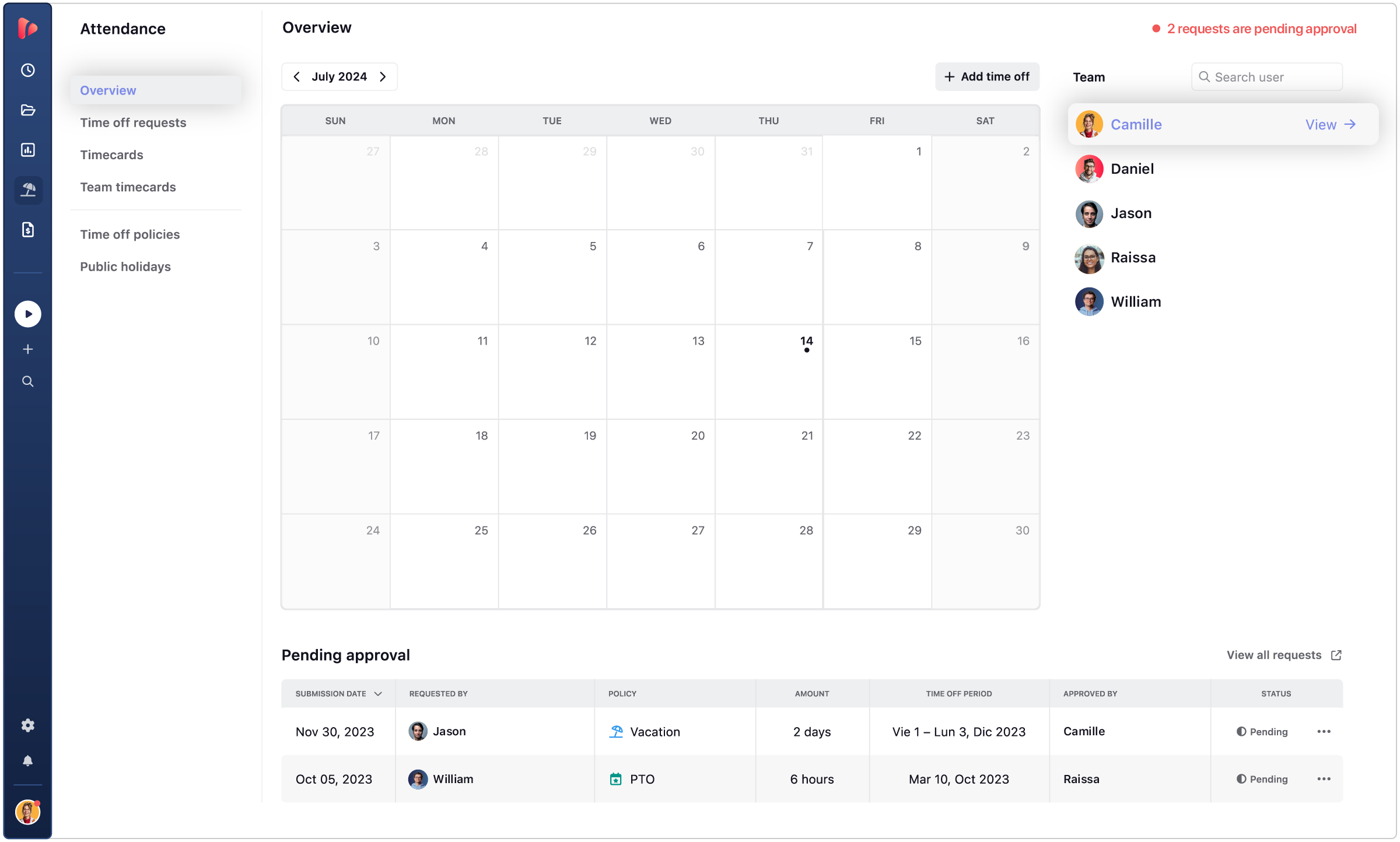
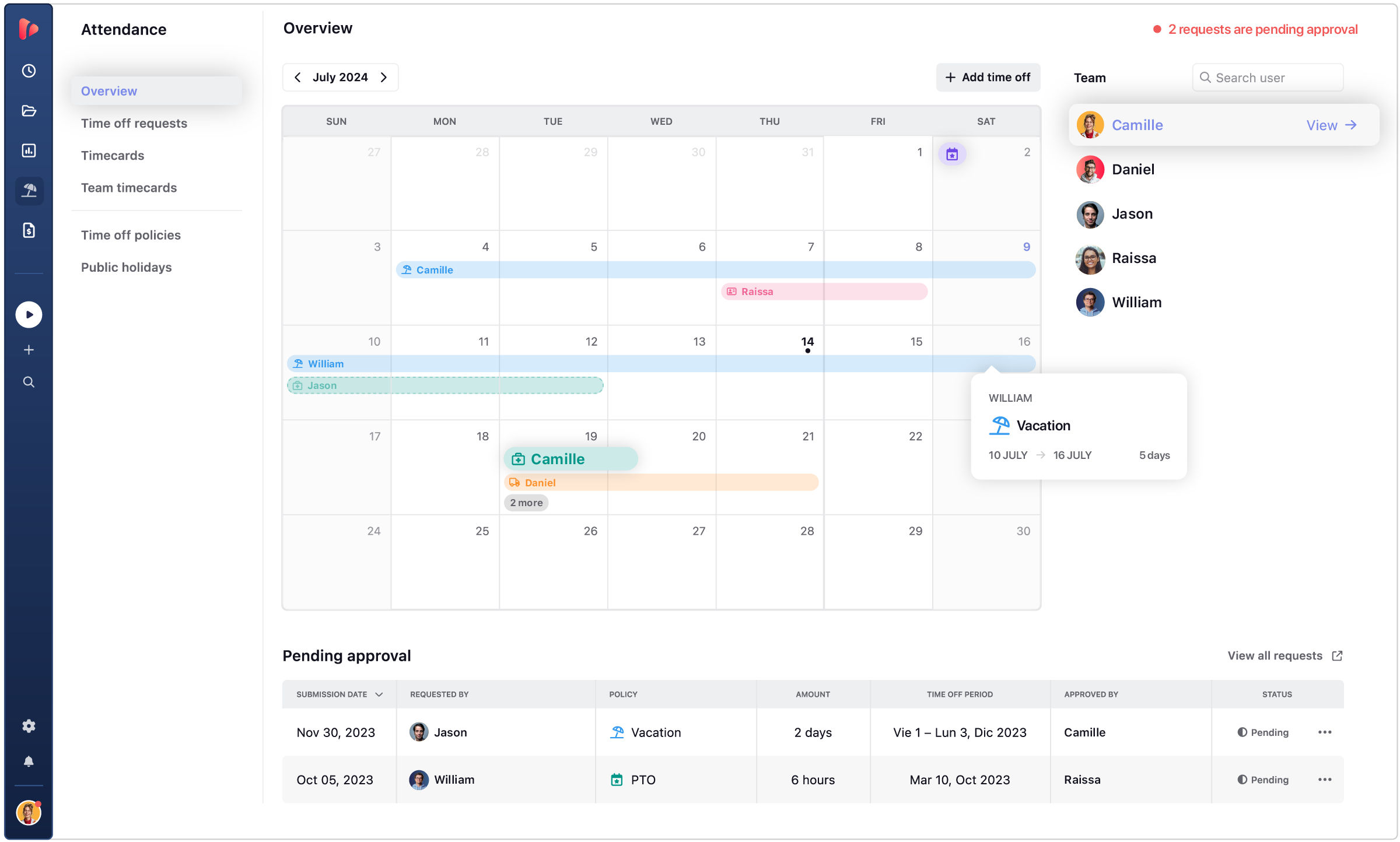
See who’s off and when with a clean, centralized calendar designed for distributed teams. Prevent scheduling conflicts, support better workload planning, and give managers full visibility across time zones.

  • Shared time-off view
  • Conflict prevention
  • Better workload planning

GLOBAL PTO

PTO & leave policies around the globe

Your comprehensive guide to paid time off policies worldwide, categorized by country.

  • This app is a lifesaver! With TrackingTime, I can easily set project timelines and track my team's progress. The ability to create detailed timesheets and business reports for clients is a game-changer.

    on nachonacho.com

  • TrackingTime was incredibly convenient to use; its simple design made it accessible to anyone. The features were outstanding and the reports provided invaluable insights into my own productivity.

    on capterra.com

  • TrackingTime keeps my team and projects on track. Saves us hours of headaches and facilitates working remotely. Top notch.

    on nachonacho.com

TESTIMONIALS

Trusted by all kinds of teams

4.7/5 on G2 · 117 verified reviews · Recognized every season as High Performer and Momentum Leader in Project Management, Time Tracking, and Time & Attendance.

leave your feedback

TIME TRACKING APP

Track time, not people

Free for unlimited users

Get started

Start tracking today. Invite your entire team — no seat limits, no credit card, no time limit on the free plan.

Sign in with Google

FAQ

Frequently Asked Questions

Get answers to all your questions about our service and plans.

What is leave management software?

Leave management software is a system that handles how employee time off is requested, tracked, and recorded — replacing informal processes like email chains, shared spreadsheets, or verbal approvals. It gives employees a clear way to log time off, gives managers real-time visibility into who’s out and when, and gives HR a structured record of leave usage across the organization — by person, leave type, and date range.

What’s the difference between leave management software and a shared calendar?

A shared calendar shows who’s out on a given day, but it doesn’t enforce policies, track usage against allowances, or create records that feed into payroll or compliance documentation. Leave management software handles the full process: time off is logged by leave type, tracked against each employee’s policy allowance, and maintained as an exportable record for HR and finance. The calendar shows the outcome; leave management software manages everything behind it.

Does TrackingTime include leave management?

Yes. TrackingTime’s leave management features let you configure time off policies by team or role, track employee time off and usage by leave type, manage holiday calendars per team or country, and give managers a consolidated view of who’s out across the organization. Leave data lives in the same system as project time and attendance records, so HR and operations have one source of truth rather than separate tools for each. Leave management is available on the Pro plan.

Can different teams or roles have different leave policies in TrackingTime?

Yes. Leave policies in TrackingTime are configurable per team or role, which makes it practical for organizations where employees have different leave entitlements by position, contract type, or country. You’re not limited to a single global policy — each group can have its own time off allowances and rules, reflecting the actual legal or contractual reality for that part of the workforce.

Does TrackingTime support multiple types of leave?

Yes. TrackingTime lets you configure different leave types — vacation, sick leave, personal days, and others — each with its own policy and allowance. Employees and managers can see exactly what type of time off is being used, and HR can report on each category separately rather than treating all absences as a single undifferentiated block.

How does TrackingTime handle public holidays alongside employee time off?

TrackingTime lets you configure holiday calendars per team or country, so public holidays are tracked automatically alongside employee-requested time off. Organizations with employees in multiple countries can apply different holiday calendars to different groups, ensuring each team’s holidays reflect their actual legal entitlements without manual management or maintaining a global calendar that doesn’t fit anyone precisely.

Can managers see who’s on leave across their team?

Yes. TrackingTime gives managers a real-time view of time off across their team — who’s out, for how long, and under which leave type — without checking emails or shared calendars. This visibility is useful for capacity planning, covering workloads during absences, and avoiding scheduling conflicts before they create operational problems.

How does TrackingTime help HR track leave balances and usage?

TrackingTime tracks each employee’s time off against their policy allowance, giving HR a consolidated view of usage by person, team, leave type, or date range. This replaces manual spreadsheet tracking and reduces errors in leave balances. HR can filter and export leave data for reporting or compliance purposes at any time, without reconstructing information from separate sources.

How does TrackingTime give managers visibility into upcoming team absences?

Managers in TrackingTime can see time off logged by their team members in a shared calendar view — who’s out, on which dates, and under which leave type. This visibility updates in real time, making it practical for planning workloads around absences, avoiding scheduling conflicts, and understanding team capacity before assigning new work — without relying on email threads or a shared calendar that nobody keeps current.

How does leave data in TrackingTime connect to payroll?

Leave data in TrackingTime — time off taken, leave type, and dates — is recorded in the same system as work hours and attendance. This means HR has everything needed to process payroll accurately without cross-referencing a separate leave tool. Leave records can be exported as CSV, PDF, or Excel, organized by person and date range, for use with external payroll systems or internal finance processes.

Does TrackingTime help with legal compliance around employee leave?

Yes. TrackingTime supports leave compliance by letting you configure time off policies that reflect legal entitlements per team or country, tracking usage against those allowances, and maintaining exportable records of all time off taken. This gives HR a structured audit trail — who took what, when, and under which policy — that can be used for labor compliance reviews, payroll audits, or employee disputes.

Can leave records in TrackingTime be exported for compliance or legal documentation?

Yes. All leave data in TrackingTime — time off taken by employee, leave type, and date range — can be exported to CSV, PDF, or Excel at any time. This gives HR and legal teams a structured record of leave history that can serve as documentation for labor inspections, payroll audits, or employee disputes, without reconstructing information from emails or spreadsheets after the fact.