How to Manage Time Off Policies Across Distributed Teams

Managing time off in distributed teams can be a nightmare for agencies. Holiday calendars, PTO rules, approval paths, and work schedules become increasingly difficult to manage as teams add employees in different countries. This guide shows how to centralize time-off management across distributed teams, so HR and People Ops can manage requests, balances, approvals, and availability without relying on separate spreadsheets for each region.
💡 Quick Summary
Time off management gets harder in distributed teams because employees in different countries may follow different holiday calendars, PTO rules, approval paths, and work schedules.
Good time-off management for distributed teams involves a centralized workflow that applies the right rules for each employee, location, contract, or policy group.
The core method:
- Define leave types
- Assign local holidays
- Set approval workflows
- Keep balances accurate
- Sync team calendars
- Connect HR tools
Centralized leave management reduces manual work by keeping requests, approvals, balances, holiday calendars, and availability in one place instead of spreading them across Slack, spreadsheets, and separate regional trackers.
Time Off Management for Distributed Teams
- Why Time Off Management Gets Harder in Distributed Teams
- What Good Time Off Management Looks Like for Distributed Teams
- How to Set Up Time Off Management for Distributed Teams
- How to Handle Different Holidays Without Manual Management
- Accrual and Carry Forward for Distributed Teams
- How to Keep Managers Informed Without Creating More Admin Work
- How TrackingTime Helps Distributed Teams Manage Time Off
- Common Mistakes When Managing Time Off in Distributed Teams
- Manage Time Off Across Distributed Teams with One Centralized Workflow
Why Time Off Management Gets Harder in Distributed Teams
Time off management becomes increasingly complex with every country or region a team adds. Different holiday calendars, PTO rules, approval owners, and work schedules create more exceptions to manage, even for companies that have very clear policies on paper.
On top of that, applying policy rules consistently becomes challenging when requests arrive through Slack or email, managers approve time off without seeing overlapping absences, and PTO balances are updated manually in spreadsheets.
As a result, HR can’t reliably keep track of who is out, which requests are still pending, and how much time off each employee has available. Without one centralized workflow for requests, approvals, balances, holidays, and availability, every new location can add more manual work instead of making the process easier to scale.
👉 You may need a better time off workflow if:
- PTO requests are managed through Slack, email, or direct messages
- Employees in different countries use the same holiday calendar
- HR updates PTO balances manually in regional spreadsheets
- Managers cannot see who is out before approving new requests
- Approved leave does not appear automatically in team calendars
- Requests stay pending when a manager is unavailable or in another time zone
- Employees are unsure how much time off they have left
- HR has to check multiple tools to confirm what policy applies to each employee
Time off rules can vary significantly across locations. For example, EU workers are entitled to at least four weeks of paid annual leave under the Working Time Directive, while the United States has no federal minimum for paid vacation. That does not mean every company needs a separate process for every country, but it does mean one generic PTO policy may not be enough.
What Good Time Off Management Looks Like for Distributed Teams
Good time-off management for distributed teams means using a centralized workflow that applies the right rules for each employee, location, contract, or policy group.
A strong distributed time off workflow should:
- Centralize PTO requests, approvals, balances, and absence records
- Apply the right leave policy based on employee location, contract, or seniority
- Keep local holidays separate from vacation and other PTO balances
- Show employees the status of each request and their available time off
- Give managers visibility into pending requests, approved leave, and team availability
- Update balances when requests are approved, changed, canceled, accrued, or carried forward
- Keep HR records and planning workflows aligned without duplicating data across tools
→ A PTO policy defines what employees are entitled to.
→ A time off management workflow makes those rules usable in day-to-day operations.
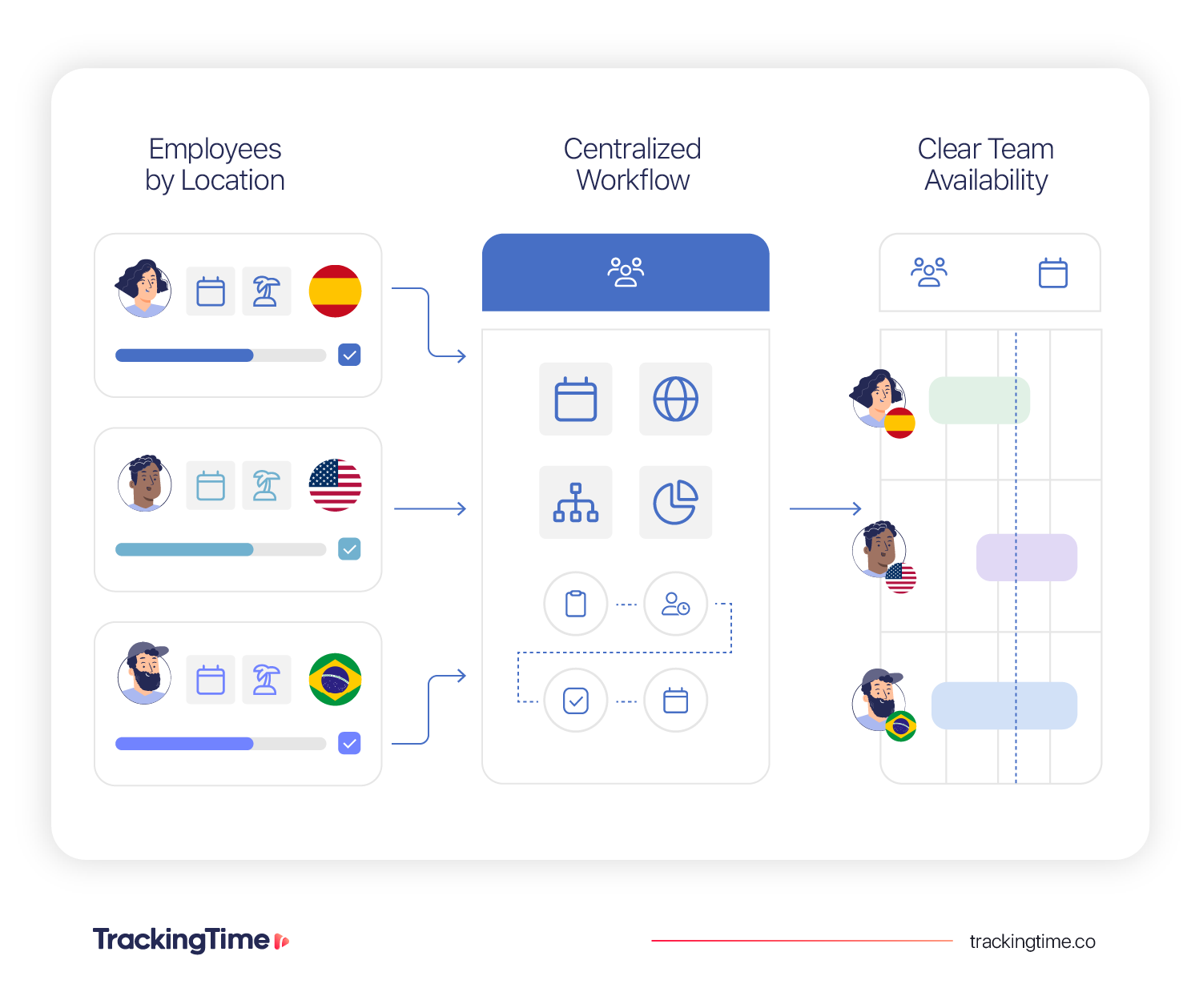
It’s worth mentioning that leave management software is usually a valuable asset for agencies dealing with these challenges. It gives distributed teams a single place to apply local policies, manage requests, maintain accurate balances, and make time off visible across countries and time zones.
📖 See our Paid Time Off guide
Learn what Paid Time Off is, how it works with real-life examples, and download a PTO policy template for free.
How to Set Up Time Off Management for Distributed Teams
Managing PTO across a distributed team requires a consistent workflow. Here’s a clear setup that your HR team can apply to improve their process.
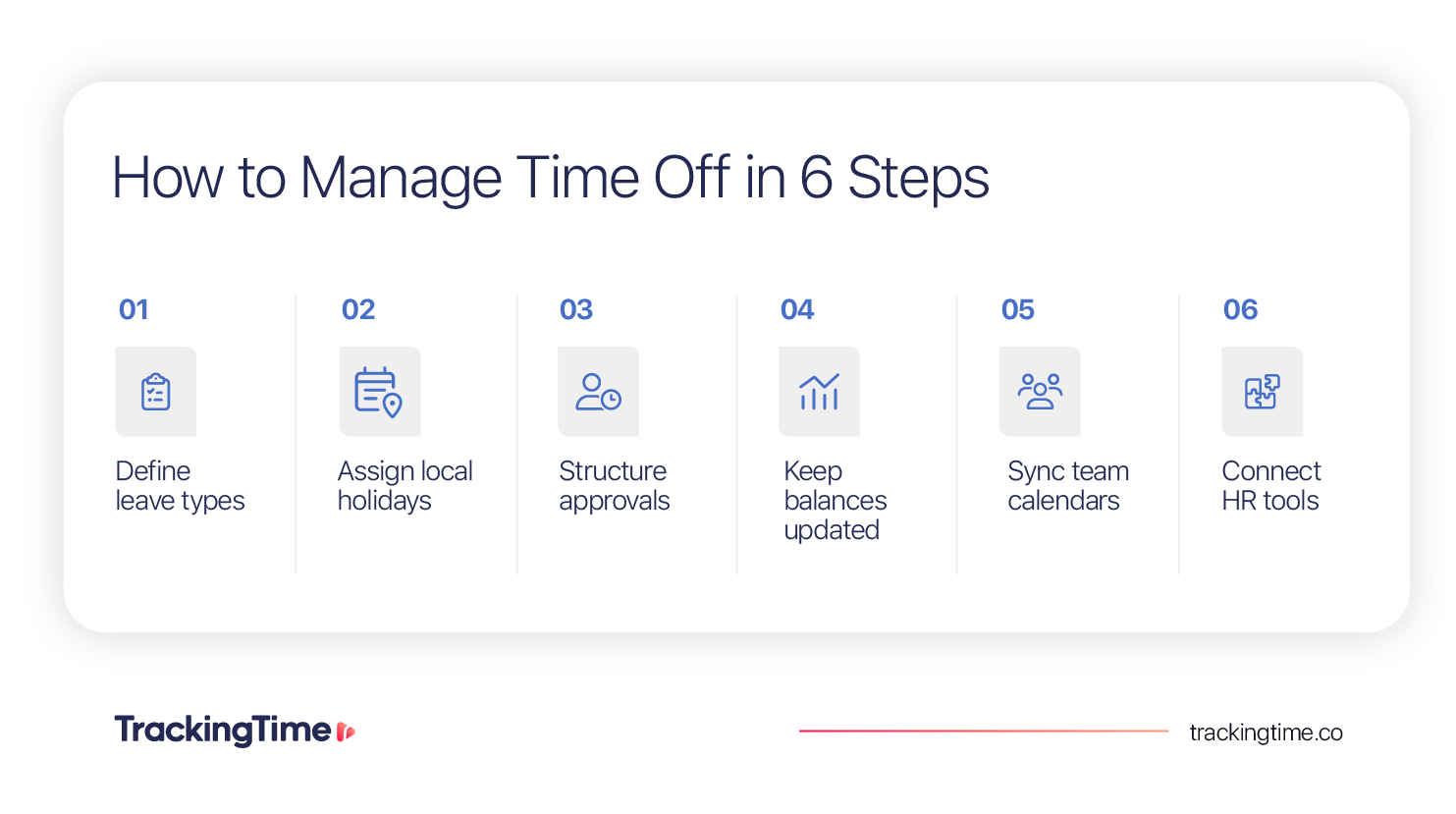
1. Define Leave Types Across the Company
Start by creating a shared set of leave types that employees and managers can recognize across the company. This gives everyone a common language for requesting and reviewing time off, even when the rules behind each type vary by country, contract, or employee group.
The most common leave types include:
- Vacation
- Sick leave
- Public holidays
- Unpaid leave
- Parental leave
- Personal days
You may also need regional or contract-specific leave types when local policies require them. For example, a sick leave request may need a different approval path, documentation requirement, or balance treatment depending on the employee’s country. Public holidays should generally be recorded separately from vacation, while unpaid leave may not affect balances in the same way as paid time off.
Avoid using a different naming system for every location. Keep leave categories consistent while allowing the policy rules behind them to adapt to the employee’s situation.
This approach makes requests easier for employees to submit and easier for managers to understand, while giving HR the flexibility to apply the correct policy without managing every exception manually.
2. Assign Holiday Calendars by Country or Region
In a distributed team, people may have different public holidays, regional observances, or local non-working days, and using one global calendar creates inaccurate availability data.
👉 A practical setup separates holidays into three layers:
- Local holiday calendars for national or regional non-working days
- Company-wide calendars for shared shutdowns or internal holidays
- Leave types for floating holidays employees can request under a defined policy
How to apply holiday calendars in practice
The best way to manage this situation is to create a holiday calendar for each country or region where you employ people. Company-wide shutdown days should appear in a separate shared calendar for everyone, while floating holidays should be handled through the regular time off request workflow.
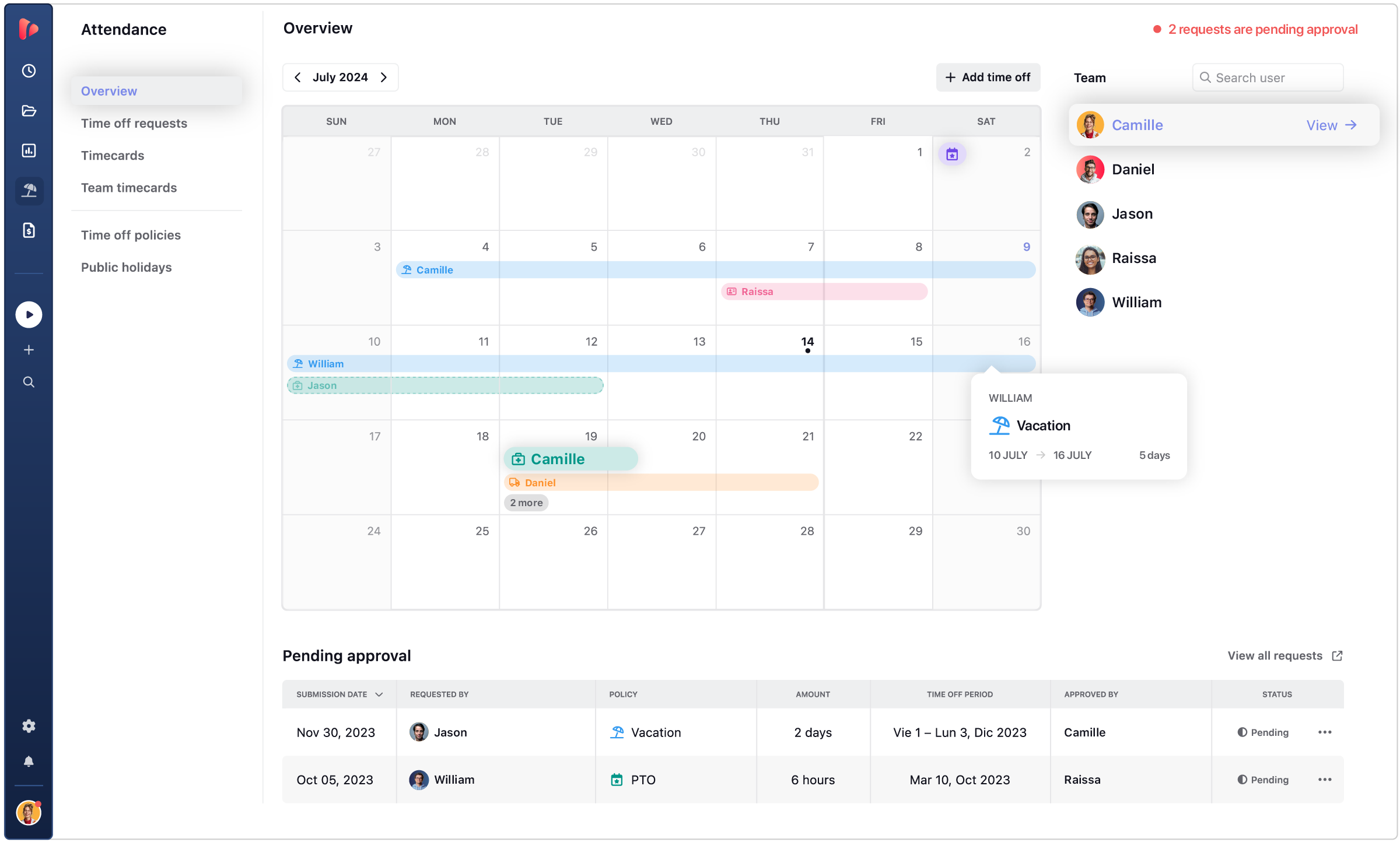
A leave management system can reduce the administrative burden by loading public holidays automatically, assigning them to the right employee groups, and displaying country-based holidays in shared availability views.
📖 See our guide on Employee Availability
Learn what employee availability means and how it works with real-life examples.
Example of a distributed holiday setup
Let’s say your company has employees in Argentina, Spain, and Colombia. Each employee is assigned the public holiday calendar that applies to their location, while company-wide shutdown days are added separately for the entire team.
This is important because countries such as Argentina, Spain, and Colombia have numerous public holidays linked to national, historical, and religious dates that are part of each country’s working culture.
The company’s PTO workflow should recognize these dates as part of how each local team operates, and managers should be able to view approved time off and local holidays together when planning coverage.
3. Structure Approval Workflows Across Time Zones
Time off approvals should not depend on a manager checking Slack messages. In distributed teams, employees and approvers may work several hours apart, so every request needs a clear owner, a visible status, and a fallback when the usual approver is unavailable.
To create a consistent approval workflow, the first thing you need to do is define who approves each type of leave.
A vacation request may only need manager approval, while parental leave, extended unpaid leave, or an exception to policy may also require HR review. The goal is to make sure the right people are involved when the request affects team coverage, policy eligibility, or employee records.
A practical approval setup should include:
👤 Approval owner for each leave type or employee group
✅ Approval level: Manager only or Manager + HR
⏳ Response deadline before the requested start date
🔄 Backup approver when the assigned manager is away
⭕️ Request states so employees can see if a request is pending, approved, rejected, or needs changes
📝 Rejection process that explains why the request was declined and what the employee should do next
On top of that, you need a clear approval workflow that could look like this:
✅ Example approval workflow
Employee requests time off → Manager reviews team coverage → HR is notified if needed → Approved or rejected → Balance and calendar update
It’s highly recommended that approvals live in the same system where requests and balances are tracked. Slack and email are useful for reminders, but they should not be the official approval record.
A centralized workflow keeps the request history, approver, decision date, status, and any comments visible to the employee, manager, and HR team.
Multi-level approval workflows can be especially useful when teams operate across countries, managers oversee several regions, or certain leave types require HR validation before they affect balances or calendars.
4. Keep Balances Accurate in Real Time
PTO balances can become unreliable when requests and approvals are managed in different places. In a distributed team, this can create conflicting records: an employee may think they have days available, and HR may need to reconcile several regional spreadsheets to find the correct balance.
The amount of paid time off each employee has available should update in real time whenever the employee’s time off record changes. That includes when:
- A request is approved or rejected
- Time off dates are changed or canceled
- Accrual is added
- Unused time is carried forward
- A seniority-based allowance changes
- HR makes a manual adjustment
Employees, managers, and HR should be able to access PTO balance information for several reasons.
| Role | What They Need |
|---|---|
| Employee | Know how much time off they can request |
| Manager | Confirm whether a request is valid before approving |
| HR | Keep one accurate source of truth across countries and policies |
5. Sync Approved Time Off to Shared Calendars
Managers should not have to ask HR who is out this week or search through Slack to understand team availability. Once time off is approved, it should appear automatically in the calendar tools.
For this purpose, agencies normally use a leave management system as the source of truth for requests and approvals, then sync approved absences to shared calendars. This can include Google Calendar, Outlook, iCal, or another calendar system the company already uses for planning and scheduling.
The key is to sync only the right information. Approved time off should appear on the relevant team or employee calendar, while pending requests remain inside the leave management workflow until a manager makes a decision. This prevents teams from planning around absences that may still be rejected or changed.
A useful calendar sync should help teams:
- Show approved time off by employee or team
- Make local holidays visible alongside planned leave
- Surface overlapping absences before managers approve new requests
- Give managers visibility across time zones
- Reduce HR follow-up and manual calendar updates
- Support capacity planning without creating another spreadsheet
In general terms, this is what a manager needs to see:
| Manager Question | What They Need to See |
| Who is out this week? | Approved time off by the team |
| Are there pending requests? | Requests waiting for approval |
| Will this affect coverage? | Overlapping absences and team calendar view |
| Is the employee available? | Current and upcoming absence status |
6. Connect HR Tools When Employee Data Already Lives Elsewhere
Many distributed teams already use an HR system such as BambooHR or Factorial to store employee profiles, locations, managers, contracts, or PTO data. In these cases, the best option is to connect them to the time off workflow where employees request leave, managers review coverage, and teams plan availability.
Without a proper integration, HR may need to update employee details, PTO balances, or approved absences in multiple places. That creates duplicate work and makes it harder to know which system has the correct record.
Before setting up a sync, decide which system owns each type of data. For example:
- Employee profile, location, manager, and contract → HR system
- Time off requests, approval status, team visibility, and calendar availability → Leave management software for distributed teams
A useful integration should help teams:
- Keep employee records aligned across systems
- Reduce duplicate entries for HR and People Ops
- Reflect approved time off in daily planning workflows
- Keep managers aware of availability without asking HR for updates
- Avoid conflicting PTO balances or absence records
The important part is ensuring one reliable source of truth for each record, then using the integration to make the right information available where people need it.
🔗 60+ Integrations
See how TrackingTime integrations keep HR data, approved time off, and team availability aligned across the tools you already use.
How to Handle Different Holidays Without Manual Management
For distributed teams, holiday management works best when each type of non-working day has a clear setup rule.
A practical way to organize this involves separating holidays into four groups:
| Holiday Type | How to Configure It | What Should Happen |
|---|---|---|
| National holidays | Assign a country-specific calendar based on employee work location | The employee appears unavailable without using PTO balance |
| Regional or local holidays | Add a more specific calendar for the relevant state, city, or employee group | Only affected employees are marked unavailable |
| Company-wide shutdowns | Create one shared company calendar | Everyone sees the non-working day and managers can plan coverage around it |
| Floating holidays | Set up a dedicated leave type with the relevant policy rules | Employees submit a request and the day follows the normal approval workflow |
A scalable workflow also needs to distinguish between holiday visibility and PTO use. For example, an employee in Colombia may be unavailable for a local public holiday, but that should not reduce their vacation balance. A manager in another country should still see that absence when planning meetings, project coverage, or delivery dates.
To manage this without annual spreadsheet work, use a centralized leave management system that can assign holiday calendars by country or region and automatically load public holiday dates. HR should only need to review exceptions instead of rebuilding the calendar manually.
Holiday setup checklist
- Assign a country or regional calendar to each employee based on work location
- Separate public holidays from vacation and other PTO balances
- Create a shared calendar for company-wide shutdowns
- Use a dedicated leave type for floating holidays
- Show local holidays alongside approved time off in team availability views
- Review holiday assignments when employees change location, contract, or employee group
Accrual and Carry Forward for Distributed Teams
PTO allowance becomes harder to manage when time off depends on location, contract type, tenure, or a different policy year. When rules live in separate spreadsheets, PTO balances become harder to audit and easier to miscalculate.
To solve this issue, configure these rules at the policy level, then assign the right policy to each employee group.
| Policy Rule | What to Configure | What It Prevents |
|---|---|---|
| Accrual | How often leave is earned, when accrual starts, and which employees follow the rule | Manual monthly balance updates |
| Carry forward | How many unused days can move into the next period, and when they expire | Unclear year-end balances |
| Seniority allowance | Which tenure milestones add more time off, and how much | HR manually tracks employee anniversaries |
| Caps or expiration | Maximum balance limits and use-by dates | Employees accumulating or losing time off unexpectedly |
Example
A distributed company may use one policy for employees who accrue vacation monthly, another for employees with an annual allowance, and a third for employees who receive additional days after a defined period of service. The workflow should apply the relevant rule automatically based on the employee’s assigned country, contract, or policy group.
👉 An employee in Spain might accrue 1.5 days per month (18 days/year), carry forward up to 5 unused days into the next period (expiring after 3 months), and receive 2 extra days after 3 years of tenure, all applied automatically based on their policy group, with no manual HR recalculation needed.
That way, the employee sees the correct PTO balance, the manager reviews requests against the right allowance, and HR does not need to recalculate balances every time a policy year changes.
Advanced leave management tools like TrackingTime Pro Plus plan support automatic accrual, carry forward, seniority allowances, and policy-based balance rules.
How to Keep Managers Informed Without Creating More Admin Work
In a distributed team, the goal is to give managers a single reliable view of requests, upcoming absences, and team coverage so they can make decisions without chasing messages or maintaining a separate tracker.
A useful setup separates information by action:
⭕️ Pending requests show managers what needs a decision
✅ Approved time off shows who will be unavailable and when
👥 Team availability helps managers spot overlapping absences before approving another request
📊 PTO balances help managers confirm that a request follows the employee’s assigned policy
In general terms, managers only need time off information for the employees and teams they manage, including approved absences, request status, local holidays, and upcoming availability.
To reduce unnecessary admin work, configure notifications around decisions rather than visibility.
Managers should receive an alert when a request needs their approval, while approved time off should update the shared calendar automatically. HR should only need to step in for policy exceptions, extended leave, missing approvers, or requests that require an additional review.
💡 Explore Time and Attendance Software
Explore how time and attendance software helps teams bring schedules, availability, time off, and attendance data into a centralized workflow.
How TrackingTime Helps Distributed Teams Manage Time Off
TrackingTime Leave Management helps distributed teams centralize time off requests, approvals, PTO balances, holiday calendars, and employee availability in one workflow. For teams handling time off tracking multi-country operations, it reduces the need to reconcile separate spreadsheets, Slack requests, and local calendars.
Teams can create configurable leave types, assign holidays by country, and keep requests, approvals, balances, and availability connected to the same employee record. This makes it easier to apply different local rules without creating a separate process for every country, contract type, or employee group.
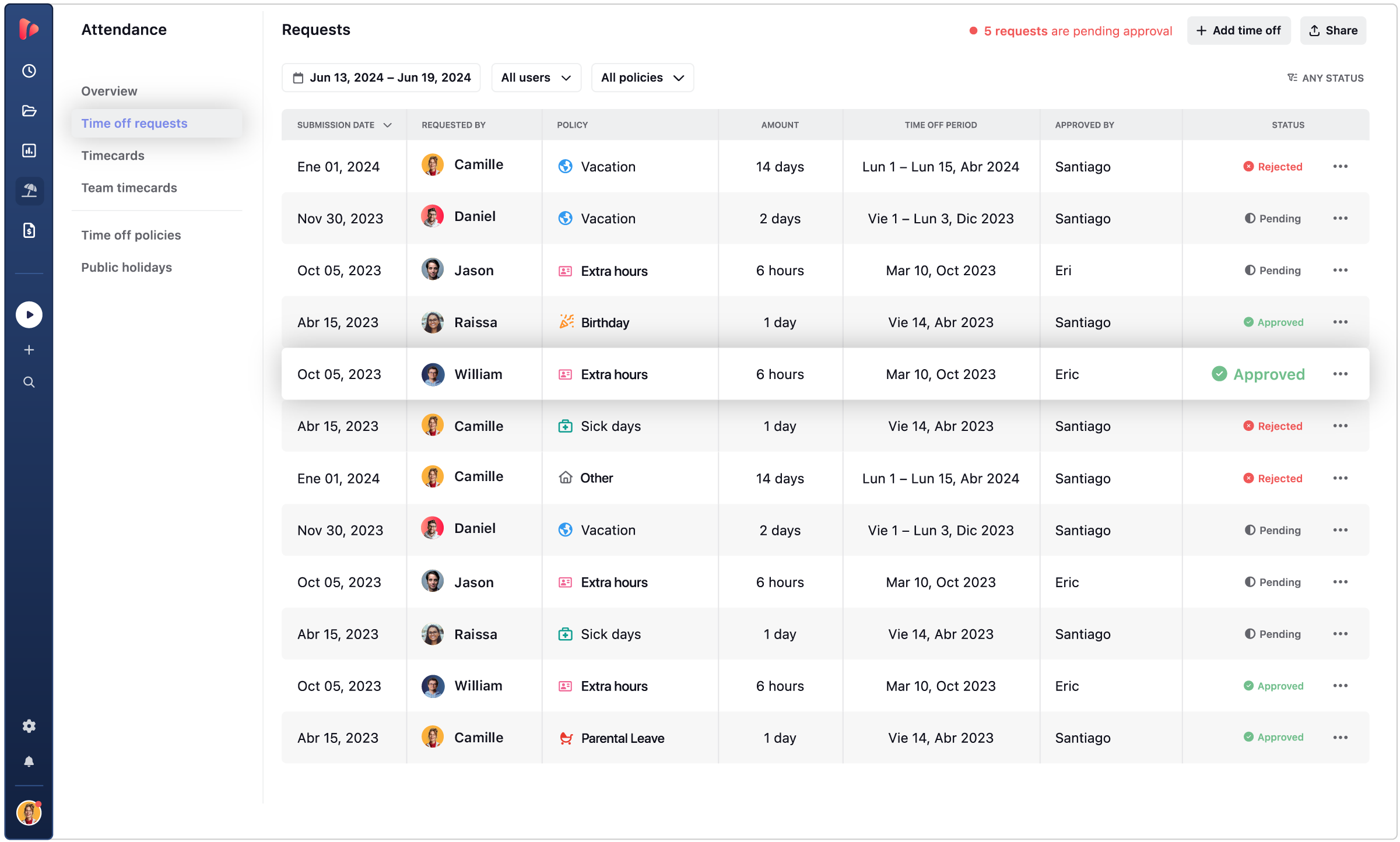
With TrackingTime, distributed teams can:
- Configure leave types and policies for vacation, sick leave, parental leave, personal days, unpaid leave, and other policy-specific absences
- Set allowances by policy, so employees have a clear time off entitlement for the relevant period
- Manage time off requests in one place with request details, optional comments or attachments, and visible approval status
- Review and approve requests through a centralized pending requests view for managers and admins
- Track PTO balances in real time by leave type, including assigned days, used days, pending requests, and remaining available time
- Select public holidays by country from an official holiday list, then configure the dates that apply to each team, group, or region
- View team availability in one calendar with approved, pending, and rejected time off requests
- Sync approved time off to Google Calendar or Microsoft Outlook through a subscription link
- Import time off from BambooHR or Factorial to avoid manually recreating absences already registered in those HR systems
The result is a more reliable workflow for distributed teams: employees can understand what they can request and how much time off they have available, managers can review upcoming absences before approving leave, and HR can manage policies and availability without reconciling multiple regional trackers.
Enhanced Time Off Approvals for Distributed Teams
TrackingTime will introduce enhanced time off approval capabilities designed for teams that need more control across countries, managers, and time zones. For teams that need more control over how time off is earned and carried across policy periods, TrackingTime’s new plan, Pro Plus, will also add advanced PTO policy capabilities.
With Pro Plus, teams will:
- Set automatic accrual rules so employees earn time off progressively throughout the year or policy period
- Configure carry forward limits for unused days that can move into the next period
- Apply seniority allowances that automatically increase time off entitlement after defined tenure milestones
🌍 Manage Distributed Time Off in One Place
Use TrackingTime Leave Management software for distributed teams to centralize country holidays, leave requests, approval workflows, PTO balances, and calendar visibility.
Common Mistakes When Managing Time Off in Distributed Teams
Most distributed PTO problems come from applying a reasonable policy through disconnected calendars, informal requests, and manual records.
- Using one holiday calendar for every employee
Local public holidays may be missed, irrelevant dates may appear for the wrong employees, and availability data becomes inaccurate - Managing all PTO requests via Slack or email
Requests can be lost, approved without a record, or left pending when managers work in different time zones - Tracking PTO balances manually by region
HR has to reconcile requests, accruals, carry forward, and adjustments across multiple spreadsheets - Not defining backup approvers
Requests can remain pending when the assigned manager is on leave, unavailable, or working in a different time zone - Forgetting to sync approved leave with calendars
Managers may approve time off without seeing it reflected in team availability or capacity planning - Keeping HR data invisible to managers
Managers may lack the context needed to review coverage, confirm policy eligibility, or avoid overlapping absences - Updating accruals or carry forward manually
Employees may see outdated PTO balances, while HR spends time recalculating rules that should be applied automatically
Clearer PTO rules can be especially important in distributed teams. In the United States, job postings mentioning unlimited PTO fell from 8.8% in 2022 to 2.9% in June 2025, according to Indeed data reported by MarketWatch. For multi-country teams, the lesson is not that every policy needs to be restrictive, but that employees and managers need clear rules around eligibility, approvals, balances, and availability.
Manage Time Off Across Distributed Teams with One Centralized Workflow
Proper time off management for distributed teams requires building a centralized workflow that enables agencies to apply the right rules across countries, holiday calendars, employee groups, managers, and time zones.
As a team expands into new locations, PTO complexity compounds. HR needs one reliable source of truth for requests, balances, holidays, and approvals. Managers need visibility into upcoming absences and team coverage. Employees need to know what they can request, how much time off they have available, and whether their request has been approved.
A PTO policy for remote or multi-country teams only works if the day-to-day process supports it. Leave Management software helps reduce spreadsheet work, avoid disconnected requests, keep balances accurate, and make local holidays visible where teams plan work.
💪 Manage Multi-Country Time Off With TrackingTime
TrackingTime Leave Management helps distributed teams centralize time off requests, country-specific holiday calendars, approval workflows, real-time PTO balances, and shared calendar visibility in one place.
Frequently Asked Questions About Time Off Management for Distributed Teams
What is time off management for distributed teams?
Time off management for distributed teams is the process of managing leave requests, PTO balances, approval workflows, holiday calendars, and employee availability across different countries, time zones, and policy groups.
How do you manage PTO policies across multiple countries?
Use one centralized workflow with different policy rules by employee location, contract, or policy group. This allows teams to manage local holidays, leave allowances, approvals, and balances without creating a separate process for each country.
Why is PTO harder to manage in distributed teams?
PTO is harder to manage in distributed teams because employees may follow different holiday calendars, leave rules, work schedules, approval paths, and local requirements. Manual spreadsheets and informal requests make those differences harder to track accurately.
How should distributed teams handle public holidays?
Distributed teams should assign public holiday calendars based on each employee’s work location. Local holidays should appear in team availability views without reducing vacation or PTO balances.
What is the best way to track PTO balances in a multi-country team?
The best approach is to use one system that updates PTO balances when requests are approved, changed, canceled, accrued, carried forward, or adjusted. This gives employees, managers, and HR the same current record.
Do distributed teams need different PTO policies by country?
Not always, but distributed teams often need different PTO rules by country, contract, or employee group. The goal is to keep leave types consistent while applying the right local allowances, holidays, and approval requirements.
How can managers see who is off in a distributed team?
Managers should use a shared availability view that combines approved time off, local holidays, pending requests, and overlapping absences. This helps them plan coverage before approving new requests or scheduling work.
What is leave management software for distributed teams?
Leave management software for distributed teams centralizes time off requests, approvals, PTO balances, holiday calendars, and employee availability across countries. When evaluating leave management software distributed across multiple locations, look for a system that can apply local policies through one shared workflow.
What should a PTO policy for a remote team include?
A PTO policy remote team needs should define leave types, eligibility, approval steps, holiday rules, PTO balances, and how employees request time off across locations. It should also clarify which rules vary by country, contract, or employee group.


