Use a Productivity Tracker to Boost Employee Performance

Managing employee performance and productivity has grown increasingly complex in recent years, particularly with the rise of remote and hybrid work models. Traditional methods of performance tracking often fall short in providing the insights managers need. The answer lies in productivity trackers—powerful tools designed to help managers efficiently assess both overall team output and individual contributions, ensuring smarter and more effective workflows.
In this comprehensive guide, we’ll explore how productivity trackers can significantly improve employee performance, what features to look for, and how to integrate these tools into your organization’s workflow. By the end, you’ll understand how to boost your team’s efficiency, motivation, and overall success.
Boost Employee Performance with a Productivity Tracker
- Why Employee Performance Matters
- Top Features to Look for in a Productivity Tracker
- How a Productivity Tracker Improves Team Collaboration
- Best Practices
- Top 5 Productivity Trackers
- Integrating Productivity Trackers
- How to Track and Analyze Remote Team Performance
- Keeping Your Team Motivated and Connected
- Avoiding Common Pitfalls
- Remote Work Trends
- Building a Successful Remote Team
Why Employee Performance Matters
In the modern workplace, performance is closely tied to productivity. Without efficient tracking methods, companies risk losing valuable data that can drive improvement and growth. Productivity trackers allow managers to gain insights into employee efficiency, giving them the tools to better manage resources, improve workflows, and support team members.
Key Benefits of Using a Productivity Tracker
Productivity trackers empower individuals and teams to work smarter by providing insights into how time is spent and tasks are managed. These tools enhance efficiency, streamline workflows, and help identify areas for improvement. By leveraging a productivity tracker, you can boost performance, reduce wasted time, and achieve your goals with greater clarity.
- Data-driven insights: Understanding how employees spend their time.
- Performance transparency: Clear visibility into task progress and completion.
- Employee accountability: Empowering teams to take ownership of their work. By offering these insights, productivity trackers not only help managers improve processes but also contribute to a more productive and engaged team.
Top Features to Look for in a Productivity Tracker
Choosing the right productivity tracker means focusing on features that offer actionable insights, foster transparency, and drive meaningful improvements in team performance. The best tools provide detailed data to help managers and employees make informed decisions and optimize workflows.
Real-Time Tracking
A productivity tracker with real-time tracking capabilities enables managers to monitor team activities as they happen. This feature provides visibility into how time is spent, which projects are progressing, and where bottlenecks might be stalling progress. With instant insights, managers can quickly identify areas for improvement and make timely adjustments to keep projects on track.
Time and Activity Tracking
Effective productivity trackers should offer both time and activity tracking. Time tracking measures how long tasks take to complete, while activity tracking focuses on the type of work being done—whether it’s client meetings, report writing, or responding to emails. Combining these insights gives a holistic view of performance, enabling teams to identify patterns, allocate resources better, and enhance overall efficiency.
Actionable Reporting
Look for tools that generate clear, data-rich reports. These reports should highlight productivity trends, areas needing attention, and opportunities for optimization. For employees, this creates an opportunity for self-assessment and improvement, while managers can use the data to fine-tune strategies and workflows. Teams that rely heavily on written updates or performance summaries may also use an AI checker to review internal reports for clarity, consistency, and compliance with company guidelines.
By focusing on these essential features, productivity trackers can transform how teams operate, making workflows more efficient and results-driven.
How a Productivity Tracker Improves Team Collaboration
Productivity trackers play a crucial role in fostering accountability and enhancing communication within teams. Transparent tracking keeps employees focused and aligned with goals, while data-driven insights help identify and address collaboration gaps. These tools empower managers to build more connected and efficient teams.
Encouraging Accountability
When employees know their activities are being tracked, they’re more likely to stay focused and meet deadlines. Transparency helps build trust between employees and managers, ensuring that both parties are aligned with performance expectations.
Facilitating Communication
A productivity tracker can highlight communication breakdowns or areas where collaboration can be improved. This allows managers to take a more proactive approach in fostering better communication among team members.
Best Practices
Effective performance tracking starts with setting clear, actionable goals for your team using frameworks like SMART. Leverage productivity data to provide constructive feedback and address challenges with transparency. This approach ensures employees feel supported, valued, and aligned with organizational objectives.
Setting Clear Goals and Benchmarks
To ensure the success of a productivity tracker, it’s important to set clear goals for your team. Use SMART goals (Specific, Measurable, Achievable, Relevant, Time-bound) to guide your employees and help them stay focused.
Using Data to Provide Constructive Feedback
The data from your productivity tracker should be used as a foundation for providing feedback. Instead of offering vague or subjective feedback, managers can use actual performance data to highlight strengths and areas that need improvement.
Overcoming Common Challenges with Productivity Tracking
Some employees may feel uncomfortable with the idea of being tracked. It’s important to approach the topic with transparency and ensure employees understand how the tool benefits them by improving their performance and supporting career development.
Top 5 Productivity Trackers
Finding the right productivity tracker can transform how teams manage tasks and improve performance. Tools like TrackingTime offer robust features for time tracking and productivity analysis, while others like Trello, Asana, Toggl, and RescueTime provide specialized solutions. Choose the tool that aligns best with your team’s needs and goals.
TrackingTime for Employee Performance
TrackingTime is one of the top productivity trackers for employee performance. This tool allows you to track time, monitor tasks, and analyze productivity trends. By generating detailed reports, TrackingTime helps managers understand which tasks are taking longer than expected and which employees may need additional support.
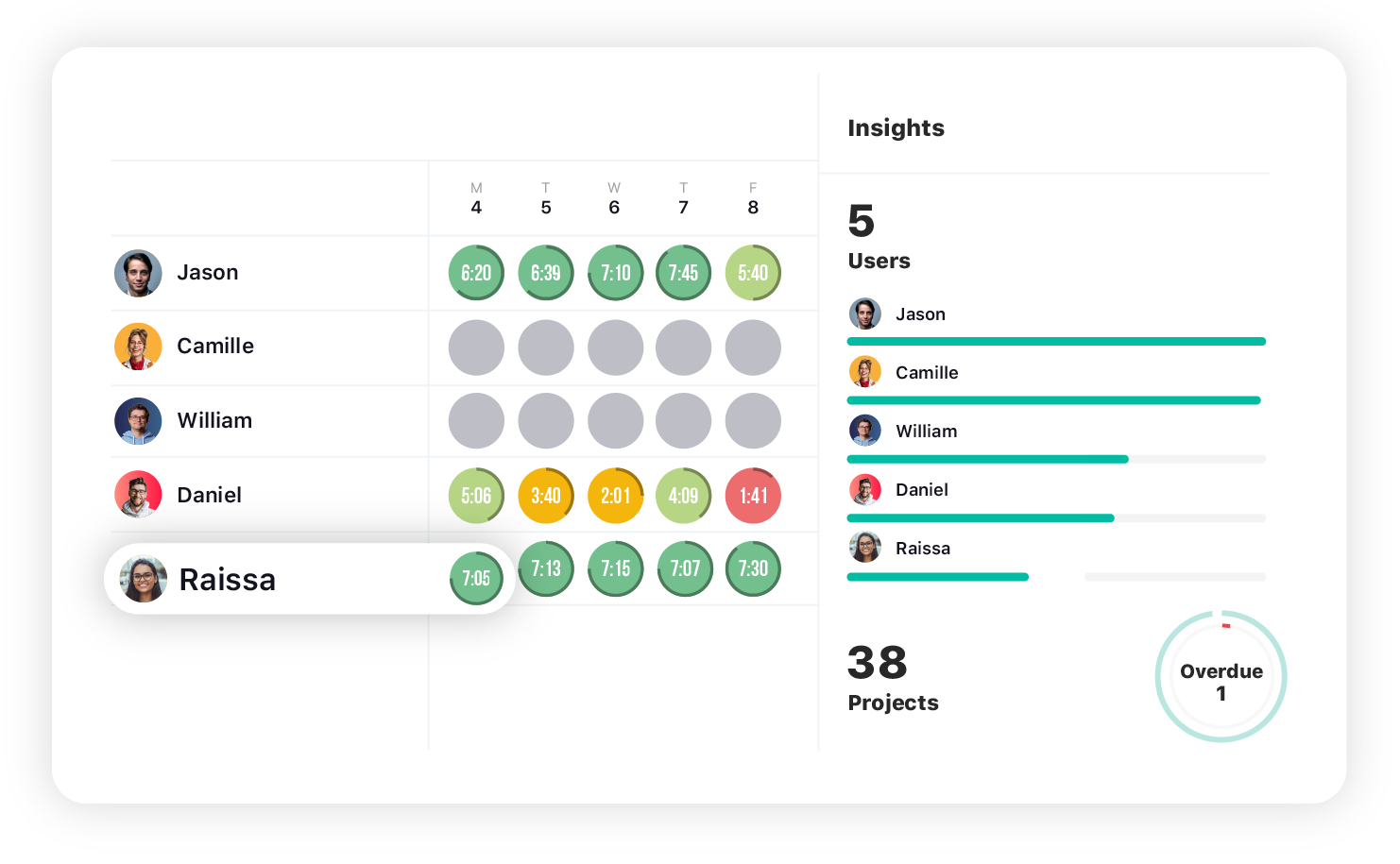
While TrackingTime is a great choice, other productivity tracking tools can also support employee performance improvement, including:
Trello for Task Management
Trello is a visually intuitive task management tool that uses Kanban boards to help teams organize, prioritize, and track their work. Each task is represented as a card that can be moved between columns like “To Do,” “In Progress,” and “Done,” providing a clear overview of project status. Trello’s simplicity makes it ideal for teams managing straightforward workflows, brainstorming sessions, or daily tasks. It also offers features like file attachments, due dates, checklists, and integration with tools like Slack and Google Drive. With customizable boards and Power-Ups to enhance functionality, Trello is a great starting point for teams looking for a user-friendly task management solution.
Asana for Project Management
Asana is a comprehensive project management tool designed for teams tackling complex projects and detailed workflows. It enables users to plan, execute, and monitor projects through features like task dependencies, project timelines, Gantt charts, and workload management. Asana’s versatility makes it ideal for cross-functional teams, as it allows for seamless collaboration and transparency across departments. Teams can set milestones, assign tasks, and track progress in real-time. The platform also supports automation of repetitive tasks, ensuring teams can focus on high-priority objectives. Whether managing marketing campaigns, product launches, or team initiatives, Asana is a powerful solution for structured project management.
ClickUp for All-in-One Management
ClickUp is an all-in-one productivity platform that combines task management, goal tracking, documents, chat, and dashboards into a single workspace. Designed to replace multiple tools, ClickUp helps teams streamline their workflow and keep everything—from tasks to docs to reporting—under one roof. Its powerful customization options allow users to create views for any working style, whether it’s lists, Kanban boards, Gantt charts, or calendars. With built-in time tracking, automations, and integrations with tools like Slack, Zoom, and Google Drive, ClickUp is ideal for teams wanting a centralized productivity system that improves alignment and efficiency.
Notion for Task Organization
Notion is a flexible productivity tool that combines note-taking, project planning, databases, and internal documentation into one highly customizable workspace. Teams can build pages for meeting notes, task lists, content calendars, knowledge bases, and more—all interconnected through relational databases. Its modular design empowers teams to design workflows tailored to their needs, making it a favorite for startups, creators, and remote teams. Notion integrates with apps like Slack, GitHub, and Zapier, and when paired with TrackingTime, it becomes a powerful system for organizing knowledge, managing projects, and keeping teams aligned while boosting overall productivity.
Integrating Productivity Trackers
Seamlessly integrating a productivity tracker like TrackingTime begins with identifying key processes that will benefit from time tracking. Pairing it with project management tools like Trello or Asana enhances task monitoring and ensures your team stays organized, efficient, and on schedule.
Integrate TrackingTime into Your Work Processes
Integrating TrackingTime into your workflow can be seamless. Begin by identifying the processes that will benefit from time tracking, such as project management or task allocation. Ensure that all team members understand how to use the tool and that they’re comfortable with the system.
Combining Time Tracking with Project Management Tools
A productivity tracker works best when combined with project management software. Tools like Trello or Asana can be used in conjunction with time tracking to monitor tasks and timelines, ensuring your team stays on track and on time.
How to Track and Analyze Remote Team Performance
Tracking remote team performance starts with setting measurable KPIs to monitor progress and identify improvement areas. Leveraging productivity data and tools like TrackingTime, Basecamp, or Trello provides actionable insights through dashboards, helping managers address inefficiencies and optimize team efficiency.
Setting and Tracking KPIs
Key Performance Indicators (KPIs) are essential for tracking the success of remote teams. By setting specific, measurable KPIs for each team member, you can gauge their progress and identify areas for improvement. This data also helps you adjust strategies to ensure goals are met.
Using Data to Improve Remote Team Efficiency
Analyzing productivity data allows managers to pinpoint inefficiencies or issues in team processes. For instance, if a team member consistently fails to meet deadlines, this could indicate a need for additional training or resources.
Tools for Performance Monitoring and Reporting
Using project management tools and time tracking software like TrackingTime, Basecamp, or Trello, you can set up dashboards that provide visual insights into task completion and project statuses. This allows you to identify potential problems before they affect overall performance.
Keeping Your Team Motivated and Connected
Fostering team engagement requires a mix of virtual team-building activities, recognition of achievements, and informal social spaces. By encouraging interaction, celebrating successes, and promoting community, managers can boost morale and maintain strong connections within remote teams.
Virtual Team-Building Activities
Engagement goes beyond just tracking productivity. To keep employees motivated, it’s essential to incorporate virtual team-building activities. These activities can include online games, virtual happy hours, and brainstorming sessions to encourage interaction and creativity.
Recognizing Achievements
Recognition is one of the most powerful motivators. Publicly acknowledging employee achievements through team meetings, emails, or even a Slack channel can increase morale and drive further performance.
Creating Social Spaces
Encourage social interactions within your team by creating informal channels on Slack for hobbies, interests, or personal achievements. These social spaces can reduce isolation and help foster a sense of community in a remote setting.
Avoiding Common Pitfalls
Effective remote team management requires clear communication guidelines and consistent check-ins to prevent misunderstandings. Promoting work-life balance through regular breaks and boundaries helps prevent burnout, ensuring sustained productivity and employee satisfaction.
How to Avoid Communication Breakdowns
Clear communication is vital in remote teams. To avoid misunderstandings, set up clear communication guidelines on how and when employees should report progress. Use tools like Slack for quick communication and Microsoft Teams for regular check-ins to ensure nothing falls through the cracks.
Preventing Burnout and Promoting Work-Life Balance
Remote work can blur the line between personal and professional life, leading to burnout. Encourage your team to take regular breaks, set boundaries, and disconnect after work hours. Creating a culture that values well-being can help maintain long-term productivity and job satisfaction.
Remote Work Trends
Remote work is constantly evolving, driven by changing workplace dynamics and advancements in technology. Staying ahead of these trends is crucial for organizations to thrive in this new era of work.
Hybrid Work Models
The rise of hybrid work, where employees split time between remote and in-office settings, is reshaping team dynamics. This model offers flexibility and work-life balance while encouraging organizations to rethink how they manage collaboration, communication, and productivity.
Advanced Collaboration Tools
Innovations in digital tools are making remote work more seamless than ever. From video conferencing platforms to project management software, these technologies are designed to foster effective communication, streamline workflows, and keep remote teams connected no matter where they are.
Focus on Employee Well-Being
As remote work blurs the line between personal and professional life, companies are prioritizing employee well-being. Trends like mental health support, flexible schedules, and initiatives to combat burnout are becoming key components of remote work strategies.
The future of remote work is rooted in adaptability, leveraging innovative solutions, and providing ongoing support to ensure remote teams remain engaged, productive, and resilient.
Building a Successful Remote Team
Managing a remote team effectively requires strong leadership, the right tools, and a commitment to fostering a positive and collaborative work culture. By implementing the best practices outlined in this guide, you can set your remote team up for success, boost productivity, and create a work environment that supports growth and engagement.


