Kanban Board Workflow Management: Principles, Setup, and Flow Optimization

Kanban is a visual workflow management method that uses boards, columns, and cards to represent work moving through defined stages. Originally developed within Toyota’s manufacturing system in the 1940s, Kanban operates on a pull-based model: new work enters the system only when there is capacity to handle it, preventing overload and maintaining a steady flow of completed tasks.
💡 The method is built on four core principles:
- Visualize work. Every task is represented as a card on a board, making the full scope of work-in-progress visible to the entire team at all times.
- Limit work in progress (WIP). Each stage of the workflow has a maximum number of tasks that can be active simultaneously. This prevents bottlenecks and forces teams to finish current work before starting new tasks.
- Manage flow. The goal is smooth, continuous movement of tasks from start to completion. Teams monitor flow metrics to identify where work stalls and take action to resolve blockages.
- Continuously improve. Kanban treats the workflow itself as something to be refined over time. Teams regularly analyze performance data and adjust their process to increase throughput and reduce waste.
This guide covers how Kanban differs from traditional task management, how to set up an effective board, how to identify and resolve workflow bottlenecks, and how to optimize flow for sustained team performance.
Kanban Board Workflow Management
- What Is a Kanban Board?
- Kanban vs. Traditional Task Lists
- Core Kanban Principles in Practice
- Setting Up a Kanban Board That Works
- Identifying and Resolving Workflow Bottlenecks
- Optimizing Flow for Sustained Performance
- Kanban and Agile: How They Connect
- Implementation Best Practices
- Kanban by Industry
- Build a Kanban Practice That Scales
What Is a Kanban Board?
A Kanban board is a visual tool used to manage work as it moves through a process. The board is divided into columns that represent workflow stages, and each task is represented by a card that moves from one stage to the next as work progresses.
Typical columns include stages such as Backlog, In Progress, Review, and Done. As tasks move across the board, teams gain immediate visibility into what work is active, what is waiting, and where delays are occurring.
Kanban boards help teams manage workflow by making work visible, limiting how many tasks can be active at the same time, and highlighting bottlenecks that interrupt the flow of work. Because the board reflects the actual process used by the team, it becomes a central tool for coordinating tasks, balancing workloads, and improving delivery speed.
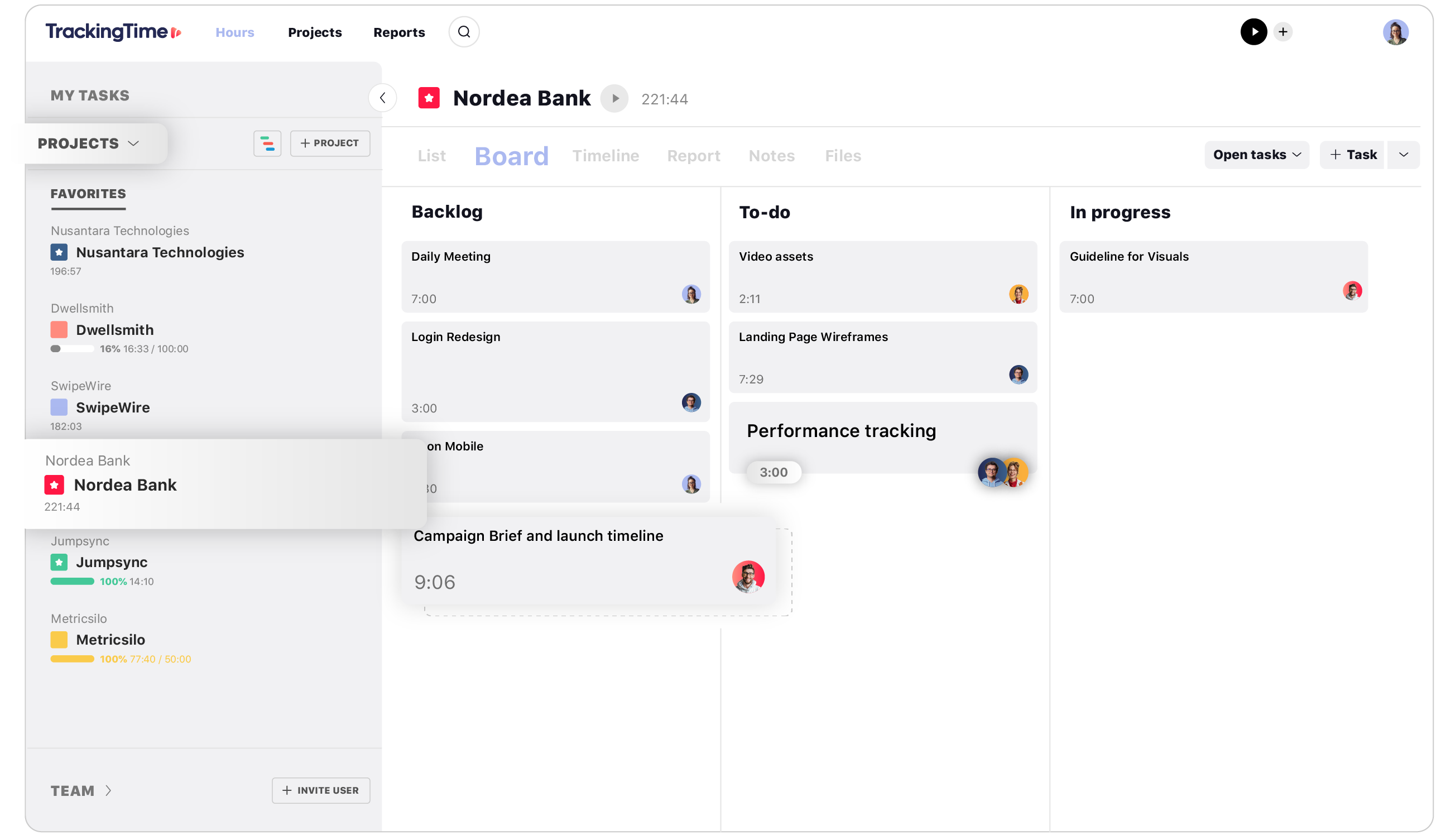
Basic Structure of a Kanban Board
A typical Kanban board contains three core elements:
- Columns: represent workflow stages such as Backlog, In Progress, Review, and Done.
- Cards: represent individual work items such as tasks, features, or deliverables.
- Work-in-progress limits: restrict the number of cards allowed in each stage to maintain steady workflow.
Together, these elements create a visual system that allows teams to track work progress, manage capacity, and continuously improve how work flows through the process.
Kanban vs. Traditional Task Lists
Most teams start managing work with task lists—a linear collection of items sorted by priority or due date. Task lists are simple and familiar, but they have structural limitations that become apparent as work complexity grows. Understanding the difference between Kanban and traditional task lists clarifies why teams that manage concurrent work across multiple stages benefit from switching to a board-based approach.
| Criteria | Traditional Task List | Kanban Board |
|---|---|---|
| Work visibility | Shows tasks in a flat list; no stage context | Shows tasks within their current workflow stage |
| Capacity management | No built-in limits on concurrent work | WIP limits enforce sustainable workload per stage |
| Bottleneck detection | Invisible until deadlines are missed | Visible immediately when cards accumulate in a column |
| Flow awareness | No concept of flow; tasks are either done or not | Continuous flow tracking with cycle time and lead time metrics |
| Prioritization | Manual reordering, often based on urgency | Pull-based: teams pull the highest-priority item when capacity opens |
| Best for | Simple, sequential personal or small tasks | Multi-stage workflows with concurrent tasks and team dependencies |
The core distinction is that task lists track what needs to be done, while Kanban tracks how work moves through a process. For teams managing work that involves multiple handoffs, review stages, or collaborative steps, Kanban provides the visibility and flow control that flat lists cannot. Integrating Kanban with structured project planning processes ensures that the board reflects strategic priorities, not just operational tasks.
Core Kanban Principles in Practice
Kanban’s four principles are not abstract ideas—they translate directly into operational practices that shape how teams work daily. Understanding each principle in depth is essential for implementing Kanban effectively rather than simply using a board as a visual task list.
Visualize Work
Visualization is the foundation of Kanban. Every piece of work—whether a task, a user story, or a deliverable—exists as a card on the board. Each card moves through columns that represent the stages of your workflow (for example: Backlog, In Progress, Review, Done). This makes three things immediately visible: what work exists, where it currently sits in the process, and who is responsible for it.
Limit Work in Progress
WIP limits are what distinguish Kanban from a simple visual board. Without WIP limits, a Kanban board is just a task list arranged in columns. WIP limits enforce discipline: they prevent teams from starting more work than they can finish, which is the most common source of workflow congestion.
Setting effective WIP limits requires balancing throughput with team capacity. A common starting approach is to set WIP limits at 1.5× the number of team members working in that stage. For example, if three developers handle the “In Progress” column, a WIP limit of 4–5 tasks prevents overload while maintaining enough work to avoid idle time.
Manage Flow
Flow is the rate at which work moves from start to completion. Healthy flow means tasks progress steadily through each stage without stalling. Two key metrics measure flow:
- Cycle time: How long a task takes from the moment work begins to completion. Lower cycle time means faster delivery.
- Lead time: The total time from when a task is requested to when it’s delivered. This includes waiting time before work starts.
The gap between lead time and cycle time reveals how much time tasks spend waiting. If lead time is significantly longer than cycle time, the bottleneck is in the queue—work is waiting to be started, not taking too long to complete. Monitoring these metrics through consistent project tracking practices surfaces flow problems before they accumulate into missed deadlines.
Continuously Improve
Kanban is inherently iterative. Teams review their workflow regularly—typically through retrospectives or flow reviews—and make incremental adjustments. This might mean adjusting WIP limits, adding or removing board columns, changing how work is prioritized, or addressing systemic blockers that slow down specific stages.
The improvement cycle is data-driven. Teams use flow metrics, cumulative flow diagrams, and throughput data to identify what changed, what worked, and what still needs attention. This approach to continuous improvement compounds over time: small adjustments in flow efficiency produce measurably better performance quarter over quarter.
Setting Up a Kanban Board That Works
A well-designed Kanban board mirrors how your team actually works—not an idealized version of the process. The setup phase determines whether the board becomes a useful management tool or decorative overhead.
Define Your Workflow Stages
Start by mapping the actual stages work passes through from request to delivery. Common structures include:
- Simple workflow: Backlog → In Progress → Done
- Review-based workflow: Backlog → In Progress → Review → Done
- Multi-phase workflow: Backlog → Design → Development → QA → Staging → Done
The right number of columns depends on your process complexity. Fewer columns provide simplicity; more columns provide granularity. Start with the minimum that accurately represents your workflow and add columns only when you need visibility into a specific stage.
Set WIP Limits for Each Stage
Assign a maximum number of concurrent tasks to each active column (exclude Backlog and Done, which don’t need limits). Start with conservative limits and adjust based on what you observe:
- Too low: Team members frequently idle because no work can enter their stage. Raise the limit.
- Too high: Tasks accumulate in stages and cycle times increase. Lower the limit.
- Right-sized: Work flows steadily through stages with minimal waiting. Tasks rarely stall, and the team maintains consistent throughput.
Document your initial WIP limits and the rationale behind them. This makes it easier to review and adjust as the team gains experience with the system.
Design Cards for Clarity
Each card on the board should include the information needed to understand and act on the task without leaving the board. At minimum, include the task title, assignee, priority indicator, due date (if applicable), and a brief description or acceptance criteria. For teams that use color coding, assign colors to categories (bug fixes, features, operational tasks) rather than priorities—visual overload undermines the board’s clarity. A well-structured project management template can standardize card structure across teams and projects.
Identifying and Resolving Workflow Bottlenecks
Bottlenecks are the primary enemy of flow. A bottleneck occurs when work accumulates at a specific stage faster than it can be processed, creating a queue that slows down everything upstream and starves everything downstream. Identifying bottlenecks quickly and resolving them systematically is the highest-leverage activity in Kanban workflow management.
How to Spot Bottlenecks
Kanban makes bottlenecks visible by design. Look for these signals:
- Card accumulation: If one column consistently has more cards than others, that stage is a bottleneck. Work is entering faster than it’s being completed.
- Increasing cycle times: If the average time tasks spend in a specific stage is growing, the stage is losing capacity relative to demand.
- Cumulative flow diagram (CFD) divergence: A CFD plots the number of tasks in each stage over time. When the bands representing two adjacent stages widen, it means work is accumulating between them—a visual indicator of a bottleneck forming.
- Frequent WIP limit violations: If a stage regularly exceeds its WIP limit, the root cause may be insufficient capacity, unclear exit criteria, or dependencies on external teams.
Systematic Bottleneck Resolution
Once you’ve identified where work stalls, apply these strategies in order of impact:
- Clarify stage exit criteria. Often tasks stall because the team isn’t clear on what “done” means for that stage. Define explicit criteria for when a task moves to the next column.
- Redistribute capacity. If the Review stage is a bottleneck, temporarily shift team members from less congested stages to help clear the queue. Kanban’s flexibility allows this without restructuring the entire team.
- Break down large tasks. Tasks that are too large tend to stall in active stages. Split them into smaller, independently deliverable pieces that flow through the board faster.
- Address external dependencies. If a stage is blocked by decisions, approvals, or deliverables from outside the team, make those dependencies visible on the board (using blocker flags or dedicated swim lanes) and escalate resolution. Tracking these blockers in a risk and issue log ensures they get resolved rather than ignored.
- Adjust WIP limits. If the bottleneck persists despite capacity adjustments, the WIP limit for that stage may need to be lowered—counterintuitively, reducing the limit forces the team to resolve blockages before adding new work.
Optimizing Flow for Sustained Performance
Flow optimization goes beyond resolving individual bottlenecks. It’s about tuning the entire system so that work moves through the board as smoothly and predictably as possible. Teams that optimize flow consistently achieve shorter delivery times, more predictable timelines, and higher throughput without increasing headcount.
Track Flow Metrics Systematically
Three metrics provide a complete picture of flow health:
- Throughput: The number of tasks completed per time period (per day, per week, per sprint). Throughput is the most direct measure of team output.
- Cycle time: Average time from work-started to work-completed. Tracking cycle time by task type (bugs, features, support requests) reveals which categories flow well and which consistently stall.
- Work item age: How long each active task has been in progress. Tasks that exceed the average cycle time for their type are at risk of stalling and should be investigated proactively.
Generating regular project reports from these metrics makes flow trends visible over time and supports data-driven decisions about process adjustments.
Use Cumulative Flow Diagrams
A cumulative flow diagram (CFD) is the most powerful tool for visualizing flow health over time. It stacks the number of tasks in each workflow stage as colored bands, creating a chart that reveals three things at a glance: overall throughput (the rate at which the “Done” band grows), WIP levels (the width of the active stage bands), and bottlenecks (where bands widen or narrow unexpectedly).
A healthy CFD shows parallel, evenly spaced bands that grow at a steady rate. Expanding bands indicate accumulation. Flat bands indicate stalled flow. Teams that review their CFD weekly catch emerging problems before they become systemic.
Reduce Batch Size
Large tasks and large batches of work slow down flow. When a single task takes a week to complete, it occupies capacity for that entire period—blocking other work from entering the stage. Breaking work into smaller, independently deliverable pieces reduces cycle time, improves flow predictability, and makes progress visible sooner. This principle applies not just to individual tasks but to how work is planned and released: smaller, more frequent releases outperform large, infrequent ones from a flow perspective.
Kanban and Agile: How They Connect
Kanban and Agile are complementary but distinct. Agile is a set of principles for iterative, adaptive work management. Kanban is a specific method for visualizing and managing flow. Many agile teams use Kanban as their primary workflow management tool, while others combine it with Scrum (often called “Scrumban”) to add visual flow management to time-boxed sprint cycles.
The key connection is that Kanban supports agile’s core values—responding to change, delivering working increments, and improving through retrospection—through a practical, visual system. Teams that practice agile without Kanban often lack visibility into how work actually flows, making it harder to identify where the process breaks down. Teams that use Kanban without agile principles may optimize flow without ensuring the work itself is aligned with strategic objectives.
The strongest results come from combining both: agile principles guide what work gets done and how priorities shift, while Kanban manages how that work moves through the team’s process. Understanding how different project management platforms support this combination helps teams choose the right tooling for their workflow.
Implementation Best Practices
Adopting Kanban effectively requires more than setting up a board. These practices ensure the method delivers sustained operational value rather than becoming another abandoned tool.
Start Simple, Then Evolve
Begin with a basic three-column board (Backlog, In Progress, Done) and conservative WIP limits. Resist the urge to build a complex board from day one. Complexity should emerge from real workflow needs identified through experience—not from assumptions about what the process should look like.
Conduct Regular Flow Reviews
Schedule weekly reviews of the board and flow metrics. Ask three questions: What is blocked and why? Where is work accumulating? What changed since last week? These reviews replace the need for lengthy status meetings—the board provides the status, and the review focuses on resolving issues. Defining clear accountability for these reviews in the team charter ensures they happen consistently.
Make Policies Explicit
Document the rules that govern how work moves through the board: What qualifies a task to enter the Backlog? What does “In Progress” mean—that work has started, or that it’s actively being worked on? What are the exit criteria for each stage? Explicit policies reduce ambiguity and prevent the board from becoming a subjective representation of work status.
Use Swim Lanes for Parallel Work Types
If your team handles multiple types of work simultaneously—urgent bugs alongside planned features, or client work alongside internal projects—use horizontal swim lanes to separate them. This prevents different work types from competing for the same WIP limits and gives the team visibility into how capacity is distributed across work categories.
Connect the Board to Outcomes
A Kanban board manages flow, but flow without strategic direction is just organized busyness. Connect the board to project objectives by ensuring that the work entering the Backlog aligns with current goals and priorities. Regular backlog refinement—reviewing, reprioritizing, and removing stale items—keeps the board relevant. Teams that connect their Kanban workflow to project profitability metrics can see not just how efficiently they’re working, but whether that work generates financial value.
Kanban by Industry
While Kanban originated in manufacturing, its principles apply wherever work flows through defined stages. Here’s how different industries apply the method:
- Software development: Kanban manages feature development, bug fixes, and releases. Columns typically follow the development lifecycle (Backlog → Development → Code Review → QA → Deployment). WIP limits prevent developers from context-switching across too many features, which is the primary source of productivity loss in engineering teams.
- Marketing and creative teams: Campaigns, content pieces, and design deliverables flow through stages like Brief → Draft → Review → Approval → Published. Kanban’s visual nature is particularly effective for teams where multiple stakeholders need to review work at different stages.
- Professional services: Client engagements, proposals, and deliverables are managed through workflow stages. Kanban helps services teams manage multiple concurrent projects while maintaining visibility into each engagement’s progress. Pairing with a structured statement of work ensures each board reflects the agreed scope and deliverables.
- Operations and support: IT tickets, customer support requests, and operational tasks flow through triage, assignment, resolution, and closure stages. Kanban’s pull-based model ensures that team members work on the highest-priority item available rather than cherry-picking easier tasks.
Build a Kanban Practice That Scales
Kanban is one of the most practical methods available for managing workflow visibility, capacity, and flow. Its strength lies in simplicity: start with a board, set WIP limits, measure flow, and improve continuously. Teams that commit to these fundamentals build a sustainable practice that scales with complexity without requiring radical organizational change.
The Project Management resource hub provides additional frameworks, templates, and guides to help teams integrate Kanban with broader project management practices—connecting workflow management to planning, reporting, and performance measurement.
Common Questions about Kanban
What is Kanban?
Kanban is a visual workflow management method that uses boards, columns, and cards to represent work moving through defined stages. It operates on a pull-based model where new work enters the system only when there is capacity, and it is built on four core principles: visualize work, limit work in progress, manage flow, and continuously improve.
How is Kanban different from a task list?
A task list tracks what needs to be done in a flat, linear format. A Kanban board tracks how work moves through a process, showing the current stage of every task. Kanban also introduces WIP limits that control capacity, flow metrics that measure delivery speed, and visual bottleneck detection.
What are WIP limits and how do I set them?
Work-in-progress (WIP) limits define the maximum number of tasks allowed in a workflow stage at the same time. They help prevent overload and maintain a steady flow of work. A common starting point is about 1.5 times the number of team members working in that stage, then adjusting based on observed performance.
What is the difference between cycle time and lead time?
Cycle time measures how long a task takes from the moment work begins until it is completed. Lead time measures the total time from when the task is requested until delivery, including waiting time before work starts. The difference between the two reveals how long tasks spend in queues.
How do I identify bottlenecks on a Kanban board?
Bottlenecks appear when cards accumulate in a specific column or when cycle times increase in a particular stage. Monitoring WIP limit violations and reviewing cumulative flow diagrams can help identify these issues early. Solutions often include redistributing work, clarifying exit criteria, or breaking large tasks into smaller ones.
What is a cumulative flow diagram?
A cumulative flow diagram (CFD) is a chart that shows the number of tasks in each workflow stage over time using stacked colored bands. It helps teams visualize throughput, work in progress, and bottlenecks. In a healthy system, the bands grow steadily and remain roughly parallel.
Can Kanban be used with Scrum or Agile?
Yes. Many agile teams use Kanban alongside Scrum in a hybrid approach often called Scrumban. Agile frameworks guide priorities and planning, while Kanban manages how work flows through the team’s process and helps maintain delivery efficiency.
What industries use Kanban?
Kanban is widely used in software development, marketing, professional services, operations, healthcare, and manufacturing. Any environment where work moves through defined stages and visibility into capacity and progress is important can benefit from Kanban.


