Task Prioritization Templates for Successful Project Management (Free Eisenhower Matrix & More)

Leverage these downloadable project management templates to apply proven frameworks like the Eisenhower Matrix, Gantt Charts, and RACI models to prioritize tasks, align teams, and keep every project moving forward.
Free Project Management Templates

💡 Great project management begins with clarity — clarity on what to do now, what to plan, what to delegate, and what to eliminate.
Project Management Templates
Project management templates turn classic methods into practical tools for modern teams. Download and use them to save time, improve focus, and build consistency across your workflow.
Eisenhower Matrix Template: Prioritize Tasks the Smart Way
The Eisenhower Matrix, also known as the Urgent-Important Matrix, is one of the simplest and most effective prioritization tools in project management. It helps teams separate tasks by urgency and importance, turning chaos into clarity and endless to-do lists into focused action plans.
The Eisenhower Matrix is inspired by a famous quote attributed to President Eisenhower:
I have two kinds of problems, the urgent and the important. The urgent are not important, and the important are never urgent.
Dwight D. Eisenhower
This quote perfectly encapsulates the idea behind the matrix: not everything that demands your attention is truly important. The matrix helps you visually organize tasks to ensure you’re focusing on what matters most.
How the Eisenhower Matrix Works
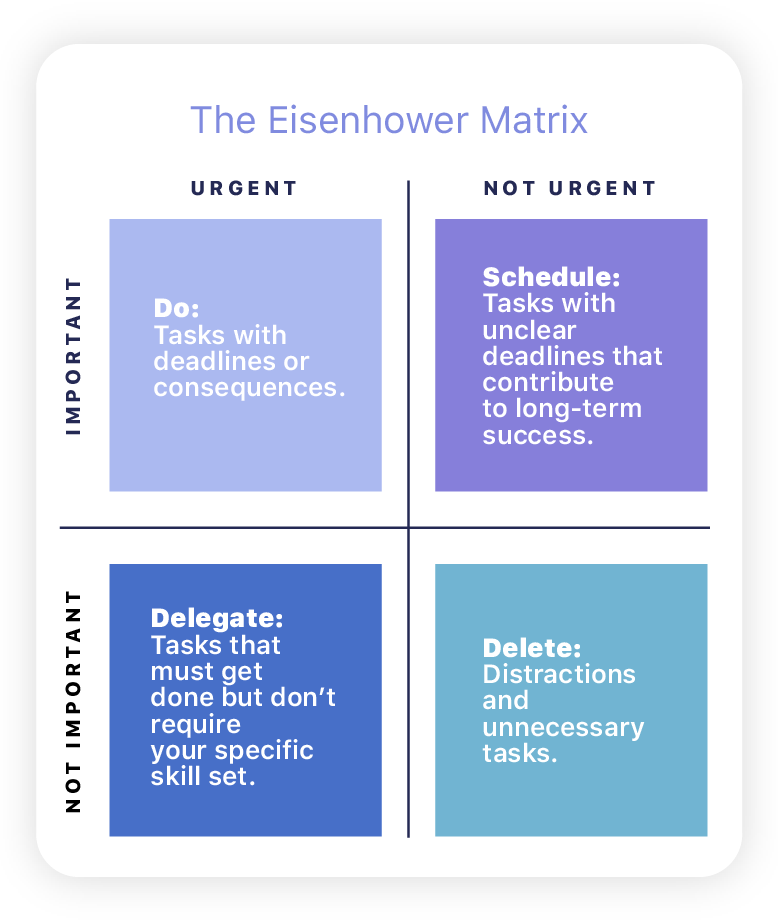
The matrix divides your workload into four quadrants that represent your decision-making priorities:
| Quadrant | Action | Examples |
|---|---|---|
| Urgent & Important | Do it now | Fixing critical bugs, meeting deadlines, handling client issues |
| Important, Not Urgent | Schedule it | Strategic planning, training, process improvement |
| Urgent, Not Important | Delegate it | Routine approvals, status updates, administrative work |
| Not Urgent or Important | Eliminate it | Outdated reports, redundant meetings |
Download Free Eisenhower Matrix Template

How to Categorize Tasks
The Eisenhower Matrix categorizes tasks into four distinct quadrants based on their urgency and importance. This framework provides a clear method for deciding how to allocate your time and energy by determining which tasks need immediate attention, which can be scheduled for later, which can be delegated, and which should be minimized or eliminated. Let’s dive deeper into each quadrant to understand how they can guide your task prioritization.
Tips for Effectively Categorizing Tasks:
- Be Honest: Objectively assess the true urgency and importance of each task.
- Consider Consequences: What happens if you delay or ignore a task? Use this to gauge its urgency.
- Review Regularly: Update your matrix often to reflect changes in your priorities.
How to Set Up Your Eisenhower Matrix
The Eisenhower Matrix is a highly effective tool for task prioritization and time management, allowing you to sort your responsibilities based on urgency and importance.
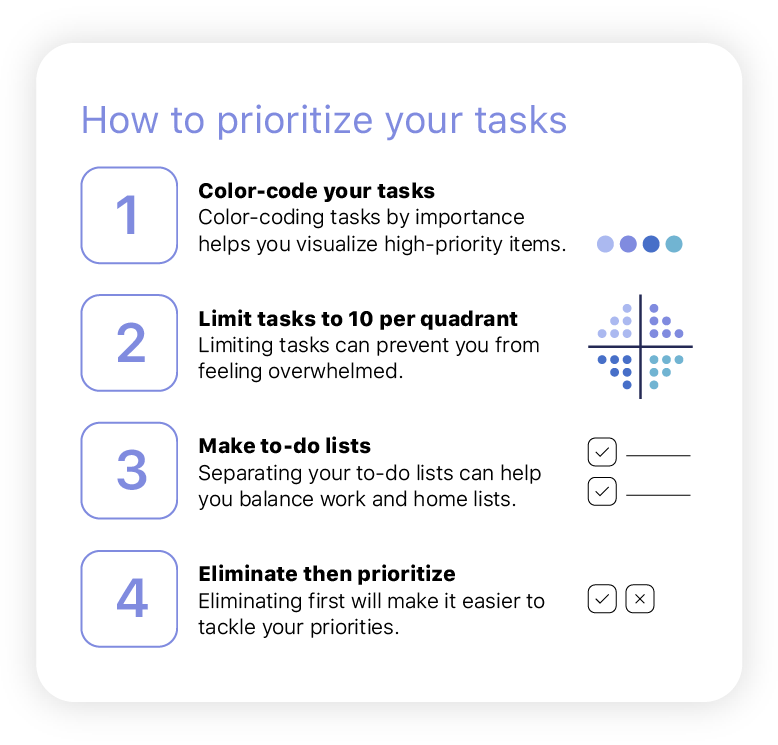
The Eisenhower Matrix uses a simple 2×2 grid to separate tasks by urgency and importance, helping you focus on what truly matters. Create it on paper or digitally, label each quadrant, and color-code for clarity. List all your tasks—work and personal—then sort them: do what’s urgent and important, schedule what’s important but not urgent, delegate what’s urgent but not important, and eliminate what’s neither.
Why the Eisenhower Matrix Still Works
The genius of the Eisenhower Matrix lies in its simplicity. It helps managers make fast, rational choices about workload and focus, and it helps teams understand what matters most without micromanagement.
When used inside your project tracking software, each quadrant can correspond to a label, priority tag, or task group — turning theory into workflow. For those who aim to excel in roles requiring strong prioritization skills, such as project management, crafting an effective project manager resume can highlight your ability to balance urgent and important tasks using tools like the Eisenhower Matrix.
Best practices for using the Eisenhower Matrix in team projects:
- Start your week with it: Identify your “Do Now” quadrant first.
- Delegate deliberately: Move routine tasks to others’ lists early.
- Review weekly: Update as deadlines change to keep momentum.
- Connect it with time tracking: See how much time is spent on urgent vs. important work — an insight that drives better long-term planning.
👉 When everything feels important, the Eisenhower Matrix helps you see what truly is.
Project Planning Templates
Once priorities are clear, planning gives structure to those priorities. These templates help you define goals, organize timelines, and allocate resources effectively before the work even begins.
Work Breakdown Structure (WBS) Template
A WBS turns large projects into manageable parts — each with clear owners, outcomes, and dependencies. It’s the foundation for estimating time, assigning resources, and measuring progress.
Project Timeline (Gantt Chart) Template
Visualize each task, phase, and dependency with a Gantt view. Ideal for tracking milestones and staying on schedule.
Download Project Planning Templates

👉 Combine these with your project planning software for seamless integration between templates and live project data.
Task Ownership Templates
Clear task ownership drives accountability and transparency. These templates help teams define roles, responsibilities, and communication lines, keeping everyone aligned on what needs to be done and who’s responsible for it.
RACI Matrix Template
Define who’s Responsible, Accountable, Consulted, and Informed for each task or milestone. Perfect for cross-functional teams and projects involving multiple stakeholders.
OKR Template
Set clear Objectives and Key Results (OKRs) to align your team’s daily tasks with larger business goals. This template helps you define measurable outcomes, track progress, and ensure every project contributes to your strategic vision. Ideal for quarterly planning and performance tracking.
Download Task Ownership Templates
Budget and Resource Templates
Even the most organized project can fail if budgets and capacity aren’t tracked closely. These templates make financial and resource management simpler and more visible.
Project Budget Tracker Template
Record planned vs. actual spending, monitor cost trends, and ensure financial alignment across projects.
Resource Allocation Template
Balance workloads and forecast availability. Ideal for managers overseeing several teams or client projects.
Download Budget and Resource Templates
👉 Integrate these insights with project reporting to connect financial data with performance metrics.
Combining Templates for Better Project Management
Templates work best when connected — not as standalone tools, but as parts of a larger workflow. For example:
- Use the Eisenhower Matrix for initial task triage.
- Then structure those tasks in the WBS Template and Gantt Chart.
- Assign roles using the RACI Matrix.
- Track budgets and time with reporting tools for full project visibility.
Make Project Templates Part of Your Workflow
Project management templates aren’t shortcuts — they’re frameworks for success. Each one transforms abstract concepts into practical systems that teams can follow.
Use these templates alongside project management software to plan smarter, manage better, and deliver consistently — without starting from scratch every time.
Other Useful Templates
Start downloading, customizing, and applying these free tools today to build a more predictable, productive workflow.
FAQs
What is the Eisenhower Matrix used for?
The Eisenhower Matrix helps teams prioritize tasks based on urgency and importance, focusing energy on work that drives results instead of distractions.
How do I use the Eisenhower Matrix Template?
List your tasks in each quadrant according to urgency and importance. Then plan, delegate, or eliminate tasks based on where they fall. Review it weekly to stay aligned.
Are these project management templates free?
Yes, all templates — including the Eisenhower Matrix, Gantt Chart, and RACI Model — are free to download and customizable for your team.
Can I use these templates with project management tools?
Absolutely. You can upload or adapt these templates directly in project management software like TrackingTime for integrated planning and execution.
Which template should I start with?
Start with the Eisenhower Matrix to set priorities, then use the WBS or Gantt Template to plan, followed by RACI and Budget Trackers for execution and control.