Employee Availability: Meaning, Examples & How It Works

Employee availability refers to the days and times an employee is able or willing to work. Teams use availability to support staffing, shift coordination, schedule planning, and attendance visibility. The term differs from a work schedule, which refers to the specific shifts or hours an employee is assigned and expected to work.
Employee Availability vs Work Schedule: Quick Comparison
| Aspect | Employee Availability | Work Schedule |
|---|---|---|
| Definition | When an employee can work. | When an employee is assigned to work. |
| Used for | Staffing, planning, and shift coordination. | Daily operations and workload coverage. |
| Flexibility | Usually flexible. | Usually fixed once assigned. |
| Example | Available after 2 PM on weekdays. | Scheduled Monday–Friday, 3–9 PM. |
💡 Quick Summary
- Employee availability shows the days, times, and conditions under which an employee can work.
- Availability is used before schedules are created; a work schedule shows the shifts or hours an employee is officially assigned.
- Teams manage availability through forms, shared calendars, shift preferences, recurring templates, and scheduling processes.
- Clear availability visibility helps managers reduce scheduling conflicts, improve staffing coverage, and coordinate attendance more accurately.
Work Availability: Meaning, Examples & How Teams Manage it
- Employee Availability vs Work Schedule: Quick Comparison
- What Is Employee Availability?
- Employee Availability vs Work Schedule
- Employee Availability Examples
- What Is an Availability Schedule?
- How Teams Collect and Manage Work Availability
- Common Staff Availability Challenges
- Why Businesses Need Visibility Into Employee Availability
- Employee Availability: Key Takeaways for Better Scheduling
What Is Employee Availability?
Employee availability is the time an employee is available to work, based on their schedule preferences, personal commitments, role requirements, or working arrangement. In a workplace context, work availability helps managers understand when people can be assigned to shifts, meetings, client coverage, or project work.
Availability can be fixed or variable. For example, an employee may be available only on weekdays, only in the evenings, or for remote work but not for office shifts. In some teams, employee availability stays the same each week; in others, it changes weekly, seasonally, or around personal constraints.
In simple terms, it shows when someone can work before a schedule is created. This gives managers a clearer starting point for planning work, avoiding conflicts, and coordinating coverage across the team.
Employee Availability vs Work Schedule
Employee availability and work schedules are closely related, but they are not the same thing. Staff availability indicates when someone can work, while a work schedule defines the specific shifts or hours they are assigned.
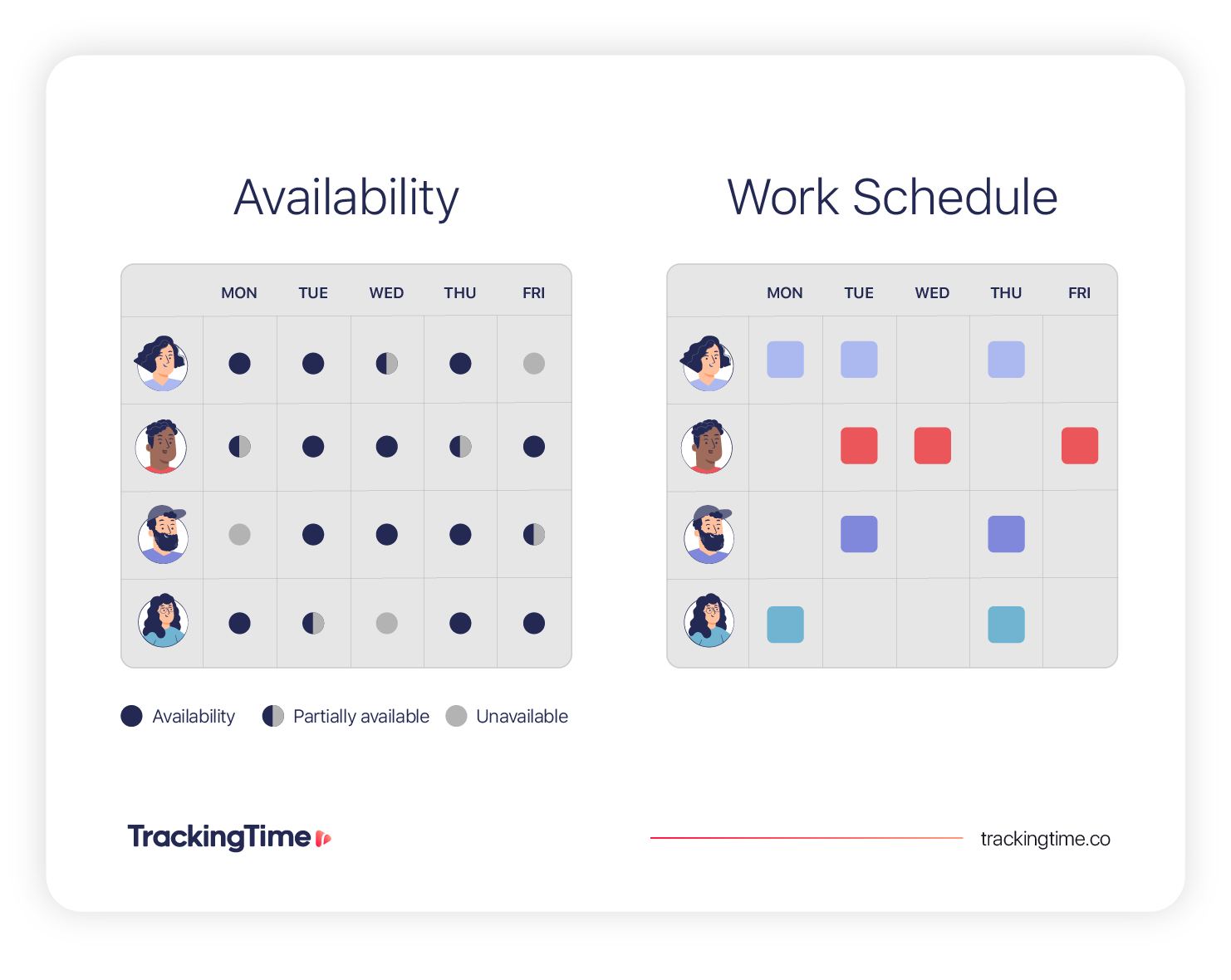
Teams use scheduling availability information to understand staffing options, coordinate shift coverage, and avoid conflicts between employee preferences and operational needs. Once availability is collected, schedules are built around coverage requirements, business hours, workloads, and team capacity.
Keeping availability and schedules separate helps teams plan more accurately and maintain better visibility into attendance.
| Aspect | Employee Availability | Work Schedule |
|---|---|---|
| Purpose | Shows when employees can potentially work. | Assigns employees to specific shifts or hours. |
| Planning Stage | Collected before schedules are created. | Finalized after staffing decisions are made. |
| Flexibility | May change weekly or seasonally. | Usually fixed once published. |
| Visibility | Helps managers understand staffing availability before scheduling. | Shows confirmed staffing coverage and assigned hours. |
| Used By | Managers during planning and staffing. | Employees and teams during daily operations. |
Related Workforce Planning Terms
| Concept | Meaning |
|---|---|
| Employee availability | When an employee can work |
| Work schedule | When an employee is assigned to work |
| Working hours | The amount of time an employee works |
These workforce planning concepts are closely connected but serve different purposes. Employee availability supports staffing and scheduling decisions before work is assigned, while work schedules and working hours help teams manage operations, attendance, and workload visibility after schedules are finalized.
Explore how employee work schedules and working hours affect shift planning, workload coordination, and attendance management across teams. Check out our guides on
Employee Availability Examples
Work availability can vary depending on the role, schedule structure, and type of business. The examples below show how teams use availability information to plan shifts, coordinate workloads, and avoid scheduling conflicts in real work environments.
Example 1: Customer Support Representative
A customer support representative working for a SaaS company submits scheduling availability from Monday to Friday between 1 PM and 9 PM. The operations manager uses this information to schedule afternoon and evening support coverage for their customers.
🕒 Availability: Monday–Friday, 1 PM–9 PM
📅 Schedule: Assigned to late support shifts during weekdays
✅ Impact: Helps maintain customer coverage during peak hours
⚠️ Challenge: Limited availability for morning team meetings
Example 2: Hybrid Marketing Coordinator
A marketing coordinator working in a hybrid team is only available for office work on Tuesdays and Thursdays. The team uses this availability schedule to coordinate in-person meetings and collaborative planning sessions.
🕒 Availability: Remote Monday, Wednesday, and Friday; office Tuesday and Thursday
📅 Schedule: In-office meetings scheduled on collaboration days
✅ Impact: Improves hybrid coordination and office-based planning
⚠️ Challenge: Last-minute office changes can affect team coordination
Example 3: Freelance Graphic Designer
A freelance graphic designer supporting multiple agency clients shares weekly work availability every Monday. Availability changes depending on project deadlines and client workload.
🕒 Availability: 20 hours per week, with flexible daytime availability
📅 Schedule: Project work assigned based on weekly capacity
✅ Impact: Helps plan capacity, avoid overbooking, and coordinate deadlines
⚠️ Challenge: Availability may change week to week during busy periods
Example 4: Agency Account Manager
An account manager at a digital agency supports several client accounts and has fixed internal meeting blocks during the week. They are available for client calls Monday to Thursday, but keep Fridays reserved for reporting, planning, and async follow-ups.
🕒 Availability: Client calls Monday–Thursday, 10 AM–4 PM
📅 Schedule: Client meetings booked within call windows
✅ Impact: Protects planning time and keeps communication predictable
⚠️ Challenge: Urgent requests may fall outside availability
These examples show how managers use work availability to make staffing decisions. Clear availability information helps teams improve planning, maintain coverage, and reduce scheduling conflicts across changing workloads and schedules.
What Is an Availability Schedule?
An availability schedule is a document or shared schedule that shows when an employee is available to work. Teams use availability schedules to organize staffing, coordinate shifts, and plan workloads before creating final work schedules.
Employees usually share work availability with managers through weekly availability forms, shared calendars, recurring availability templates, or scheduling systems. Some teams use fixed availability schedules that stay consistent every week, while others update availability regularly based on changing workloads, classes, personal commitments, or seasonal demand.
For example, a team member may submit recurring weekday availability, while another employee updates their availability every week depending on project work.
| Employee | Availability |
|---|---|
| Employee A | Monday–Friday, 8 AM–4 PM |
| Employee B | Tuesday–Saturday, 10 AM–6 PM |
| Employee C | Weekdays after 2 PM only |
Clear availability schedules help managers reduce scheduling conflicts and maintain better coverage across the team.
How Teams Collect and Manage Work Availability
Teams collect employee availability in different ways depending on how schedules are organized and how often availability changes.
In smaller teams, managers may use weekly forms, shared calendars, or team communication channels to track work availability. Larger teams often rely on scheduling and attendance systems to centralize availability information and coordinate staffing more efficiently.
How Teams Collect and Manage Work Availability
As schedules become more flexible and teams more distributed, many organizations also use time tracking workflows alongside scheduling and attendance systems to improve visibility into employee availability, working hours, and staffing coordination across teams.
Some businesses ask employees to submit availability every week, while others use recurring availability templates for more consistent schedules. Teams with flexible schedules or rotating shifts may also allow employees to submit shift preferences in advance to support planning and workload coordination.
Common Ways Teams Manage Staff Availability
- Weekly availability forms: Useful when availability status changes often from week to week.
- Shared calendars: Helpful for hybrid teams coordinating meetings, office days, and remote availability.
- Shift preference submissions: Useful for teams that need to balance employee preferences with coverage needs.
- Team communication channels: Good for quick updates, last-minute changes, or shift swap requests.
- Scheduling and attendance systems: Helpful when teams need one central place to manage availability, schedules, and attendance visibility.
Typical Employee Availability Process
Most teams follow a simple process to manage employee availability before schedules are published:
- Employees submit availability information
- Managers review staffing and coverage needs
- Schedules are created around business requirements
- Availability updates are communicated regularly
- Attendance and coverage are monitored after schedules are finalized
Managing team availability is especially important for hybrid teams, shift-based businesses, and organizations with changing staffing needs.
📚 Related Resources
Learn how time and attendance practices support scheduling visibility and how time tracking helps teams understand workloads
Common Staff Availability Challenges
Managing staff availability becomes more difficult when schedules change frequently, communication is inconsistent, or staffing needs shift over time. The challenges below are common in teams with flexible schedules, hybrid work arrangements, or changing workload demands.
1. Last-minute availability changes
Employees may need to change their availability because of personal commitments, emergencies, or unexpected workload changes. When this happens close to a scheduled shift or meeting, managers may need to adjust coverage quickly.
2. Misalignment between availability and staffing needs
An employee may be available during certain hours, but those hours may not match the team’s busiest periods or coverage requirements. This can create gaps even when availability has been submitted correctly.
3. Inconsistent availability updates
Availability can become outdated if employees do not update it regularly. This is especially common in teams with changing weekly schedules, hybrid work arrangements, or seasonal staffing needs.
4. Communication problems
Availability updates can get lost when they are shared across different channels, such as email, chat, spreadsheets, or verbal conversations. This makes it harder for managers to know which information is current.
5. Overlapping availability across too few employees
Several employees may be available during the same time windows, while other periods remain uncovered. This can make schedules look full on paper but still leave the team with coverage gaps.
What Happens When Employee Work Availability Is Poorly Managed?
Poor visibility can create staffing gaps, scheduling conflicts, inconsistent attendance coverage, and unnecessary last-minute changes. Over time, this can reduce scheduling accuracy, increase workload pressure on available employees, and make workforce coordination more difficult across teams.
Why Businesses Need Visibility Into Employee Availability
Employee availability becomes much harder to coordinate when managers lack clear visibility into who is available, when they can work, and how availability changes over time.
Clear availability visibility helps teams coordinate schedules more accurately, identify staffing gaps earlier, and improve attendance planning across changing workloads, flexible schedules, and distributed teams.
| Without Clear Availability Visibility | With Clear Availability Visibility |
|---|---|
| ❌ Scheduling conflicts appear late | ✔️ Teams plan schedules more accurately |
| ❌ Managers rely on outdated information | ✔️ Managers identify conflicts earlier |
| ❌ Coverage gaps are harder to detect | ✔️ Staffing coverage becomes more predictable |
| ❌ Last-minute shift changes become more common | ✔️ Attendance coordination improves |
📖 Related Reading
Explore how flex time works, when it makes sense, and how companies use flexible scheduling without losing visibility into availability and coverage.
Why Employee Availability Matters
Employee availability plays an important role in staffing coordination, workload planning, and day-to-day operations. Teams rely on accurate availability information to assign shifts more effectively, balance workloads, and reduce scheduling conflicts before schedules are finalized.
This makes it easier to balance workloads, maintain consistent staffing coverage, and avoid last-minute schedule changes that disrupt operations.
Teams that regularly manage different working hours, rotating shifts, or remote availability often rely on clear availability tracking to improve planning visibility across the organization.
Employee Availability: Key Takeaways for Better Scheduling
Employee availability shows when employees are able to work before schedules are created. Unlike a work schedule, which assigns specific shifts or hours, employee availability helps managers understand staffing options, coordinate workloads, and plan coverage more effectively.
Clear employee availability helps teams plan schedules more accurately, coordinate staffing needs, and reduce conflicts before schedules are finalized. As teams become more distributed and schedules become more dynamic, staff availability becomes an essential part of workforce planning and operational coordination.
🛠️ Time & Attendance Resources
Explore additional time and attendance resources to learn more about scheduling coordination, workload visibility, and employee attendance planning.
Frequently Asked Questions about Employee Availability
What is the meaning of employee availability?
Employee availability is the days and times an employee is able or willing to work. Businesses use availability information to plan schedules, coordinate staffing, and manage attendance coverage more effectively.
What does availability mean for a job?
Availability for a job refers to the days, hours, shifts, or work locations a person is available to work. Employers use this information to determine scheduling compatibility and staffing coverage.
What is an availability schedule?
An availability schedule is a shared record of when employees are available to work. Teams use it before creating work schedules to plan shifts, meetings, and coverage.
What is an example of availability?
An example of availability is an employee who can work Monday to Friday from 1 PM to 9 PM, or a hybrid employee who is available remotely every day but only in the office on Tuesdays and Thursdays.
How to show work availability?
Employees can show work availability by sharing available days, time ranges, preferred shifts, unavailable periods, and location limits. This can be submitted through a form, calendar, or scheduling process.
What do you mean by employee scheduling?
Employee scheduling is the process of assigning employees to specific shifts, hours, meetings, or work periods. It uses availability, staffing needs, and workload requirements to create a final work schedule.
How to manage staff availability?
Teams can manage staff availability by collecting updates regularly, using one consistent format, keeping availability centralized, and reviewing it before creating schedules.
Can employee availability change over time?
Yes. Employee availability can change over time because of personal commitments, seasonal demand, hybrid work arrangements, role changes, or changing business needs.


