Time Blocking: Method, Examples & How to Make It Work

Time blocking is a simple idea with a real impact: instead of reacting to whatever lands in your inbox first, you assign every hour a job before the day begins. No reactive spirals, no end-of-week surprises. Just a plan — and, with TrackingTime, the data to back it up.
💡 Quick Summary
- Time blocking assigns specific tasks to specific time slots in your calendar, replacing open-ended to-do lists with a structured daily plan.
- The method works in five steps: list your tasks, estimate time, place blocks on your schedule, add buffer, and review regularly.
- Time blocking, time boxing, and task batching are related but distinct. Each one solves a different scheduling problem.
- Common mistakes include overfilling the day, underestimating how long tasks take, and making the schedule too rigid to adapt when priorities shift.
- For project-based teams, time blocking works best when connected to actual time tracking — so the gap between what was planned and what was executed becomes visible and actionable.
Table of Contents
What Is Time Blocking?
Time blocking is a planning method that assigns specific tasks or types of work to specific time slots before the day begins. Instead of working from an open-ended to-do list and deciding reactively what to do next, you build a schedule in advance so each block of time has a clear purpose when you sit down to work.
In practice, a time-blocked day might include a morning block for focused project work, a mid-morning block for email and admin, and an afternoon block for meetings and follow-ups. The exact structure depends on role and workload. What stays constant is the principle: you decide intentionally how your time will be used, rather than letting the day decide for you.
The goal is not to plan every minute perfectly. It is to create enough structure to protect focused work, reduce constant task switching, and make your workload visible before the day becomes reactive. Time blocking sits within a broader set of time management practices that share this same premise: decisions made before the day begins are more deliberate than decisions made under pressure. A time-blocked schedule does not need to be rigid to be useful. It needs to be realistic.
💡 Flexibility is part of the method
Time blocking gives your day a plan. It does not require you to follow that plan perfectly when priorities change — it requires you to have made one.
The Time Blocking Method: Step by Step
Time blocking works by assigning tasks to time slots before the day begins, rather than deciding what to work on in the moment. The method is straightforward, but it works best when the schedule is realistic and leaves room to adapt. Here is how it works.
1. List your tasks
Start by identifying everything that needs your attention during the day: focused project work, meetings, admin tasks, follow-ups, and any other commitment that requires time on your schedule. The goal at this stage is not to prioritize — it is to see the full scope of what you are working with before deciding where each item belongs.
2. Estimate the time needed
Assign a realistic time estimate to each task. It does not need to be exact, but it should be honest. Most people underestimate how long tasks take, which is one of the most common reasons time-blocked schedules fall apart by midday. When in doubt, add buffer rather than compressing too many tasks into a single block.
3. Place blocks on your schedule
Assign each task to a specific time slot on your calendar. Reserve your highest-focus blocks for work that requires sustained attention, and cluster lower-focus tasks like email and admin into dedicated windows. Task batching — grouping similar types of work into the same block — helps reduce the context switching that fragments concentration throughout the day. This is the core of the time blocking strategy: giving each part of the day a defined purpose before it starts.
4. Add buffer time
A schedule with no gaps is a schedule that will not survive contact with a real workday. Add buffer blocks between major tasks to handle transitions, overruns, and unexpected requests. Back-to-back blocks with no breathing room are one of the fastest ways to abandon the method entirely, because the first disruption makes the rest of the schedule feel unrecoverable.
5. Review and adjust
At the end of each day or week, look back at what worked and what did not. Which tasks took longer than expected? Which blocks were consistently interrupted? Over time, this review makes your estimates more accurate and your schedule more dependable. Treat the method as a planning discipline that improves with practice, not a fixed system that either runs perfectly or fails.
A Practical Time Blocking Example
Here is what a structured, time-blocked workday can look like in practice:
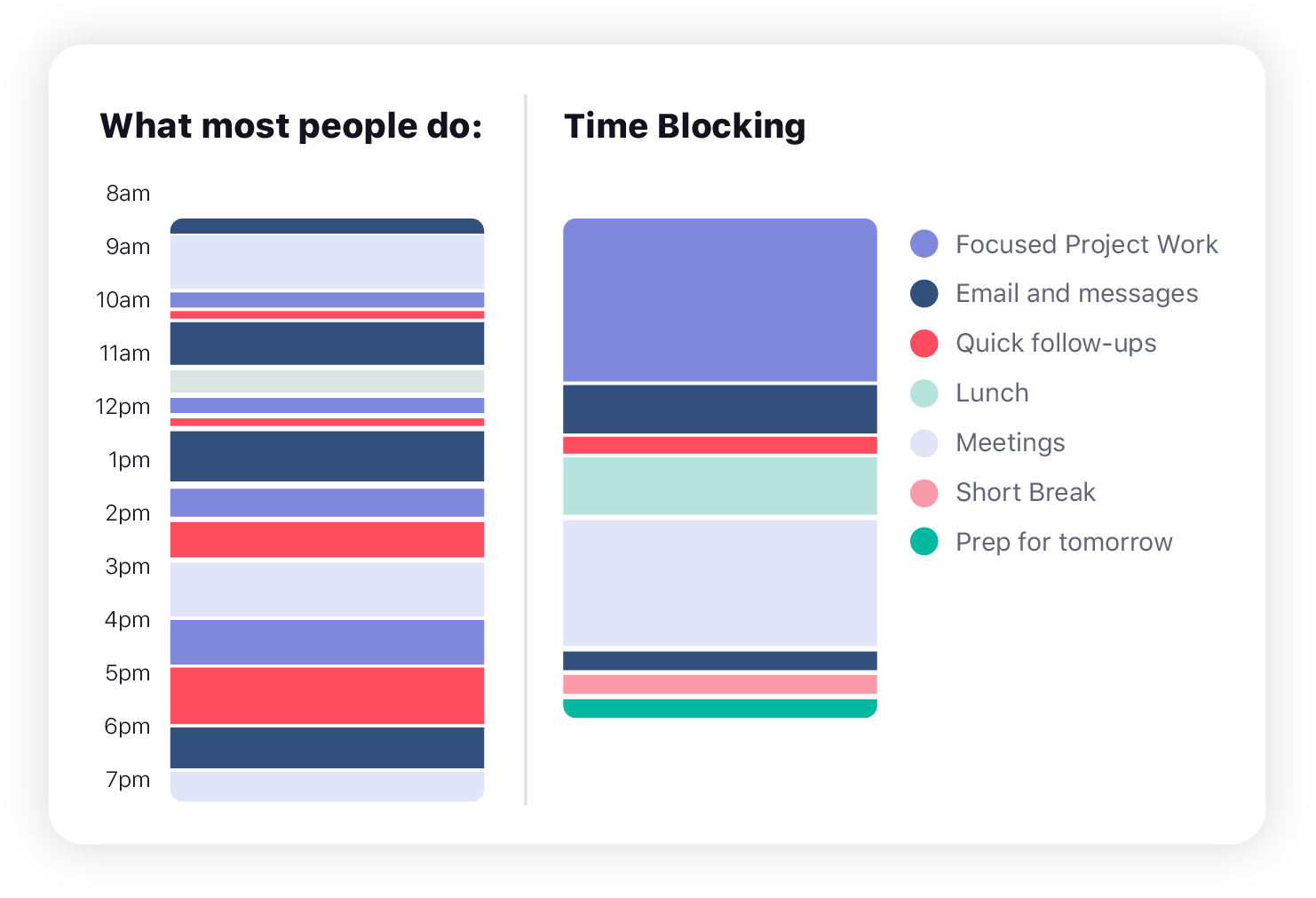
The day opens with the longest block reserved for work that requires sustained attention — the kind of work that suffers most from interruptions. Shorter, lower-intensity tasks like email and messages are grouped into a dedicated window later in the morning, after the most cognitively demanding work is already done. Meetings are clustered in the afternoon to avoid fragmenting the earlier part of the day. A final planning block closes the schedule and keeps the next morning from starting cold.
The specific structure will look different depending on role, team rhythm, and workload. A consultant with back-to-back client calls will block their day differently than a developer with long focus cycles. What the structure shares is the same underlying logic: each part of the day has a purpose assigned to it before it begins, rather than emerging reactively as work piles up.
Benefits of Time Blocking
When used consistently, time blocking changes how the workday feels to manage. The benefits are not abstract — they show up in how much focused work actually gets done, how often the schedule holds, and how clearly people can see whether their priorities are getting adequate time.
- More structure: The day has a defined shape, so your time is not guided only by a to-do list or the last message you received.
- Better focus: Dedicated blocks make it easier to stay on one type of work for longer without constant task switching eroding concentration.
- Clearer workload visibility: You can see before the day starts whether your schedule is realistic and whether high-priority work has enough time assigned to it.
- Less reactive work: Blocking time in advance reduces the habit of jumping between email, meetings, and small requests throughout the day without any intentional plan.
- Lower decision fatigue: When you already know what each block is for, you spend less energy deciding what to do next — which leaves more capacity for the work itself.
These benefits compound over time. The first week of time blocking often feels imprecise as estimates are off and the schedule gets disrupted. By the third or fourth week, the blocks become more accurate and the structure more resilient, because the daily review has had time to improve both the estimates and the plan. Building stronger time management skills in general follows the same pattern: the discipline becomes easier as the feedback loop between planning and execution tightens.
💡 Protect your most important work first
If high-priority tasks never get a dedicated block on the schedule, they will consistently get displaced by whatever is most urgent in the moment.
Time Blocking vs. Time Boxing vs. Task Batching
Time blocking, time boxing, and task batching are closely related methods, but they solve different scheduling problems. Using only one term for all three creates confusion about what each approach is actually asking you to do.
Time blocking determines when work happens. Time boxing determines how long you will spend on it. Task batching determines which tasks belong together in the same session. The three methods are complementary and often used in combination, but they are not interchangeable.
| Method | Core question it answers | How it works | Best for |
|---|---|---|---|
| Time Blocking | When will I work on this? | Assign tasks to specific time slots on your calendar before the day begins | Building a structured daily plan and protecting focused work from interruption |
| Time Boxing | How long will I spend on this? | Set a fixed time limit for a task, then stop or reassess when the box expires | Tasks that tend to expand without a firm boundary, or work that benefits from deadline pressure |
| Task Batching | Which tasks should I group together? | Collect similar or related tasks and complete them in one dedicated session | Repetitive or context-similar tasks like email, admin, and follow-ups that are cheaper to handle in bulk |
In practice, a well-designed schedule often uses all three. You might block 9:00 to 11:00 for project work (time blocking), set a 45-minute box for a specific deliverable within that block (time boxing), and consolidate all of your email and Slack replies into a single 30-minute window at 11:30 (task batching). Each method strengthens the others when applied together.
👉 Related time management methods
- Day Theming — organize each day around a broader type of work
Common Time Blocking Mistakes (and How to Fix Them)
Most people who try time blocking and abandon it do not abandon it because the method is wrong. They abandon it because the schedule they built was unrealistic from the start. The mistakes below are the most common culprits, and each one has a straightforward fix.
- Overfilling the day: Scheduling more than realistically fits creates a day that feels behind from the first hour. Plan for 70 to 80 percent of available time, leaving the rest as buffer for what you did not anticipate.
- Underestimating how long tasks take: Optimistic estimates cause the entire schedule to slip when the first task runs long. Track how long similar tasks actually take over two or three weeks, then use those numbers instead of guesses.
- Leaving no buffer time: Back-to-back blocks look efficient but make the schedule brittle. Add 10 to 15 minutes of unscheduled time after each major block.
- Making the schedule too rigid: A plan that cannot absorb a shifted priority becomes a source of stress rather than structure. Treat the schedule as a guide, not a contract. Rescheduling a block is not failure — it is the method working as intended.
- Blocking time without prioritizing first: Filling every block with whatever is on the list gives equal weight to everything, including tasks that do not deserve prime time. Assign your most important work to your sharpest hours before placing anything else.
- Checking messages during focused blocks: Interrupting a deep work block to handle email or notifications defeats the purpose of the block. Designate specific windows for asynchronous communication and protect the others.
The most durable fix for all of these mistakes is the same: a short daily review. Five minutes at the end of the day to look at what held and what did not will, over a few weeks, produce a schedule calibrated to how you actually work rather than how you imagine you work.
Time Blocking and Time Tracking: Closing the Loop
Time blocking tells you what you intend to do. Time tracking tells you what you actually did. For individuals, the gap between those two things is useful information for improving estimates and adjusting the schedule. For teams that work on client projects, retainers, or billable hours, that gap is a business metric — and ignoring it has a cost.
When a project team blocks three hours per day for a client engagement, that plan exists only as calendar intent. It does not automatically appear in a timesheet, it does not update a retainer budget, and it does not appear in a report to the client. What closes the loop is converting those planned blocks into recorded time entries — so the data from execution is as structured as the plan that preceded it.
Agencies that run on retainers encounter this problem routinely. The team plans the week, the work gets done, and the retainer overrun is discovered at month-end — when the margin is already gone and the conversation with the client is no longer preventable. The blocks were there. The tracking was not.
Three ways to connect time blocking to time tracking
There are three practical approaches, depending on how your team already works.
Via Google Calendar or Outlook integration. If your team already plans the week using calendar events, a calendar integration can sync those events directly into TrackingTime as time entries. Planning and tracking become the same action — the calendar event is created once, and it appears in the time record automatically. This approach works well for teams with structured weekly planning rituals and an existing calendar habit.
Via scheduled events natively in TrackingTime. Rather than building blocks in a calendar app and syncing them, you can create scheduled time events directly inside TrackingTime. This means your planned hours and your actual hours live in the same system from the start. Before the week begins, you can already see how many hours are allocated to each project, how that compares to the available budget, and whether the retainer has room. When the work gets done, those scheduled events are logged as real time entries with a single action. For project-based teams, this visibility before execution is the part that changes how retainer risk is managed.
Via manual logging after the block. The simplest approach: use the time blocking schedule as a guide during the day and log the actual hours at the end of the day or week. Less precise, but functional for teams with strong individual discipline and low need for real-time workload visibility.
The underlying principle is the same across all three: a calendar block is a plan, not a record. The plan is useful for structuring the day. The record is what drives billing, reporting, and financial decisions. Teams that connect the two operate with a level of visibility that calendar-only time blocking cannot provide.
👉 Time blocking inside TrackingTime
TrackingTime supports scheduled events natively — so planned hours, actual hours, and project budgets live in the same place. See how AutoTrack and calendar integrations work together.
Frequently Asked Questions About Time Blocking
What is the concept of time blocking?
Time blocking is a planning method where you assign specific tasks or types of work to specific blocks of time in your calendar. Instead of working from an open-ended to-do list, you decide in advance what you will work on and when. Each block has a clear purpose before the day begins, which reduces reactive work and protects time for focused tasks.
How do you start time blocking as a beginner?
Start by listing the tasks you need to complete that day, estimating how long each one will take, and placing them into specific time slots. Do not try to plan every hour — block two or three priority tasks first, add buffer between them, and keep the schedule loose enough to absorb changes. Review what worked at the end of the day and adjust your estimates from there.
Is time blocking the same as time boxing?
No. Time blocking determines when you will work on something by assigning it to a specific slot in your calendar. Time boxing determines how long you will spend on it by setting a fixed limit, after which you stop or move on. The two methods are complementary — you can block time for a task and then box a specific part of that block — but they answer different scheduling questions.
Does time blocking actually work?
Time blocking works when the schedule is realistic and includes buffer time. It is most effective when treated as a flexible planning tool rather than a rigid system. The first week often feels imprecise, but a short daily review improves estimate accuracy over time. For teams, it works best when connected to actual time tracking, so planned hours can be compared against what was really executed.
What is the difference between time blocking and task batching?
Time blocking assigns any type of work to a specific time slot. Task batching groups similar tasks together so they can be handled in a single session — reducing the context switching that happens when you mix different types of work throughout the day. Task batching is often used inside a time-blocked schedule: for example, blocking 11:00 to 11:30 specifically for all email and admin tasks rather than handling them throughout the day.
Can time blocking help with retainer management for agencies?
Time blocking helps agencies plan how hours will be allocated across clients at the start of each week. But planned hours only become useful data when they are recorded as actual time entries. When time blocking is connected to time tracking — either through a calendar integration or by creating scheduled events directly in a time tracking tool — teams gain visibility into how planned hours compare to actual delivery, which makes retainer overruns visible before they affect the client relationship or the project margin.


