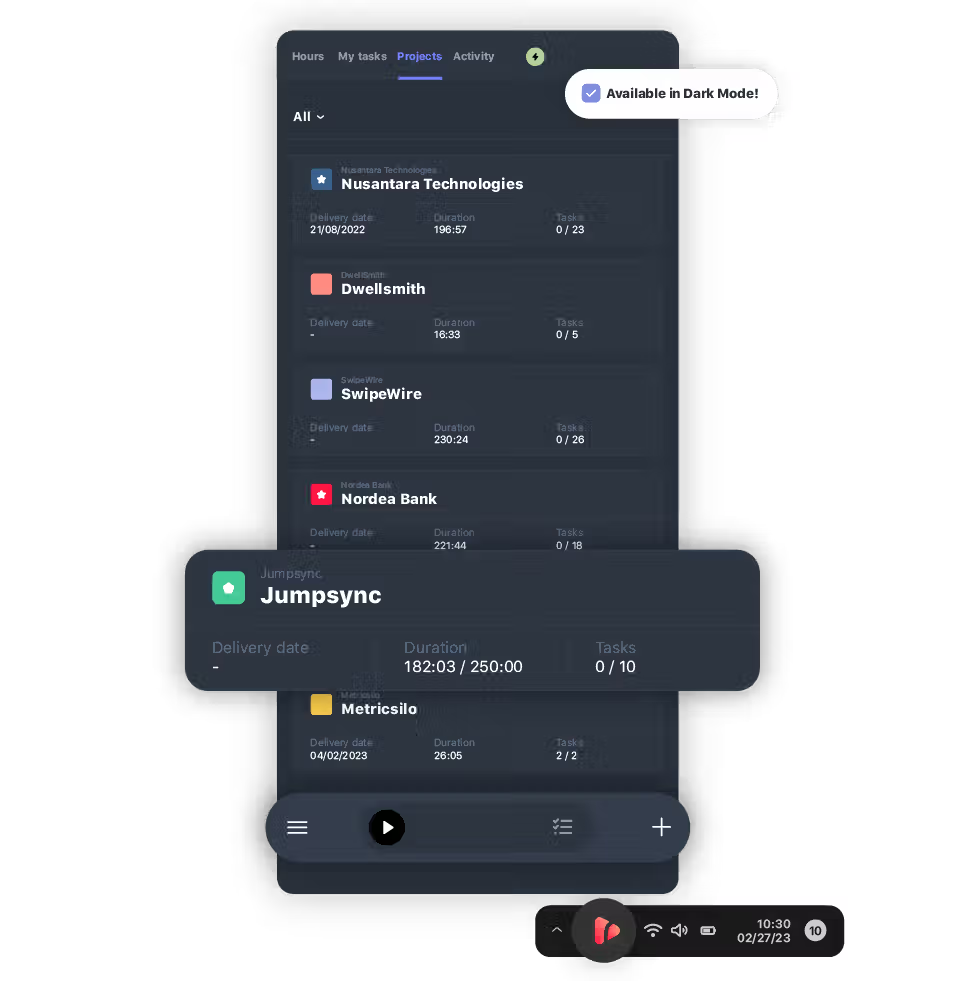


Automatically log work hours with reliable, precise time data for accurate reports.
Time Tracker for Windows
Track time on Windows.
Gain a comprehensive overview of your tasks and projects, and log team hours effortlessly with our Windows time tracker, designed to fit seamlessly into your daily workflow.

time tracking apps
A time tracker for all your devices.
TIME TRACKER DESKTOP APP
Effortless desktop time tracking.
Easily track your time with our intuitive desktop app, created to integrate seamlessly into your Windows workflow.

Visualize your work pace.
Stay on top of weekly activities and monitor progress to pinpoint areas for improvement. Manage workloads efficiently to meet goals and deadlines.
Pace
Boost productivity.
Switch between web and desktop apps smoothly to ensure time tracking consistency. Easily add and manage tasks or projects to streamline workflow on your Windows system.
Devices
Easy access
Open the desktop time tracker directly from your Windows taskbar, enabling you to manage multiple tasks without interrupting your flow.
Desktop assistantTime Tracker Built for Windows
Track, manage, and report from your desktop.
Designed to fit right into your Windows workflow, this desktop app makes time tracking effortless. Log hours, schedule tasks, and report time without opening a browser.

Native Windows app.
Track time directly from your desktop with a lightweight app designed for Windows. No browser required—just launch and go.

Flexible time tracking.
Start or stop timers, log hours manually, or let AutoTrack record your activity in the background while you work.

Schedule your workday.
Organize your day by scheduling your tasks directly on the app, and log time against them once you complete them.

Manage tasks.
Visualize your assigned tasks and log time against them within the desktop app, access task details and edit or reassign.
AUTOMATED TIME TRACKER
Track time, not people.
Enjoy 100% private and automatic time tracking for Windows.

Forget manual tracking

Enhance work habits
Access valuable activity insights to support productivity and optimize work habits.

Accurate reporting
Trust in automatic, error-free tracking to generate precise reports, allowing accurate billing.


Works with 60+ tools your team already uses











Social proof
Why 15,000+ teams trust TrackingTime.

High rates from our users confirm that we’re built for teams.






-

OPENSTAX
-
MOMA
-
PLAYPASS
-
SSL
-
SMARTSHEET
-

MCI






FAQS
Straight answers for Windows users.
The best time tracker for Windows is one that lets you log time from your taskbar, switch tasks seamlessly, and sync data across devices. Many Windows users also need integrations with Microsoft Teams, Outlook, and Planner. TrackingTime’s time tracker for Windows checks all these boxes, making it a strong choice for professionals and teams.
Yes. Time tracking apps help with productivity, payroll, and compliance. On Windows, they can also integrate with tools you already use, like Office 365 or Microsoft Teams.
get started
Track from your PC, AutoTrack fills in the rest.
AutoTrack runs in the background, detects activity, and suggests entries you just confirm. Free to start, no credit card required.
Start for free