Best Time Tracking Software in 2026: Top Tools Compared by Use Case

Choosing the right time tracking software depends on how your team works. This comparison breaks down the top tools by use case, so you can quickly identify which one fits your workflow, reporting needs, and team size.
Compare the Best Time Tracking Software
| Tool | Best for | Good fit if you need | Pricing model |
|---|---|---|---|
| #1 TrackingTime | SMB teams & operations | Timesheets, project visibility, team coordination | Free plan + paid tiers |
| #2 Toggl Track | Individuals & small teams | Simple, fast time tracking | Free plan + paid tiers |
| #3 Clockify | Budget-conscious teams | Free plan with scalable features | Free plan + paid tiers |
| #4 Hubstaff | Workforce operations | Scheduling, payroll, field teams | Paid plans only |
| #5 Time Doctor | Performance-focused teams | Detailed reporting & accountability | Paid plans only |
| #6 Harvest | Agencies & services | Billing, invoicing, client tracking | Free (limited) + paid |
| #7 Everhour | PM-integrated teams | Works inside PM tools | Paid plans only |
| #8 Timely | Automated tracking | AI-based time capture | Paid plans only |
| #9 RescueTime | Individuals | Personal productivity insights | Free + paid tiers |
| #10 TimeCamp | Budget teams | Low-cost tracking + reporting | Free + paid tiers |
This guide compares the best time tracking software in 2026 by real-world use case, adoption fit, and pricing model. Instead of generic rankings, you’ll see which tools work best for freelancers, remote teams, agencies, compliance-heavy organizations, and teams looking for free time tracking software that actually works at scale.
💡 How to use this list: Start with the ranked tools below if you want a general shortlist. If you already know your workflow, jump to “Best Time Tracking Tools by Use Case” to find the fastest fit.
Best Time Tracking Software
What Is Time Tracking Software?
Time tracking software records time spent on tasks, projects, or clients using timers, manual entries, or automatic capture. Teams use it to bill clients accurately, run payroll, forecast capacity, measure productivity, and understand where work actually goes — especially in remote and hybrid environments where visibility is limited.
How We Evaluated the Best Time Tracking Software
We evaluated tools based on what actually matters to buyers: adoption and data usefulness. A time tracker only works if people use it consistently, and the data only matters if it holds up for real decisions.
Core Time Tracking Features
Timers, manual edits, timesheets, and approvals.
👉 Why it matters: If tracking is slow or rigid, teams won’t use it consistently.
Reporting and Analytics
Project and client reports, exports, utilization, profitability, and compliance needs.
👉 What we looked for: Reports that answer real questions — what to bill, what projects cost, where time goes.
Integrations
Project management tools, calendars, communication apps, and accounting or payroll systems.
👉 Why it matters: Tracking works best where work already happens.
Pricing and Scalability
Free tiers, per-user pricing, and what paid plans unlock.
👉 How we compared: Not just price, but whether free plans are usable for real teams and how costs scale.
User Experience and Onboarding
Daily workflow clarity, rollout friction, and admin control.
👉 What we judged: How quickly a team can start tracking and keep data consistent without heavy training.
Best Time Tracking Software (Ranked)
The tools below are ranked based on how well they perform in real-world team environments, not on feature volume alone. Each ranking considers ease of adoption, accuracy of time data, reporting usefulness, integration flexibility, and how well the software scales as teams grow.
This ranking prioritizes tools that teams consistently use over time and that produce reliable data for billing, payroll, and planning. A higher rank reflects stronger overall fit across common use cases, while lower-ranked tools may still be excellent choices for more specific workflows.
1. TrackingTime
TrackingTime is the most balanced option for teams that want accurate time tracking without adding friction or default monitoring. It combines flexible tracking methods with reporting and integrations, while maintaining a trust-first posture that works well for remote and hybrid teams.
🏆 Best overall for teams and adoption at scale

A key advantage is its free plan marketed for unlimited users, which removes one of the biggest rollout blockers: seat limits. When everyone can track time from day one, data stays consistent and adoption is higher.
- Best for: Teams that want time tracking for projects, reporting, and day-to-day visibility without surveillance
- Key features: Timer + manual tracking, project/task structure, reports, integrations
- Pricing: Free plan marketed for unlimited users; paid plans unlock advanced features
- Pros: Easy to roll out; strong adoption; practical for growing teams
- Cons: Not a fit if screenshots or strict monitoring are required
- Editor’s take: The best all-around starting point when adoption matters
- Quick takeaway: Ideal if you’re asking, “Is there a free time tracking tool that works for a whole team?”
Why it stands out:
TrackingTime offers unlimited users, tasks, projects, clients, and integrations — even on the free plan — plus combines automatic time tracking, attendance, PTO, and project management in one streamlined solution, helping teams scale without switching tools, ideal for small businesses.
2. Toggl Track
Toggl Track is built for speed and minimal friction. It’s popular with freelancers and small teams that want straightforward time tracking without complex setup.
✨ Best for simplicity and fast daily tracking

- Best for: Freelancers and small teams
- Key features: Fast timers, manual entries, simple reports
- Pricing: Free up to 5 users; paid plans add team features
- Pros: Very easy to use; low habit friction
- Cons: Limited admin controls as teams scale
- Editor’s take: Excellent for simplicity, less ideal for structured operations
- Quick takeaway: Choose Toggl when speed matters more than governance
3. Clockify
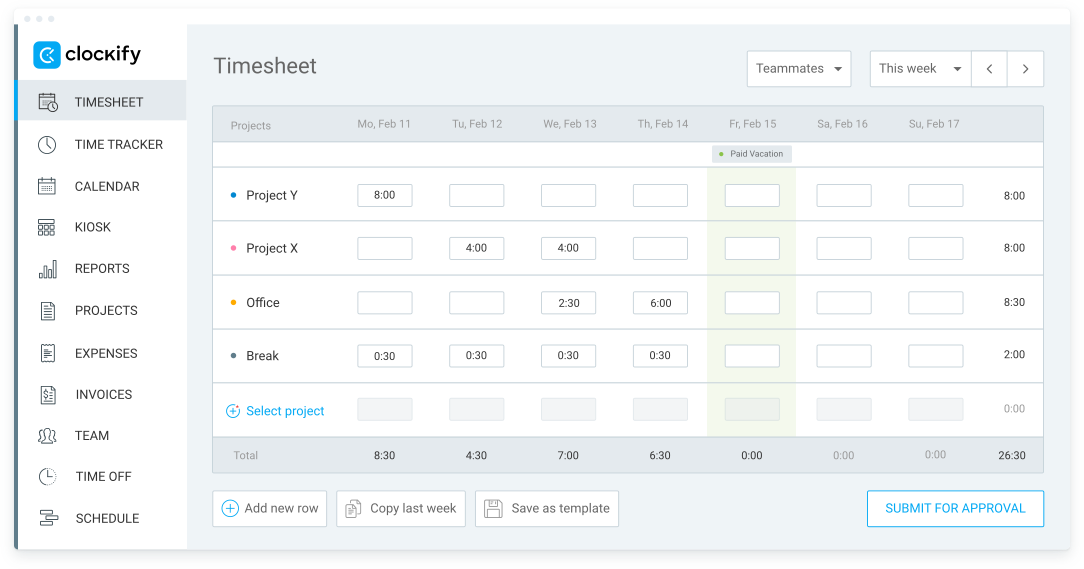
Clockify is often chosen when budget and team size are the main constraints. Its free tier is positioned for unlimited users, making it a common baseline choice for teams starting with time tracking.
✨ Best free baseline for large rollouts
- Best for: Large teams needing a free starting point
- Key features: Timers, timesheets, reporting, apps
- Pricing: Free plan marketed as $0 for unlimited users; paid tiers add controls
- Pros: Easy to deploy widely; low commitment
- Cons: Advanced reporting and admin controls may require upgrades
- Editor’s take: Great for broad rollouts, confirm what’s behind paid tiers
- Quick takeaway: A practical free baseline
4. Hubstaff
Hubstaff is designed for teams that explicitly require monitoring, including screenshots and activity tracking. It works best where oversight is non-negotiable and expectations are clearly defined.
✨ Best for monitoring and compliance-driven environments

- Best for: Compliance-focused or monitoring-required teams
- Key features: Time tracking with screenshots and monitoring reports
- Pricing: Paid plans; monitoring features vary by tier
- Pros: Strong proof-of-work capabilities
- Cons: Can reduce trust and adoption in autonomy-first cultures
- Editor’s take: Choose only if monitoring is truly required
- Quick takeaway: Best for oversight, not just time logs
5. Time Doctor
Time Doctor emphasizes activity insights and behavioral analytics alongside time tracking. Like other monitoring-heavy tools, it fits best in policy-driven environments.
✨ Best for behavior analytics and workforce visibility

- Best for: Organizations needing visibility and analytics
- Key features: Monitoring-oriented reports and productivity insights
- Pricing: Tiered paid plans
- Pros: Strong analytics for oversight
- Cons: Culture-sensitive; heavier feel
- Editor’s take: Powerful for analytics, not ideal for trust-based teams
- Quick takeaway: Choose when visibility is the main goal
6. Harvest
Harvest is purpose-built for teams that track time primarily to bill clients. Its strength is the time-to-invoice flow.
✨ Best for billing and invoicing workflows

- Best for: Agencies and service teams
- Key features: Time tracking, invoicing, expenses
- Pricing: Paid per-seat plans
- Pros: Clean billing workflow; client-ready reports
- Cons: Limited for broader team operations
- Editor’s take: Ideal when billing accuracy is the priority
- Quick takeaway: Pick Harvest for invoicing-first workflows
7. Everhour
Everhour works best when time tracking lives inside your project management tool, reducing context switching and improving adoption.
✨ Best for PM-centric teams

- Best for: Teams working inside a PM tool
- Key features: Task-based tracking, reports, budgeting
- Pricing: Paid plans; small-team options may exist
- Pros: Strong adoption in PM-driven teams
- Cons: Plan limits can affect integrations
- Editor’s take: Great if tracking inside PM is non-negotiable
- Quick takeaway: Best when tasks drive time tracking
8. Timely
Timely is designed for people who forget timers. It captures activity automatically, then requires review.
✨ Best for automatic time capture

- Best for: Context-switch-heavy roles
- Key features: Automatic capture with review workflow
- Pricing: Paid plans
- Pros: Reduces manual effort
- Cons: Requires a consistent review habit
- Editor’s take: Useful if you dislike manual tracking
- Quick takeaway: Automation first, review required
9. RescueTime
RescueTime focuses on behavior and focus, not billing or payroll.
✨ Best for personal focus insights

- Best for: Individuals optimizing deep work
- Key features: Focus and productivity analytics
- Pricing: Personal and team plans
- Pros: Strong self-management insights
- Cons: Not a billing or payroll tool
- Editor’s take: Personal insight, not team ops
- Quick takeaway: Choose for focus awareness
10. TimeCamp
TimeCamp appeals to teams that want broad coverage in one tool.
✨ Best generalist option

- Best for: Small teams wanting an all-in-one option
- Key features: Time tracking plus operational add-ons
- Pricing: Tiered plans
- Pros: Flexible configurations
- Cons: Less specialized than best-in-class tools
- Editor’s take: Confirm it matches your primary workflow
- Quick takeaway: Breadth over specialization
Best Time Tracking Tools by Use Case
Different teams track time for different reasons. Instead of ranking tools by feature count, this section highlights which time tracking software works best for specific workflows — based on adoption, reporting needs, and how teams actually use the data day to day.
Best for Freelancers
(low friction, fast daily use, simple reporting)
- TrackingTime — A flexible option for freelancers who want project tracking, reports, and room to grow without switching tools later.
- Toggl Track — Lightweight and fast, ideal for solo work where simplicity matters most.
- Harvest — Well suited when tracked time needs to turn directly into client invoices.
Best for Remote Teams
(adoption at scale, collaboration, visibility without surveillance)
- TrackingTime — Strong fit for distributed teams thanks to easy rollout, shared projects, and reporting without default monitoring.
- Clockify — A practical baseline for large remote teams that want broad adoption with minimal upfront cost.
- Everhour — Works well when time tracking needs to live directly inside an existing project management tool.
Best Free Time Tracking Software
(usable free tiers that work beyond a pilot)
- TrackingTime — Positioned as free for unlimited users, making it suitable for full-team rollouts without seat limits.
- Clockify — A common choice for teams needing a no-cost starting point with basic tracking and reporting.
- Toggl Track — Free plan works best for very small teams or individual users.
Best for Agencies and Enterprise Teams
(billing workflows, client reporting, operational scale)
- TrackingTime — A flexible option for agencies that need project visibility, reporting, and team adoption without heavy monitoring.
- Harvest — Designed around invoicing and client billing, making it a natural fit for service-based businesses.
- Timely — Useful for agencies with frequent context switching that benefit from automatic time capture.
Best for Payroll and Compliance
(audit-ready records, policy support, oversight when required)
- TrackingTime — Suitable when teams need reliable time records and reports without a monitoring-first approach.
- Hubstaff — Built for environments where proof-of-work and monitoring are explicit requirements.
- Clockify — Works well when compliance needs focus on accurate time logs rather than behavioral monitoring.
Time Tracking Software Comparison
Choosing the right tool can feel overwhelming, so we’ve put together this quick comparison table. It highlights the key strengths, ideal use cases, and whether each tool includes employee monitoring — helping you find the best match for your team’s needs.
| Tool | Best For | Key Features | Monitoring? |
|---|---|---|---|
| TrackingTime | SMBs, scaling teams | Time, PTO, attendance, 50+ integrations | ❌ |
| Toggl Track | Freelancers, small teams | Simple timers, reporting | ❌ |
| Clockify | Budget-conscious teams | Free plan, invoicing add-ons | ❌ |
| Hubstaff | Monitoring + tracking | Screenshots, GPS, activity levels | ✅ |
| Time Doctor | Monitoring + productivity | Screenshots, app/web tracking | ✅ |
| Harvest | Billing-heavy teams | Time + expenses + invoicing | ❌ |
| Everhour | PM tool users | Asana/Trello integrations | ❌ |
| Timely | Passive tracking | AI auto time logging | ❌ |
| RescueTime | Personal focus | Auto tracking + focus tools | ❌ |
| TimeCamp | Budgets + time + invoicing | All-in-one tracking | ❌ |
Free vs Paid Time Tracking Software
Free plans work well for basic tracking and early adoption. Limitations usually appear in approvals, advanced reporting, permissions, and integrations.
- When free is enough: freelancers, early-stage teams, habit building
- When to upgrade: approvals, finance workflows, compliance, scaling teams
Typical upgrade triggers by team size
| Scenario | What usually works | Upgrade triggers | Why it becomes an issue |
|---|---|---|---|
| 10-user team | Free or entry tiers | Approvals, reporting depth | Managers need consistency |
| 50-user team | Unlimited free tiers | Permissions, audits, integrations | Scale creates inconsistency |
| Monitoring-heavy org | GPS and screenshots | Policy clarity, trust | Monitoring needs alignment |
| Agency | Workflows and collaboration | Client billing, margins | Time must map to invoices |
How to Choose Time Tracking Software
The best time tracking software depends on your team’s size, culture, and priorities. Use this checklist:
- Team size and rollout needs
- Manual vs automatic tracking
- Reporting and approvals
- Integrations
- Budget and scalability
- Compliance requirements
Common Questions about Best Time Tracking Software
What is the best time tracking software for scaling teams?
TrackingTime is a strong option for scaling teams because it supports project tracking, reporting, PTO, and integrations without relying on intrusive employee monitoring, which helps maintain adoption as teams grow.
Which time tracking tool works best for freelancers?
Freelancers often choose tools like Toggl Track, Clockify, or TrackingTime because they offer flexible tracking methods, simple daily workflows, and client-ready reports.
Do all time tracking tools include employee monitoring?
No. Many time tracking tools focus on productivity and reporting without surveillance. TrackingTime, Toggl Track, and Timely do not rely on monitoring by default, while tools like Hubstaff and Time Doctor include monitoring features.
Which time tracking software integrates with project management tools?
Time tracking tools such as TrackingTime, Everhour, and Toggl Track integrate with popular project management platforms like Asana, Trello, Microsoft Teams, and similar tools to reduce manual data entry.
Is AI-powered time tracking worth using?
AI-powered time tracking can be useful for people who frequently forget to start timers. Tools like Timely automate activity capture and rely on a review step, which can reduce manual effort while still maintaining accuracy.


